
Contents
Free Open House Sign-In Sheet (Printable PDF)Why Open Houses Have a Sign-In SheetThe Eight Questions on Our Sheet, and What Each Answer DecidesQuestions Fair Housing Rules Keep Off the FormTexting Consent: What a Tick Box Does and Doesn’t CoverPaper, Tablet or QR Code: Which Sign-In Works Best?The 24-Hour Follow-Up PlanQR Sign-In With a Digital Business Card (DBC)FAQOpen House Sign-In Sheet: Free Printable PDF + QR Option
Visitors fill in an open house sign-in sheet at the door, and it gives the hosting agent two things: a record of who toured the home and a way to follow up. A good one asks eight things: name, phone, email, whether the visitor already works with an agent, whether they are pre-approved, how they heard about the home, the best time to reach them, and their permission to be contacted. It asks nothing about family, religion, origin, disability or any other trait fair housing law protects.
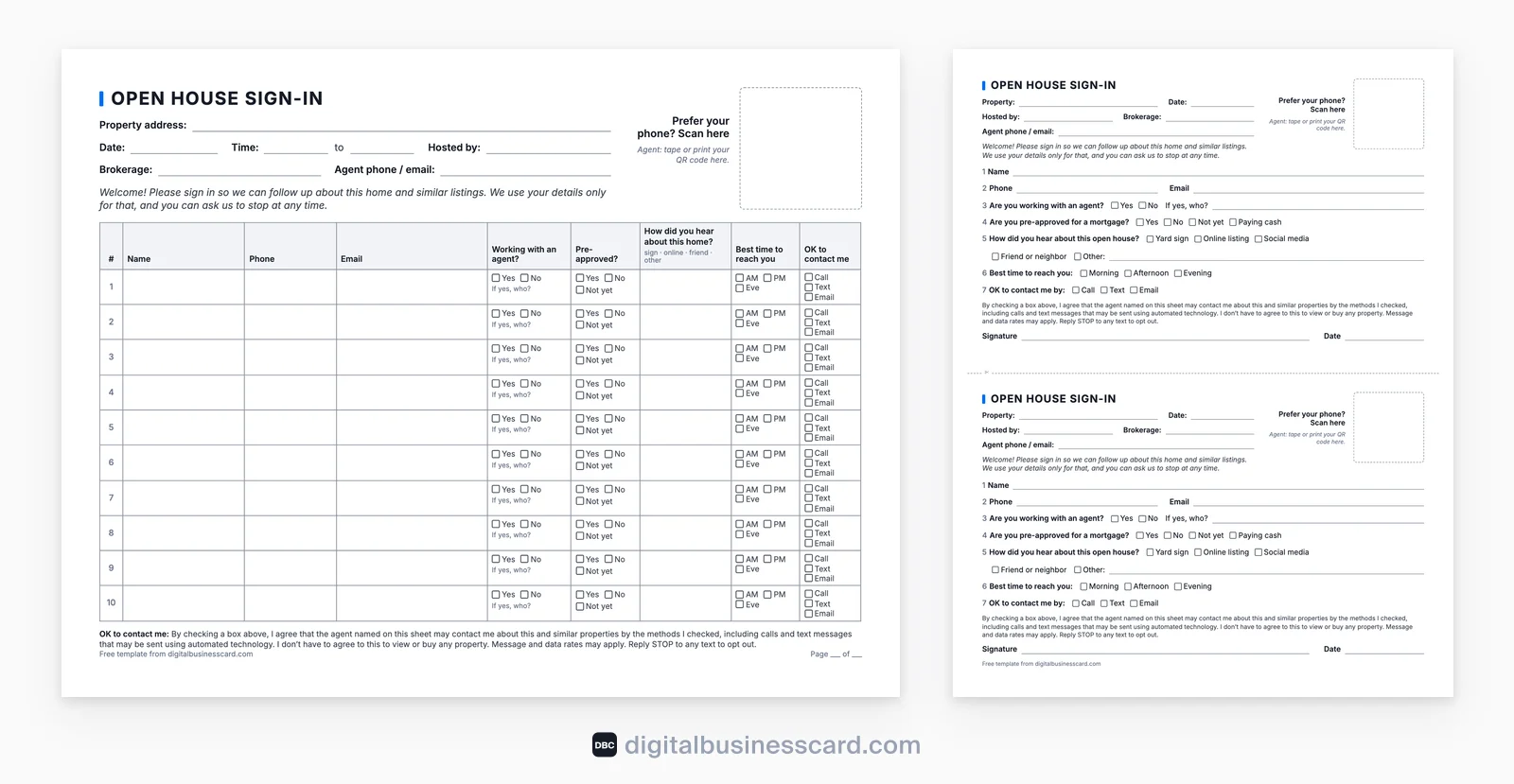
Our free open house sign-in sheet (PDF) asks exactly those questions on US Letter paper, in two versions: a classic table for busy Sundays and a one-visitor-per-card version for visitors who would rather not read each other’s phone numbers. Below, we explain what each answer decides, which questions fair housing rules keep off the form, what a texting tick box does and doesn’t cover, how paper compares with a tablet or a QR code, and a 24-hour follow-up plan. We make DBC, a digital business card that can serve as a QR sign-in, so we list its limits next to what it does.
Free Open House Sign-In Sheet (Printable PDF)
Download the sign-in sheet (PDF, US Letter, 2 pages). Print it at 100% scale. Both pages have a header you fill in before doors open: property address, date, your name, brokerage and phone; the table page adds the open-house hours. There is also an empty square labelled “Prefer your phone? Scan here”, where you can tape a QR code if you also offer a digital sign-in.
Version | Layout | Use it when |
|---|---|---|
Page 1: classic table | Landscape, 10 numbered rows, one column per question, checkboxes for the yes/no answers | Traffic is steady and you want everything on one clipboard |
Page 2: one visitor per card | Portrait, two half-page cards with a cut line, a consent line and a signature on each | You want privacy, or signed consent: each visitor fills a card and drops it in a folder or box, so nobody sees the rows above |
Many free sheets ask less. A top Google result for “open house sign in sheet” when we checked in November 2026, from Open House App, fits four visitors per page and asks name, phone, email and whether the visitor works with an agent. That covers who came, but not who is ready to buy or who agreed to hear from you. Ours adds the four questions that shape your follow-up.
Why Open Houses Have a Sign-In Sheet
The sheet does three jobs. It gives you a list of people to follow up with. It gives you something concrete to report to the seller: how many groups came, how they heard about the listing, how many already have an agent. And it tells you who is in the house.
That last job matters more than it sounds. In the NAR 2022 Member Safety Report, 42% of residential REALTORS® had hosted an open house alone that year, and 18% said they had felt unsafe while hosting one alone. A name and phone number for everyone who walks in is a small safety measure, and it works best when you ask every visitor the same way.
The Eight Questions on Our Sheet, and What Each Answer Decides
Read the finished sheet on Sunday evening and every column should tell you something to do: who goes first on Monday’s call list, what you send them, which channel you use and at what hour. A column that decides none of that only gives a visitor one more reason to walk past the clipboard.
Contact Details: Phone and Email, Not Either-Or
Some visitors answer texts but ignore email, others do the opposite, so ask for both. Handwriting is paper’s weak spot here: emails get misread, and a visitor who doesn’t want a call can write a number that doesn’t work. Glance at the entry while the visitor is still standing there, and ask about anything you can’t read.
Agent Status: The Question That Sorts Your List
In NAR’s 2025 buyer survey, 88% of buyers bought through a real estate agent or broker (NAR, 2025 Profile of Home Buyers and Sellers), so a good share of your visitors will already have one. Those visitors are someone else’s clients. Article 16 of the NAR Code of Ethics bars REALTORS® from acting against another REALTOR®’s exclusive representation agreement. Its Standards of Practice ask you to check whether a prospect already has such an agreement before you sign them or give substantive help, such as writing an offer. The yes/no box starts that check at the door. Add “If yes, who?” so you can send that agent the disclosures or feedback they ask for.
Visitors don’t need to sign anything else to look around. NAR’s consumer guide to open houses says someone visiting an open house on their own does not need to sign a written buyer agreement, and the hosting agent does not need one with buyers touring the home. Your sign-in sheet is a sign-in sheet, not an agreement.
Financing: Pre-Approved, Not Yet or Cash
Yes, No, Not yet, plus Paying cash on the card version. A pre-approved buyer with no agent goes to the top of your call list. A “not yet” is a chance to offer a lender introduction, if your brokerage allows it. Ask whether they are pre-approved, not for income, price ceiling or credit score: those details are private and don’t belong on a sheet that strangers can read.
Source: Which Marketing Brought Them In
Yard sign, online listing, social media, friend or neighbor, other. This answer is for you and the seller. After a few open houses you’ll know whether the signs, the listing portals or your own posts bring people in, and the seller gets a real answer when they ask whether the marketing is working.
Timing: When Your First Call Should Land
Morning, afternoon or evening. It costs the visitor one tick, and your first call reaches them at an hour they picked.
Permission: Which Channels They Agreed To
A checkbox per channel (call, text, email) and a consent line under it. What that line can and can’t do is the subject of its own section below, because texting is where a sign-in sheet meets federal rules.
Questions Fair Housing Rules Keep Off the Form
The fair housing regulation covers more than advertising. It makes it unlawful to make, print or publish any notice or statement about the sale of a home that indicates a preference, limitation or discrimination because of race, color, religion, sex, handicap, familial status or national origin. Its examples include “words, phrases, photographs, illustrations, symbols or forms” (24 CFR 100.75). A sign-in sheet is a form. Questions that touch those traits don’t belong on it, even when you mean well.
Leave off | Why |
|---|---|
“How many kids do you have?” “Who will live here?” “Expecting?” | Familial status is a protected class |
“Where are you from originally?” “What language do you speak at home?” | National origin |
“Which church do you attend?” | Religion |
“Do you need accessibility features?” “Any disabilities we should know about?” | Handicap (disability). If a visitor raises a need, help them; don’t ask on the form |
Age, date of birth, marital status | Not federal classes, but many states and cities protect them |
Home address, driver’s license number, income, credit score | Not needed to follow up, and anyone at the table can read them |
States and cities often protect more traits than federal law does, such as source of income, marital status or age, so check your local list. This is a summary, not legal advice; your broker or your state REALTOR® association can confirm the protected classes where you work. Two habits matter as much as the questions themselves. First, ask every visitor to sign in the same way: don’t wave some groups through and stop others. Second, treat the finished sheets as client data. In the same NAR safety report, only 67% of residential REALTORS® said their office had procedures for safeguarding and disposing of client data. File the sheets at the office or enter them and shred them, and don’t leave them on a counter after the open house.
Texting Consent: What a Tick Box Does and Doesn’t Cover
A name on a sign-in sheet doesn’t, by itself, show that the person agreed to marketing. That is why our sheet has a tick box per channel and this line under it:
“By checking a box above, I agree that the agent named on this sheet may contact me about this and similar properties by the methods I checked, including calls and text messages that may be sent using automated technology. I don’t have to agree to this to view or buy any property. Message and data rates may apply. Reply STOP to any text to opt out.”
We wrote it with the federal telemarketing rule in mind (47 CFR 64.1200). For marketing calls and texts placed with an autodialer or a prerecorded voice, it requires “prior express written consent”: a written agreement, signed by the person, that names the phone number, clearly says they agree to receive marketing calls or texts sent with that technology, and makes clear that agreeing is not a condition of buying any property, goods or services.
The two pages of our sheet do different jobs here:
- Ticks on the table page are not signed written consent. The page has no signature line. A tick is a plain record of which channels the visitor said yes to, not the signed agreement the rule describes.
- The card version carries a signature and date under the same line. If you plan to load open house leads into an autodialing or automated texting platform, use the signed cards or a separate consent form, and have your broker confirm the wording first.
Other federal and state rules on calls and texts can apply too. This is not legal advice: ask your broker what your office requires before you text or call from a sign-in list, and before you automate anything.
Paper, Tablet or QR Code: Which Sign-In Works Best?
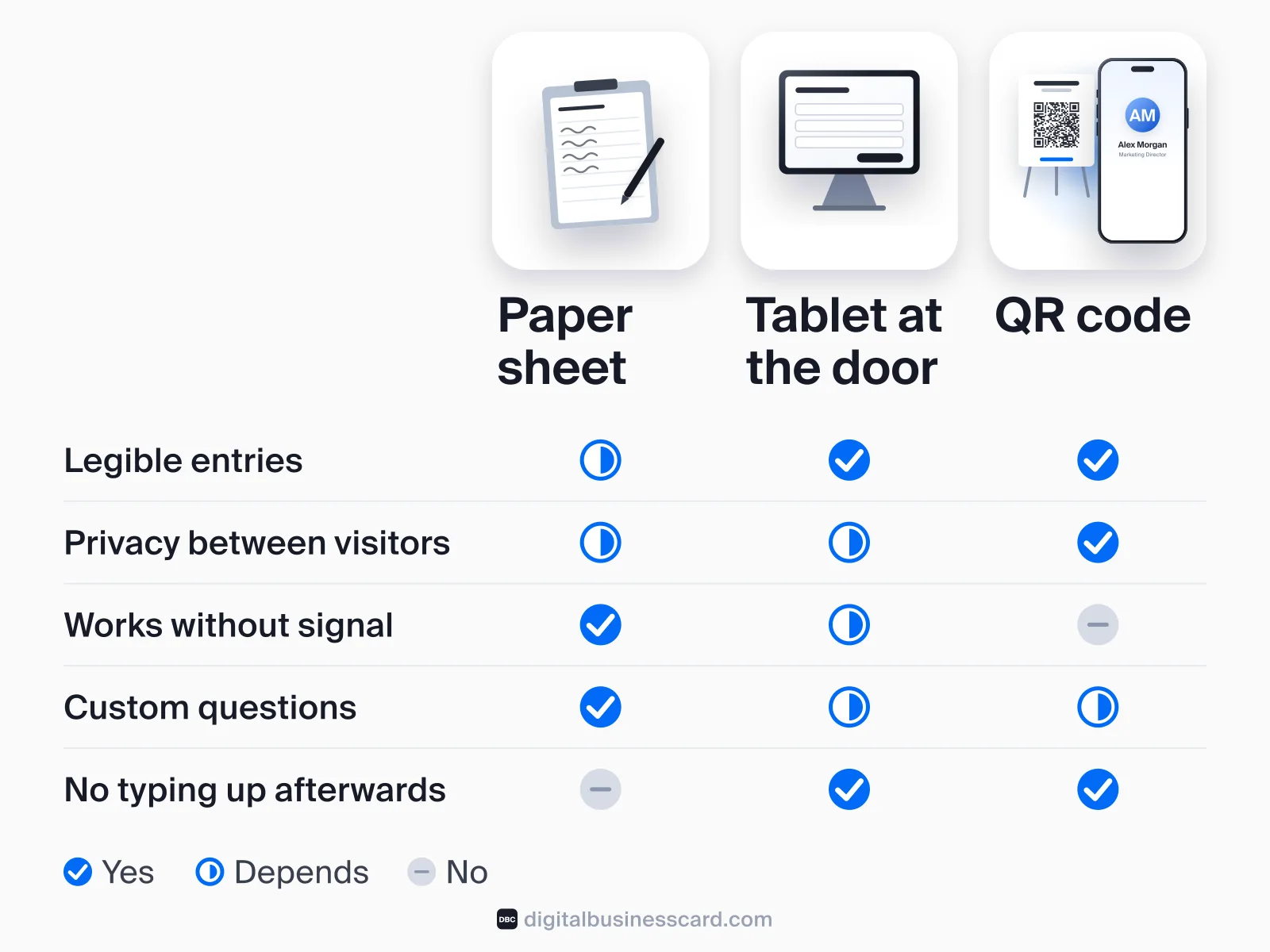
All three work, and each fails in its own way.
Paper sheet | Tablet at the door | QR code on the visitor’s phone | |
|---|---|---|---|
Setup | Print, clipboard, pen | Charged tablet, form or app, stand | A printed QR sign at the door |
Legible entries | Not always | Yes | Yes |
Privacy between visitors | Table: none. Cards: good | Good, if the form clears after each entry | Good, each visitor uses their own phone |
Works without signal or Wi-Fi | Yes | Depends on the app | No, the visitor’s phone needs data |
Custom questions | Anything you print | Depends on the form | Depends on the form |
Typing it up afterwards | Every entry | None | None |
Who it misses | People who won’t write their details in front of others | People who won’t type their details in front of you | People who won’t scan or have no data |
Phones are not the barrier: 91% of US adults own a smartphone, according to Pew Research Center’s 2026 survey. The barriers are signal in the house and the visitor’s willingness to scan. A common setup combines the two: a QR code on a stand at the door, the paper sheet beside it for anyone who prefers a pen or has no signal. Size the code for the distance people read it from. Our QR code size guide puts it at about 1.2 inches for a sheet read from a foot away and 4 inches for a sign read from 3 feet. Our guide on how to create a QR code explains why a code that opens a hosted page beats a static one you can never edit.
Dedicated open house apps, which several of the top Google results promote, add what a sheet or a plain form doesn’t have, such as property feedback questions and automatic follow-up messages. If you host every weekend, they are worth a look. A Google Form behind a QR code is the do-it-yourself version: free, any question you like, entries in a spreadsheet.
Whatever the Format, What Gets People to Sign
People sign when the request feels like part of the visit rather than a gate:
- Greet first, ask second. Say hello, offer the property sheet, then point to the sign-in. A clipboard on an empty table gets ignored.
- Trade something useful. Offer to email the disclosures, the floor plan or recent sales nearby. That gives the visitor a reason to write a real email address.
- Stop at eight. Anything you can learn in conversation, such as timeline or must-haves, learn in conversation.
- Offer both formats. The QR square on our sheet exists for visitors who would rather type on their own phone.
- Write it down yourself if needed. If a visitor declines but chats, note what they tell you, along with the time and a description, right after they leave. Don’t follow up with anyone who didn’t give you contact details.
The 24-Hour Follow-Up Plan
Speed decides more than the script does. In a study of web leads published in Harvard Business Review, firms that tried to contact a lead within an hour were nearly seven times as likely to qualify it as those that tried even an hour later. Open house visitors are warmer than web leads, but the same clock runs: by next weekend, they may have toured several more homes.
- Same evening. Enter every sheet or check your digital list. Mark who already has an agent; they get a thank-you, not a pitch.
- Same evening or next morning. A short thank-you by the channel each visitor checked: “Thanks for stopping by 12 Elm Street today. Here are the disclosures you asked for. Happy to answer anything about the house or the neighborhood.” Send what you promised at the door.
- Within 24 hours. Call the visitors who are pre-approved and unrepresented, at the time of day they picked.
- Days 2 to 7. Send listings that match what they said they liked, or an invitation to your next open house nearby, only to those who agreed to hear from you.
- For the seller. Report the count, how people heard about the home, how many had agents, and the feedback you gathered in conversation. Don’t forward visitors’ personal details unless they agreed to that.
QR Sign-In With a Digital Business Card (DBC)
A digital business card can work as a QR sign-in, because DBC cards have a built-in lead capture form. This is how it works, and where it stops.
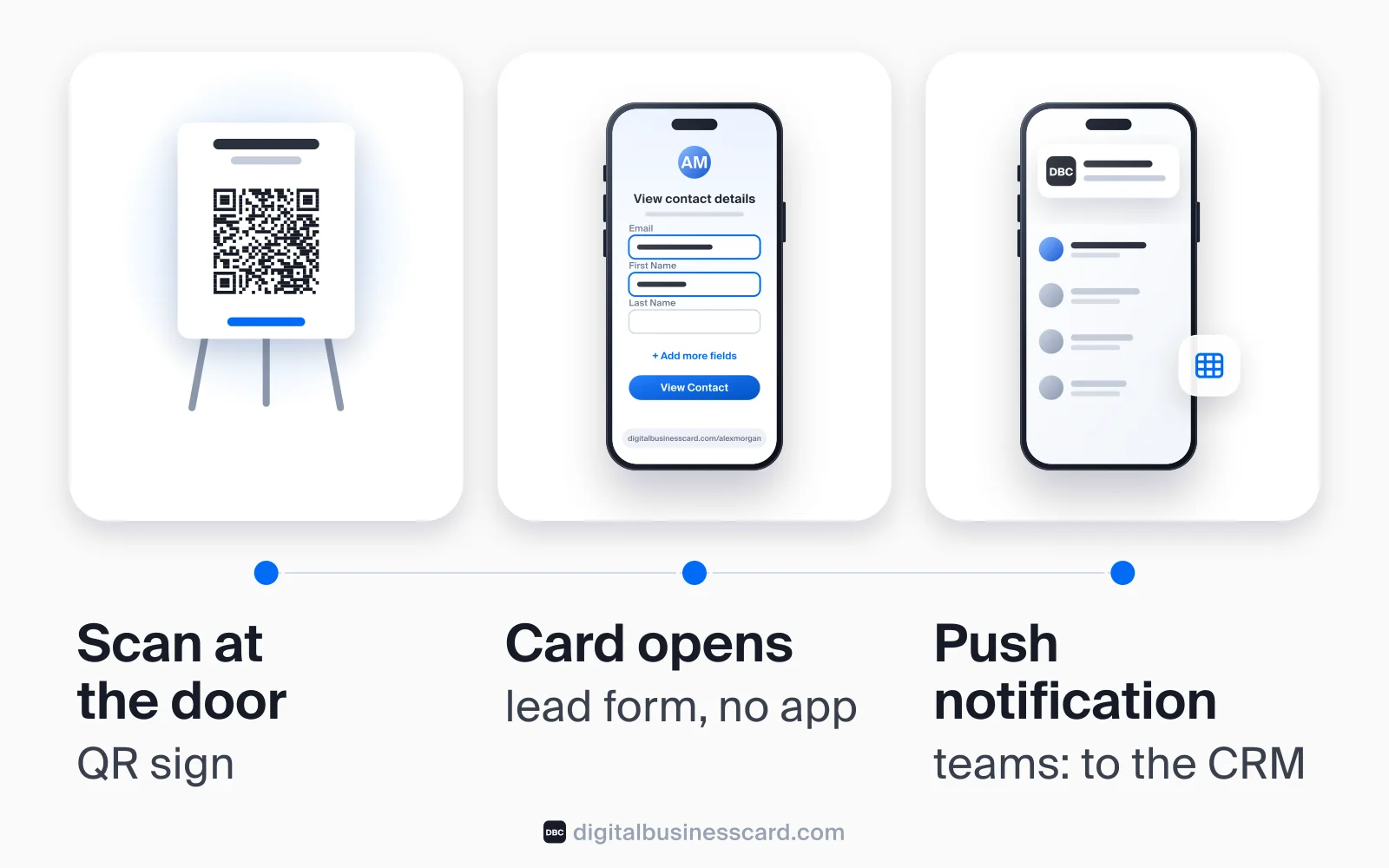
For a solo agent. Turn on lead capture for your card in the DBC app, save your card’s QR code to your photos and print it on the door sign or tape it into the square on our sheet. A visitor scans it with their phone camera, and your card opens in their browser, with no app to install. A form asks for their details in exchange for yours: email and first name are required, last name is shown, and they can add a phone number and company. They can also close the form and just read your card. When someone submits it, you get a push notification, and their details wait in the DBC app until you add them to your contacts. After they submit, your full card opens, and Save Contact puts you in their phone’s contacts.
For a brokerage team. On team cards managed in the DBC dashboard, an admin chooses the form fields from a set list: name, email, phone, company, position, website, LinkedIn and a note. Every field you include is required. Leads from the card’s form go straight to the team dashboard and, with Auto-sync on, to the connected tools: Salesforce, HubSpot, Zoho CRM, Pipedrive, monday.com, Notion, Google Sheets and Slack alerts. Real estate CRMs outside that list are not connected directly.
What DBC does not do. It is a business card with a lead form, not an open house app. It does not ask custom questions like “Pre-approved?” or “How did you hear?”, collect property feedback, send follow-up messages for you, or show a consent checkbox. If you need those, use the paper sheet alongside it, a form tool, or a dedicated open house app. The card also needs the visitor’s phone to have a data connection.
The case for using it anyway is that the same card does the rest of your week. It goes on yard signs, flyers and your email signature, and our guide to digital business cards for realtors covers what else agents use one for. If you run lead capture at trade shows as well, our trade show lead capture guide covers that setting. DBC is paid: there is no free individual plan, and current prices are on the pricing page.
Give every agent in the office the same sign-in
Brokerages pick the form fields once, apply one card design to every agent, and send card leads to Salesforce, HubSpot, Zoho CRM, Pipedrive, monday.com, Notion or Google Sheets. The Business plan is billed per card annually, from 5 cards (see current pricing), and teams start with a 30-day team trial.
FAQ
What should be on an open house sign-in sheet?
Why do open houses have a sign-in sheet?
Do I have to sign in at an open house?
How do I make an open house sign-in sheet template?
Is a digital or paper open house sign-in better?
Can I text people who signed in at my open house?
How fast should I follow up after an open house?
Is the open house sign-in sheet really free?

A content writer with over 8 years of experience creating analytical content for digital products and B2B SaaS companies. His work focuses on practical guides, pricing breakdowns, and comparisons that help teams evaluate costs, features, and differences between tools.
Your first impression decides everything
- Look professional and build trust instantly
- Forget about reprints and lost contacts
- Update your details anytime
 Get Started Today