
Contents
What Is a Lead Retrieval App?What Official Lead Retrieval Costs in 2026–27What a Badge Scan Actually ReturnsWhat Your Own App Can and Cannot ReadWhen to Rent the Show’s App, and When to Bring Your OwnThe Leads No Badge CoversConsent at the ScanHow to Capture Leads at a Trade Show, Step by StepWhere DBC Fits, and Where It Doesn’tAn Exhibitor’s Checklist Before You Choose a ToolFAQTrade Show Lead Capture: Lead Retrieval App vs Your Own App
Trade show lead capture is how an exhibiting team records the people it meets at a show, and what each of them needs, so sales can follow up. There are two routes: rent the show’s lead retrieval app, which decodes that show’s badges into registration data, or bring your own app, which works at every event but, unless you also pay for the show’s badge API, reads only what a badge prints or a visitor chooses to share. Some universal apps connect to that API, but the access is sold per show and costs more than a license for the show’s app.
On the 2026–27 order forms we checked, a single phone-app license for the show’s app costs $255 to $540 per show, and five reps on the app route pay $815 to $1,200 before tax and fees. Rent when you exhibit once or twice a year or need the full registration record. Bring your own when you exhibit often, meet people away from the booth, or want one workflow at every event. The two routes can also work side by side.
The booth still earns the effort: 74% of attendees say in-person events are the best place to discover new products, according to a 2025 Freeman trends report. This guide works from the organizers’ own order forms and badge documents rather than vendor claims: what the official app costs, what a badge scan actually returns, where consent comes in, and how to catch the leads no badge covers. We make DBC, one of the bring-your-own options, so we list its limits next to what it does.
What Is a Lead Retrieval App?
A lead retrieval app is the badge-scanning app an event’s official contractor rents to exhibitors for one show. Scanning an attendee’s badge pulls that person’s registration record, typically name, company and email and often phone and address, into the exhibitor’s portal. The license covers a single event and works only on that show’s badges.
The order forms put it plainly: “App activation applies to singular event” (SEMA Show 2026 and AAOS 2027). The contractor changes from show to show: CMR at ATD, Maritz at NRA, SEMA and AAOS, Event Citadel at INTA, CTI Meeting Technology at European congresses such as ICRA and ESMO. So do the portal, the export and the price.
Lead capture is the job itself: getting every useful conversation into your pipeline, whatever the tool. The show’s app is one way to do it. A tool you own is another: an app that scans business cards and badge text, a digital card that lets visitors share their details, even a notebook. The job is the same whether you call it trade show lead capture or event lead capture, and whether the event is a trade fair, a medical congress or a partner summit.
What Official Lead Retrieval Costs in 2026–27
We read the lead retrieval order forms for seven shows on the 2026–27 calendar, plus one 2024 European form, and checked every number in October 2026. Prices rise at each deadline, so each cell shows the earliest and the last listed price, before tax and fees. The five-user column uses the cheapest combination each form sells.
Show | 1 app user | 5 app users |
|---|---|---|
$350–$400 | $950–$1,200 | |
$579–$599 (3-pack) | $877–$897 | |
$455–$525 | $915–$975 | |
$470–$540 | $945–$1,005 | |
$255–$305 | $815–$860 |
Across these five shows, one rep pays $255 to $599 per show (NRA sells its app only as a three-user pack), three reps pay $535 to $800, and five reps pay $815 to $1,200. That is far less than you get by pricing a rented handheld for every rep, which is how some comparisons build their team totals. Rented handhelds and tablets cost $395 to $705 per device on these forms: worth it for a busy booth that shares one device, not as the default for each rep.
Not every show sells per-user licenses:
- ACEP26 builds lead capture into the show’s own app and charges one flat rate per booth for all booth staff: $400 to $800 by booth size, or $550 to $950 with qualifier questions.
- ICRA 2026, scanned by CTI, rents booth scanners at €525 net per device.
- ESMO 2024 charged €395 per scanner for symposium scanning, for a maximum of three hours.
And the license is bought again at every show. A team that sends five reps to ten shows a year spends roughly $8,150 to $12,000 on app licenses alone.
What Gets Added On Top
Add-on | What the forms charge |
|---|---|
Sales tax | |
Processing fee | |
Qualifier questions | $90 at INTA to $175 at AAOS |
Booth delivery | $80 at INTA to $240 at AAOS |
Loss or damage | $95 waiver per item at SEMA, $500 device damage at INTA, $2,000 for a lost handheld at ATD |
API for your own scanner | $950 at NRA to $1,370 at AAOS; €870 plus €1.45 per record at ICRA (early rate) |
The small print matters as much as the price. INTA’s contractor states that it “is not responsible for device malfunctions or the loss of leads.” ATD wants rented devices back “within one (1) hour of the event closing.” ACEP26 gives no refund if you cancel, for any reason, and offers no API at all: “There are no options for APIs or Developer Kits.”
When Leads Arrive: The 14-Day Clause, Read Correctly
You may read that leads from a rented scanner can take up to 14 days to arrive. The Maritz forms say something narrower: “Leads captured through badge images and handwritten badge ID’s are available for upload within 14 days post-event, and are subject to a data services fee” (NRA 2026, SEMA 2026, AAOS 2027). Normal scans are live. ATD’s contractor promises you can “view and collect leads as you scan, even while the expo is still open,” and Maritz lists “View and edit data in real time.”
The slower cases are narrow: photographed or handwritten badges, CMR’s post-show data merge for your own scanner (returned “within 48 hours of receipt”), and ESMO symposium scans, emailed “within 72 hours after your satellite session.” The real friction is elsewhere. Every show has its own portal, its own export and its own qualifier setup, and the CSV still has to be cleaned and imported into your CRM.
What a Badge Scan Actually Returns
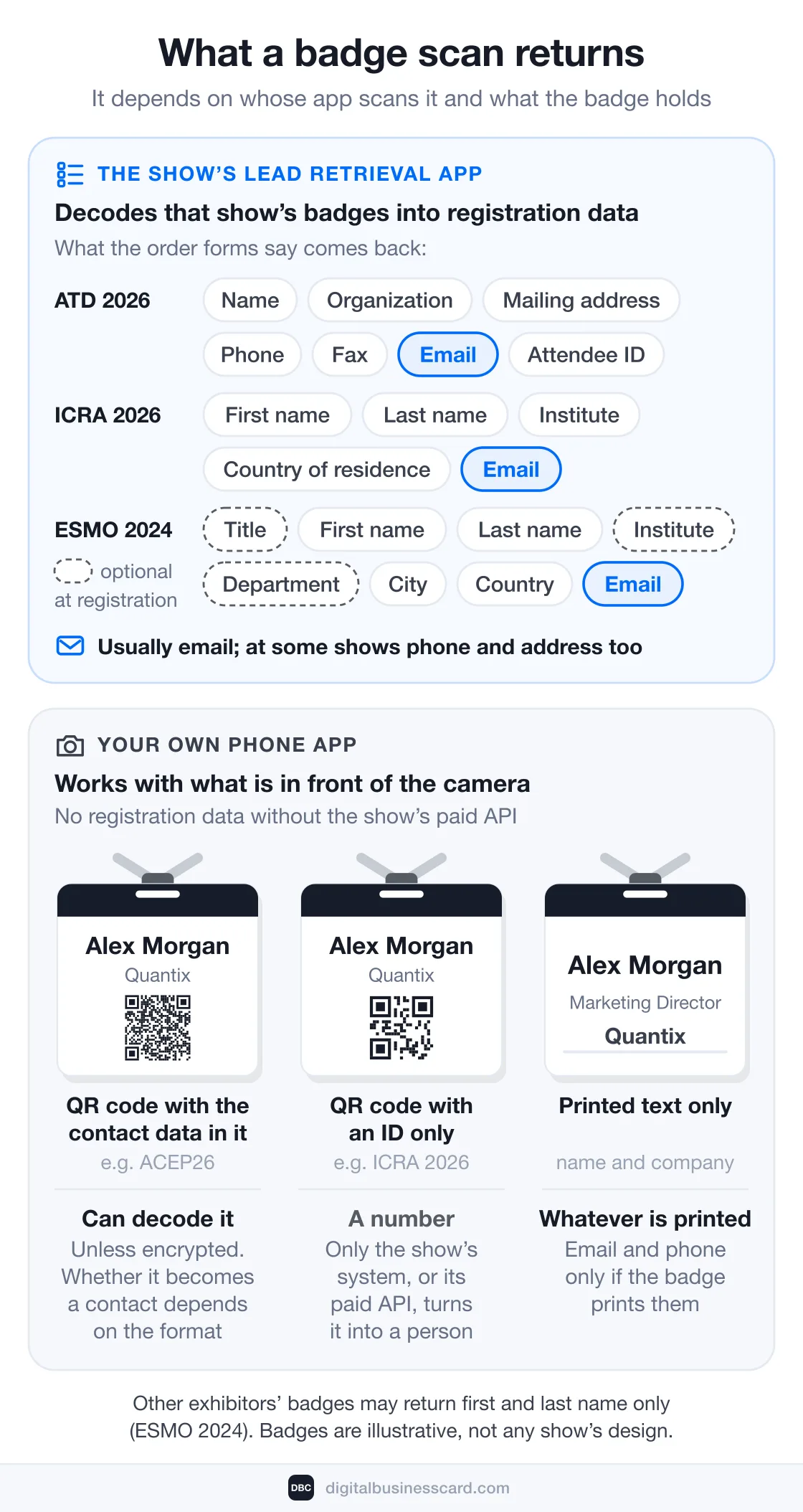
What you get from a badge depends on what the badge holds. The organizers’ own documents show three models.
The badge holds | What a scan gets you |
|---|---|
A QR code with the contact data in it. ACEP26 uses “QR barcodes that are fully encoded with attendee contact info as well as important demographic data.” | The data itself. The show’s app reads it. Another QR reader can decode it too, unless the show encrypts it, and whether that app turns it into a contact depends on the format. |
A QR code with an ID only. ICRA 2026: the code “contains the individual person ID only.” | A number. Only the show’s system, or its paid API, turns it into a person. |
Printed text. The name and company you can read across the aisle. | Whatever is printed. Email and phone only if the badge prints them. |
When the show’s system decodes a badge, here is what the forms say comes back:
- ATD 2026: “Attendee Name, Organization, Mailing Address, Phone Number, Fax Number, Email Address, and a unique numerical ID for each attendee.”
- ICRA 2026: “First name, last name, institute, country of residence and email address.”
- ESMO 2024: title, first name, last name, institute, department, city, country and email address, with title, institute and department optional at registration.
So a rented scan usually does include email, and at some shows phone and address too. It is not limited to name and company.
Two caveats come from the same documents. Other exhibitors are thin records: at ESMO, “participants wearing an Exhibitor or Industry Satellite badge will only appear in the scan results with basic contact information such as first name and last name.” If many of your conversations are with partners, distributors or other vendors, the official scan gives you little. And a scan is only as good as registration. CTI warns that “not all delegates will provide the registration department with the complete contact information,” so it “cannot guarantee the accuracy of the data.”
What Your Own App Can and Cannot Read
An app you bring yourself has no access to the show’s registration database unless you pay the show for it. Some universal apps, such as Cvent iCapture, integrate with badge providers and pull “the official registration data behind the badge.” The access itself is sold per show, on the show’s order form. AAOS 2027 lists an Event API (“YOUR developers integrate with OUR API with YOUR lead system”) at $1,155 to $1,370, NRA 2026 an API for 3rd-party systems at $950, and ICRA 2026 a webservice at €870 plus €1.45 per record if ordered before May 1, 2026 (€970 plus €1.75 after). That is more than the show’s own app or scanner costs, on top of what you pay for your own app. DBC does not connect to these APIs. Without that access, an app works with what is in front of the camera:
- Printed badge text. An AI scanner reads the name, company and title from a photo. It gets an email or phone number only if the badge prints one.
- Paper business cards. A full card usually carries email and phone, so a card scan can return a complete contact.
- Contact QR codes. A QR code that holds a link, a vCard or a MeCard, such as another person’s digital business card, turns into a contact. If you want to know what that file carries, see what a vCard is.
- ID-only badge codes. Nothing useful. The code is a registration number, and only the show’s system can resolve it. That is why ICRA sells outside-device access as a paid webservice.
Some universal apps add paid enrichment that looks up an email from a name and company. The other way to get the email is to ask for it: let the visitor share their details with you directly, which we cover below.
Official apps are not limited to badges either. Maritz lists business card scanning in its SWAP app (NRA 2026), and Event Citadel says its app can “capture leads everywhere, on and off the show floor” (INTA 2026). The difference is scope: they work at that one show, on that show’s license.
When to Rent the Show’s App, and When to Bring Your Own
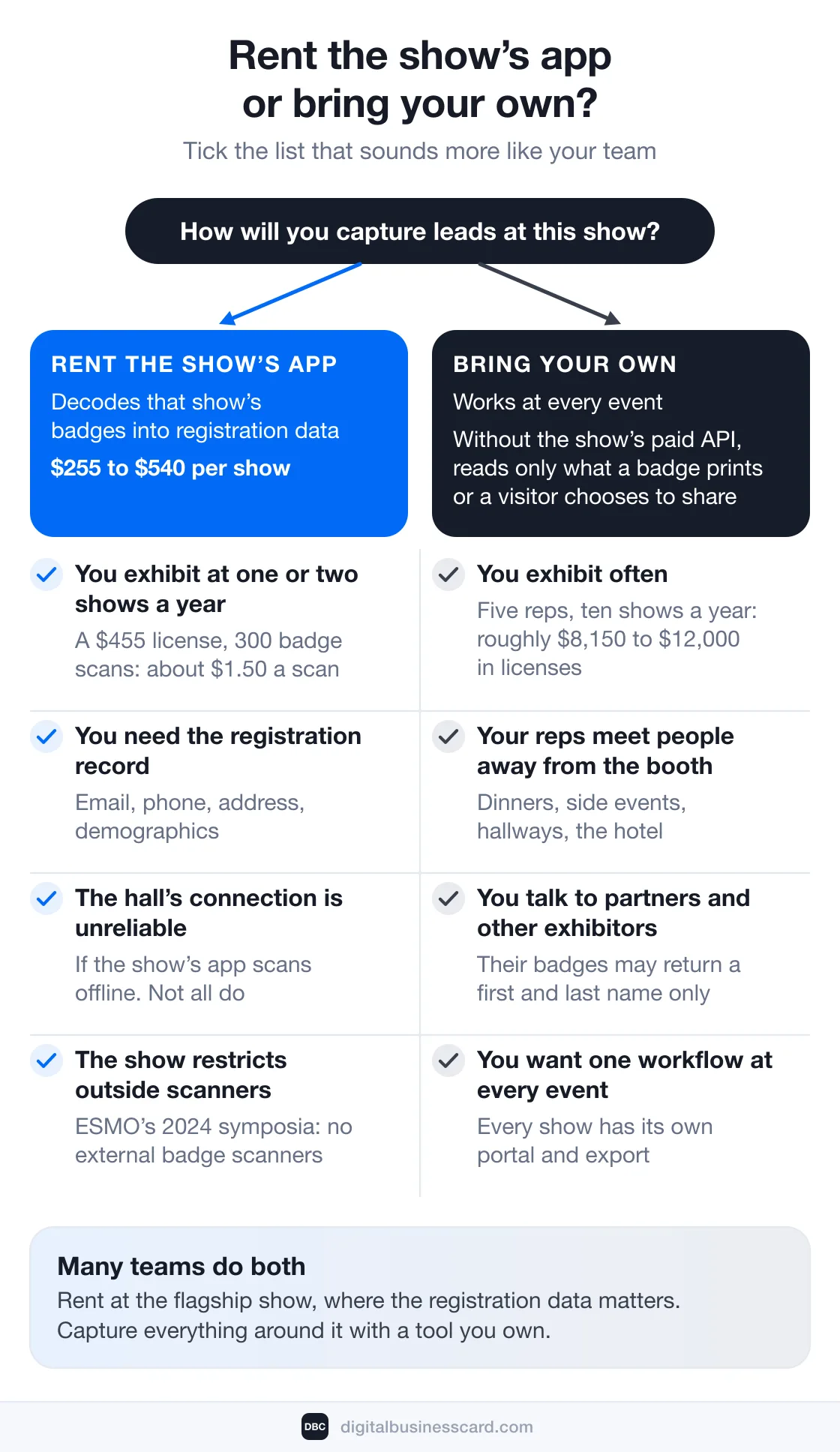
Rent the show’s lead retrieval app when:- You exhibit at one or two shows a year. A $455 license that brings in 300 badge scans costs about $1.50 a scan, and you get full registration records without building a process.
- You need the registration record (email, phone, address, demographics) for most booth visitors, especially at shows whose badges carry only an ID.
- The hall’s connection is unreliable. Some official tools scan offline: Maritz lists “Scan leads with or without data connection” (NRA 2026), and CTI says “No Wifi needed for the actual scanning process” (ICRA 2026). Not all do. CMR’s app “requires either a cellular/mobile network or a Wi-Fi connection” (ATD 2026).
- The show restricts outside scanners. At ESMO’s 2024 symposia, “external badge scanners are not accepted!” ICRA allows them in the exhibition area only after you buy its API, and never in corporate sessions.
- You exhibit often. Licenses, qualifier setup and add-ons are bought again at every show.
- Your reps meet people away from the booth: dinners, side events, hallways, meetings at the hotel.
- Many of your conversations are with other exhibitors and partners.
- You want one workflow at every event.
Many teams that exhibit regularly do both: they rent at the flagship show where the registration data matters, and capture everything around it with a tool they own.
The Leads No Badge Covers
A badge scanner only works where there are badges, and often only on the show floor: ICRA’s terms say scanning “is only allowed on the booth or during a corporate session unless agreed by the organizer.” Plenty of useful conversations happen outside that:
- the hallway and coffee-line conversations, the kind of networking we cover from the attendee’s side in how to network at a conference;
- customer dinners, side events and meetups the show doesn’t run;
- partner, distributor and vendor reps;
- events with no badges at all: roadshows, workshops, smaller industry meetups.
For these, the tool is a two-way exchange. The rep shows a QR code from the app or a phone wallet. The other person scans it with their phone camera, the rep’s card opens in their browser, and they can save the rep’s contact and share their own details through a short form. There is nothing to install and nothing to decode, and the person typed their own email, which is the one field a badge photo usually can’t give you.
Consent at the Scan
Badge scanning feels routine, but the organizers’ terms put the responsibility on the exhibitor:
- CTI, which runs scanning at European congresses such as ICRA and ESMO: delegates “may refuse to have their badge scanned” and “can object to being scanned without negative consequences.” Its terms add: “By using our service, you acknowledge your role as data controller” (ESMO 2024, ICRA 2026).
- Maritz, on its US forms: guests “agree to Terms of Use which include voluntarily sharing their personal information with exhibiting companies via lead retrieval,” and “Maritz recommends all customers seek their own expert advice for privacy compliance concerns” (SEMA 2026).
- DMEXCO, in its 2026 lead booklet: “The purpose of the data use is agreed at the time of connection between the two connecting parties,” and “Always create a new report before contacting your leads. This is the only way to contact the leads with valid opt-in.”
Two practical consequences follow. Ask before you scan: at European events visitors may say no, and the show expects you to accept that. And a photo of a badge or business card taken with your own app is not covered by terms written for the show’s lead retrieval, so a lawful basis for using it is on you.
A two-way exchange is opt-in by its mechanics: the visitor decides to share and types their own details. That makes the moment of consent visible. It does not replace your own privacy review, and this section is not legal advice.
How to Capture Leads at a Trade Show, Step by Step
Capture is half the job. The other half is the follow-up, and that is where exhibitors have been slow. In EXHIBITOR Magazine’s 2015 Sales Lead Survey, 62 percent of exhibiting leads were contacted within five days, only 22 percent of exhibitors responded within 24 to 48 hours of the show, and 69 percent of face-to-face marketers passed all leads to sales without vetting them first. It is the newest survey of its kind we could open at the source, so read it as a direction rather than a current benchmark.
Before the Show
- Decide what a qualified lead looks like and which few facts decide it. Official apps sell qualifier questions as a per-show add-on. In a tool you own you set up your form once. DBC has no qualifier questions: pick the card’s lead-form fields and agree on a short note each rep writes per contact.
- Give every rep the same card. One team template with each rep’s details, and the card’s QR code in Apple Wallet or Google Wallet so it opens from the lock screen.
- Create the event before you travel, with its dates and the reps attending, so every lead is tied to the show it came from.
- If you are renting, order before the first deadline. On these forms the earliest price is $20 to $70 below the last one per license.
- Plan for the hall’s connection. If your scanner needs one, bring a hotspot rather than relying on venue Wi-Fi.
At the Booth
- For a visitor you want to keep talking to, show your QR code and let them share their details through your card.
- For a quick contact, photograph the business card or the badge. Check the fields the scanner filled in before you save.
- Write the next step while the person is in front of you. A note that says “send pricing for 40 seats by Friday” is worth more than a lead score.
After the Show
- Follow up within 24 to 48 hours. Speed matters. In a Harvard Business Review study of web leads (not trade show leads), firms that tried to contact a lead within an hour were nearly seven times as likely to qualify it as firms that tried even an hour later. In the same study’s audit of 2,241 US companies, 23% never responded at all, and those that replied within 30 days took 42 hours on average.
- Vet before you hand over. Sort leads into “talk this week,” “nurture” and “not a fit,” so sales gets a short list rather than a pile of badge scans.
- Get every lead into one CRM before the follow-up starts, whichever tool captured it.
- Measure leads to sales. Only 35 percent of exhibitors measured what share of their show leads became a sale, up from 28 percent in 2010, according to EXHIBITOR’s 2015 survey results. Measuring is what tells you which shows to book again.
Where DBC Fits, and Where It Doesn’t
DBC is a bring-your-own option. It replaces the paper card, catches the conversations no badge covers and keeps each event’s leads in one place. It does not replace the show’s app when you need the registration record. Here is what it does at a show today, limits included.
At a show you need to | DBC today |
|---|---|
Scan a badge | Reads the printed name, company and title from a photo. Does not decode badge barcodes or QR codes, and does not pull registration data. |
Scan a business card | Reads the card from a photo: name, title, company, email, phone, website and links. You review the fields before saving. |
Scan someone’s digital card | Reads QR codes that hold a link, a vCard or a MeCard. |
Capture someone with no badge | Two-way exchange on the rep’s card: they share their name and email, plus any fields your team adds. |
Scan without signal | Not supported. Scanning needs a connection. |
Know which show a lead came from | Event campaigns attribute each rep’s leads by the campaign dates, inside the DBC dashboard. CRM records do not carry the event, source or owner. |
Get leads into your CRM | Leads shared through a card sync automatically to Salesforce, HubSpot, Zoho CRM, Pipedrive, monday.com, Notion or Google Sheets when auto-sync is on. Scanned contacts are pushed by an admin, in bulk, from the dashboard. |
Export a file | File exports carry name, position, company, website, owner and date, but not email or phone. |
Pay per show | No. Business is $4.99 per card/month, billed annually, from 5 cards, with no per-scan fees. |
In practice it works like this. Reps use their own iPhone or Android phone, and the people they meet install nothing. Before the show, an admin creates an event campaign in the dashboard with the name, location, dates, the reps attending and a lead goal. Every lead those reps capture within the dates is attributed to the campaign automatically, and the rep does not have to pick an event. Set the end date after your travel day, because a contact saved after the end date is not attributed. Add the event’s total cost and an average lead value, and the campaign page shows an estimated ROI and leads per rep as the show runs. Slack can post an alert for each new lead shared through a card. Admins see every rep’s leads; reps see their own.
The lead form on a team card always asks for first name, last name and email. Your team can add company, position, phone, website, LinkedIn or a note, and every field you add is required, so keep it to two or three. Visitors can close the form and still see the card.
Popl and Blinq sell event lead capture features too; we compare their plans in our Popl pricing and Blinq pricing breakdowns.
Run your next show from one team dashboard
Give every rep a branded card with a two-way exchange, scan business cards and badge text in the app, and see each event’s leads per rep in one dashboard. Business is $4.99 per card/month, billed annually, from 5 cards, and teams start with a 30-day team trial.
An Exhibitor’s Checklist Before You Choose a Tool
Seven questions settle most tool decisions. Here is how the show’s app, a typical universal app and DBC answer each. Whichever you consider, us included, ask the vendor to show you rather than tell you.
Question | How each option answers |
|---|---|
1. Will it read this show’s badges? | Show’s app: yes, it is built for them. Universal app: printed text from a photo; encoded QR codes depend on the format; ID-only codes need the show’s API. Some apps connect to it and pull the full registration record, but the API is bought per show and costs more than the show’s app. DBC: printed text only, not badge codes. |
2. Does it work offline in the hall? | Show’s app: depends on the contractor, so check the form. Universal app: ask for a demo in airplane mode. DBC: no. |
3. Will I know which show each lead came from? | Show’s app: yes, one portal per show. Universal app: usually through event tags or campaigns. DBC: yes, in the dashboard only. |
4. Can I add my own qualifying questions? | Show’s app: as a paid add-on, $90 to $175 per show on these forms. Universal app: usually through custom forms. DBC: no custom questions. The card’s form takes set fields (company, position, phone, website, LinkedIn, note), and each one you add is required. |
5. How do leads reach my CRM? | Show’s app: a CSV from the portal, or the show’s API at $950 to $1,370. Universal app: native integrations; check which leads sync automatically. DBC: card leads sync automatically; an admin pushes scans. |
6. What happens to duplicates? | Show’s app: one list per show. Universal app: ask whether it merges or flags them. DBC: no merging. Someone you scan who also shares their details appears twice. |
7. Who is the data controller, and what paperwork comes with the tool? | Show’s app: you are, under CTI’s terms; Maritz tells you to take your own advice. Universal app: ask for a data processing agreement and current security documentation. DBC: ask us for the same before you roll out. |
FAQ
What is lead retrieval?
How much does lead retrieval cost?
Can I use my own app instead of the show’s lead retrieval app?
Can a phone app scan any badge?
What data does a badge scan capture?
Do I need consent to scan a badge?
How fast should I follow up on trade show leads?
Is there a free trade show lead capture option?

A content writer with over 8 years of experience creating analytical content for digital products and B2B SaaS companies. His work focuses on practical guides, pricing breakdowns, and comparisons that help teams evaluate costs, features, and differences between tools.
Your first impression decides everything
- Look professional and build trust instantly
- Forget about reprints and lost contacts
- Update your details anytime
 Get Started Today