
Contents
The Verdict Up FrontHow We Judged the Scanner AppsAll 12 Scanners Compared: Free Scans, Price, Where the Contact Goes1. DBC — the scanner inside a digital business card app2. Google Lens and iPhone Live Text — the no-app path3. Haystack — the most free scans4. HubSpot — the free scanner inside HubSpot's app5. Zoho Card Scanner — free, lands in Zoho CRM6. CamCard — the standalone scanner, with a 100-scan free cap7. Covve Scan — accuracy, offline, 60+ languages, no free plan8. Blinq — scanning on Premium, auto-sync on Business9. HiHello — five cards a month free, bulk scanning on every plan10. Popl — event teams, with prices only in the app11. Wave — pay per scan12. Contacts+ — a scanner that files cards into your address bookWhere Does the Scan Actually Go? Three DestinationsScanning Badges at a Trade ShowA Box of 300 Cards: When Bulk Mode or Hardware Beats a PhoneThe Scanner Apps to Skip in 2026Who Owns the Lead When a Whole Team ScansFAQBest Business Card Scanner Apps (2026): Scan Caps and Prices
The best business card scanner app in 2026 depends on where you want the contact to end up. For a card a month you do not need an app: Google Lens and the iPhone camera's Live Text save a phone number or email from a card into your contacts for free. For a stack of cards and a searchable list, Haystack scans without a cap on its free plan, and CamCard gives you 100 scans before it asks for money. If your contacts live in a CRM, the scanner inside HubSpot's or Zoho's own app is free and skips the export step. And if you already carry a digital business card, the scanner built into your card app — DBC, Blinq, HiHello and Popl all have one — keeps the cards you collect next to the card you hand out.
That last part matters more than the OCR. Sales reps spend only 40% of an average workweek selling, and 13% of the week goes to manually entering data, according to Salesforce's State of Sales report (7th edition, February 2026, 4,050 sales professionals). A scanner that reads a card perfectly and then strands the contact in its own app has only moved the typing to a different screen.
So this ranking checks four things for every app, on the vendor's own pricing and help pages as of October 2026: what a scan costs (the free cap and the paid price), where the contact lands (your phone's address book, the app's own list, a CRM or a spreadsheet), what it reads (a paper card, the printed text on a badge, a QR code), and whether the app still exists. That last question is not rhetorical. Microsoft retired Lens in early 2026 and ABBYY's Android reader has been gone since 2023, and Salesflare's guide, one of the top results for this search and updated in August 2026, still recommends Office Lens.
The Verdict Up Front
- No app at all: Google Lens (Android and iPhone) or Live Text (iPhone). Free, one field at a time.
- Most free scans: Haystack, unlimited on its free plan. CamCard gives 100 scans in total, then charges.
- Inside a CRM: HubSpot's scanner (free), Zoho's Card Scanner (free), Pipedrive's (on every paid plan). Salesforce's own app does not scan cards.
- Scanner plus a digital card: DBC (included in every paid plan), Blinq (Premium and up), HiHello (5 a month free, 20 on Professional), Popl (paid plans).
- Accuracy first, no free plan: Covve Scan. Works offline, reads 60+ languages, stops scanning when the 14-day trial ends unless you pay.
- Teams at an event: whichever app your rep attribution and CRM push are set up for. The team section below compares them.
How We Judged the Scanner Apps
Every app answers the same four questions, whether its store listing calls it a business card scanner or a business card reader. What does a scan cost? The free cap and the paid plan that includes scanning, taken from the vendor's pricing page or help center, not from another ranking. Where does the contact land? Your phone's address book, the app's own list, a CRM or a spreadsheet, and whether getting it there is automatic or one more tap. What does it read? A paper card, the printed text on a conference badge, a QR code, several cards at once, with or without a connection. Does it still exist? Products that older rankings recommend have since been retired or cut back, so each entry notes its 2026 status.
What we did not do is run an accuracy bake-off, because no vendor publishes a figure you could compare. ABBYY once claimed "up to 99,8 percent" text-recognition accuracy, in 2012, "according to internal ABBYY testing"; Covve claims "96% accuracy in 60+ languages" on its own page. Neither number says how often you will correct a name or an email on a real card. Test any scanner on five of your own cards, including the busiest one, before you pay.
All 12 Scanners Compared: Free Scans, Price, Where the Contact Goes
Prices are US, checked on 2026-10-21. "Annual" means the per-month price when you pay for a year.
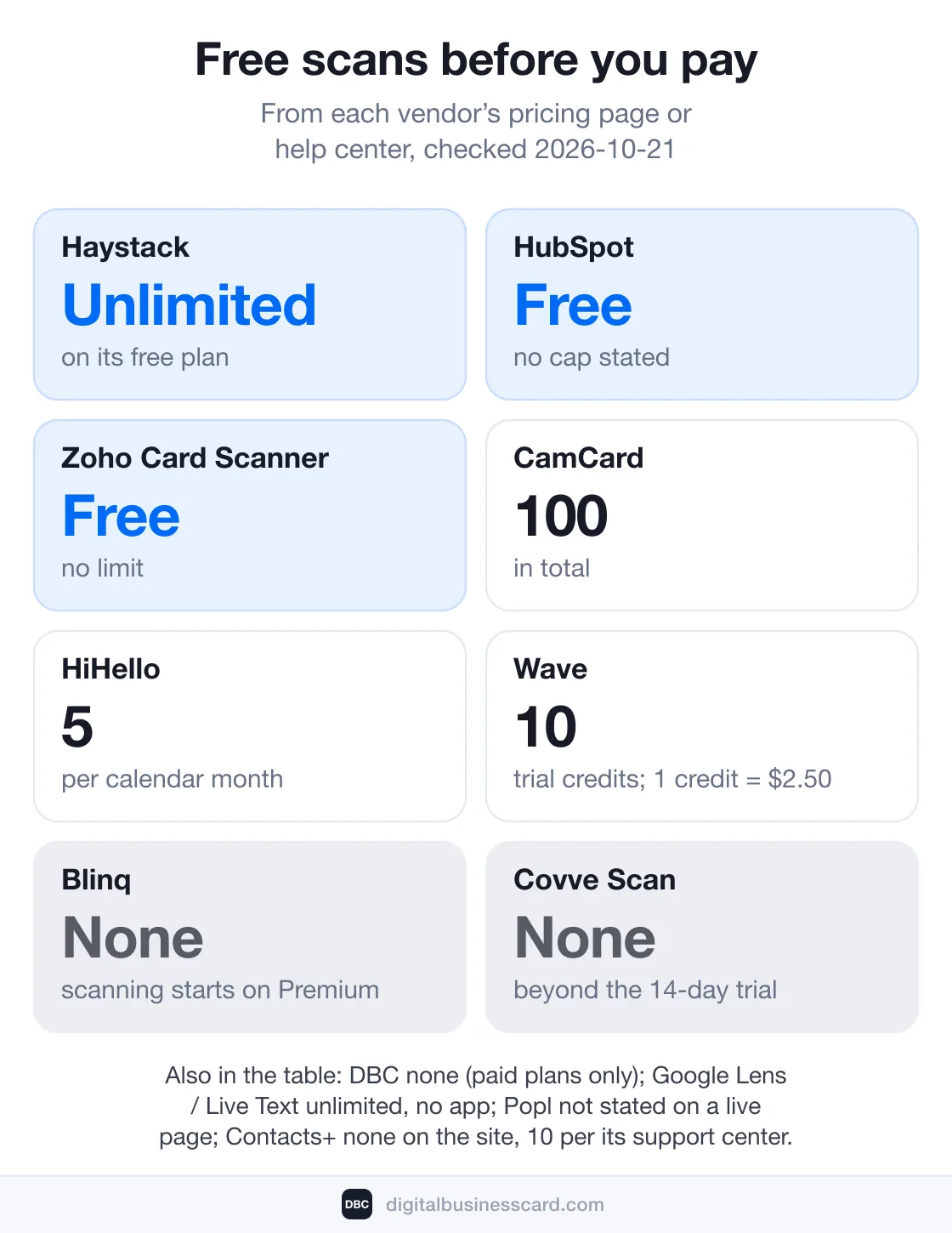
App | Free scans | Scanning on a paid plan | Where the contact lands | Reads |
|---|---|---|---|---|
DBC | None (paid plans only) | Individual and Business plans; Business $4.99/card/mo annual | App contacts; vCard to phone; team leads in the dashboard | Card, badge text, QR |
Google Lens / Live Text | Unlimited | — | Phone contacts, one field at a time | Card text |
Haystack | Unlimited | Pro $4.50/user/mo annual; Business $2.50 | Haystack list; phone via sync; CSV and CRM on paid plans | Card, QR |
HubSpot | Free, no cap stated | — | A HubSpot contact | Card, vCard QR |
Zoho Card Scanner | Free, no limit | Salesforce connector $4.99/mo | A Zoho CRM contact or lead | Card |
CamCard | 100 in total | Premium $49.99/yr; Business $21–25/user/mo | App list; Excel, VCF and CRM sync on Premium | Card, QR, multi-card |
Covve Scan | None (14-day trial) | Essential $119/yr; Pro $199/yr | App; phone contacts; Excel; CRM on Pro add-on | Card, QR; badges on Pro |
Blinq | None (Premium) | Premium $9.99/mo or $7.33 annual; Pro $199/yr; Business $4.99 | Blinq contacts; phone; CSV; CRM sync on Business | Card, badge, QR, LinkedIn QR |
HiHello | 5 per month | Professional $6/mo annual (20/mo); unlimited add-on | HiHello contacts; spreadsheet; CRM on Business | Card, badge, QR; ~100 in bulk |
Popl | Not stated on a live page | Pro $7.99/mo or $76.99/yr | Leads; phone; CSV or CRM export on paid plans | Card, QR; badges on Teams |
Wave | 10 trial credits; 1 credit = $2.50 | Pro $7/mo annual; Teams $5/user/mo annual | Wave contacts; device; CSV and CRM on paid plans | Card (1 credit), badge (4), QR (1) |
Contacts+ | None on the site, 10 per its support center | Premium $9.99/mo annual, 100 cards/mo | Google, iCloud or Outlook address book; CSV, vCard | Card, screenshots |
1. DBC — the scanner inside a digital business card app
Best for: people who hand out a digital card and collect paper ones.
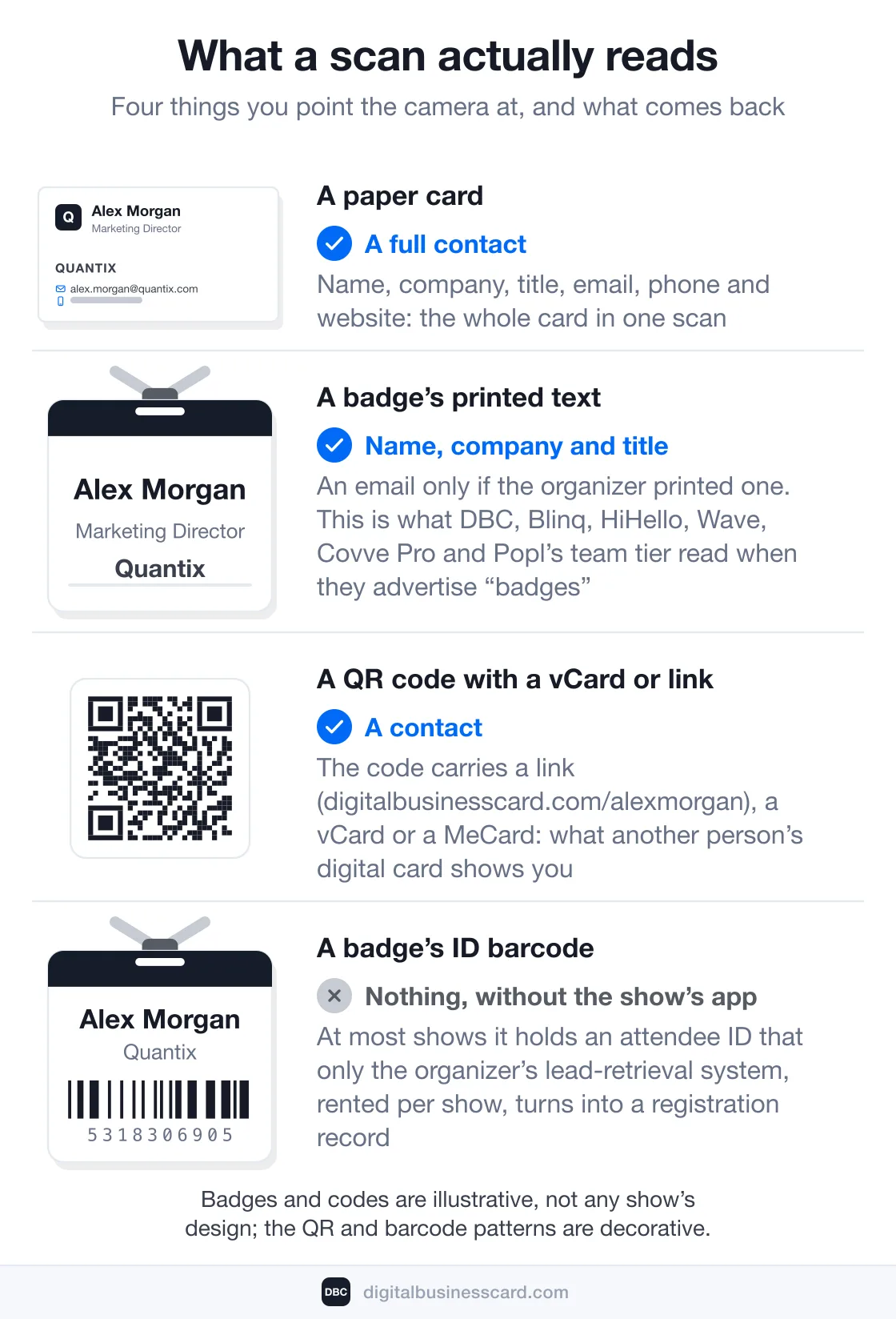
DBC is our product, so this entry comes from the code rather than a store listing. The Scan tab in the app opens AI Scan with two modes. Card & Badge takes a photo of a paper card or a conference badge, sends it to our server, where an AI model reads it, and comes back with a prefilled contact — first and last name, company, position, website, email, phone and social links — that you check before saving. QR Code reads a code that carries a link, a vCard or a MeCard, which is what another person's digital card shows you. The point of the pairing is that the people you meet land in the same app as the card you share, with your own QR code and the rest of the digital-card feature set one tab away.
- Free scans: none. The scanner is part of the paid plans, listed as "AI-powered scanner" on every one of them.
- Price: included in the Individual, Business and Enterprise plans; Business is $4.99 per card/month, billed annually.
- Where the contact lands: your contacts list in the app; any contact can be shared to your phone as a vCard. On a team account every member's scans also appear as leads in the web dashboard, with the scanning member as owner, where they can be tagged, pushed as selected leads to HubSpot or Salesforce, or exported in full to Zoho, Pipedrive, Google Sheets, monday.com or Notion. The dashboard's CSV export carries name, company, position and owner but not email or phone, so the CRM push is how contact details leave the dashboard.
- Reads: paper cards, the printed text on a badge, and QR codes that hold contact data. It does not decode the attendee-ID barcode on a badge.
- Watch out: one photo makes one contact, there is no bulk mode, scanning needs a connection, and the scanner lives only in the iOS and Android app, not in the web dashboard. Scans from the app reach a CRM when you push them from the dashboard; they do not sync on their own.
2. Google Lens and iPhone Live Text — the no-app path
Best for: a card or two a month, saved straight into the phone.
Both phones can already read a card. Google's help page lists the use case in one line, "Business card: Save the phone number or address to a contact," and Lens is reachable from Google Photos, Google Assistant and, on Pixel and some other phones, the Google app on Android. On an iPhone, Lens works inside Google Photos or the Google app, "but not with your camera." Apple's route is Live Text: in Photos, tap a number or an email on a card and, in Apple's words, "you might see the option to Make a FaceTime call or Add to Contacts." It needs an iPhone XS or XR or later on iOS 15 or later. The Contacts app itself has no scan button in iOS 26, and had none in iOS 18. Between them the two paths cover every phone: Android ran 69.17% of the world's smartphones and iOS 30.81% in September 2026, per StatCounter.
- Free scans: unlimited, nothing to install.
- Where the contact lands: your phone's address book, one field at a time. Neither tool turns a whole card into name, company, title and email in one go; you save the number, then the email, then type the rest.
- Reads: printed text on anything the camera sees.
- Watch out: no history of what you scanned, no export, no CRM. Fine for the occasional card, a chore at twenty.
3. Haystack — the most free scans
Best for: individuals who want a searchable list and pay nothing.
Haystack's pricing page says it plainly: "Share and scan cards as an individual for free," and the Personal plan lists the AI card scanner as unlimited. The catch is where the scans sit: in your Haystack account, synced across devices and the web. Turn on Contact Syncing in the settings and scanned cards copy into your phone's contacts, or export a card at a time with "Export to Phone."
- Free scans: unlimited.
- Price: Pro $4.50 per user/month billed annually ($7.95 monthly); Business, for 10 or more users, $2.50 per user/month annually ($4.95 monthly). 14-day trial on the team plans.
- Where the contact lands: the Haystack list; your phone's contacts through sync; CSV export and the CRM integrations (Salesforce, HubSpot and Microsoft Dynamics, some of them through third-party automation) only on paid accounts.
- Reads: paper cards, double-sided ones too, in "more than 25 languages" per the FAQ. No badge mode.
- Watch out: the scan flow asks you to confirm the email address before saving, so a card without one takes an extra step, and CSV export is paid-only.
4. HubSpot — the free scanner inside HubSpot's app
Best for: anyone whose contacts already live in HubSpot.
"HubSpot's scanner is free forever," and it is a feature of the HubSpot mobile app rather than a separate download. HubSpot's help article sets the limits: Android and iOS 16 or later, and "the business card scanner is not supported on iPads."
- Free scans: free, with no cap stated; "No arbitrary limits, no hidden fees."
- Where the contact lands: a HubSpot contact, after you confirm the matched properties (email, first and last name, job title, phone number, website, street address, postal code) and tap Save. The record's original source is logged as the business-card scanner.
- Reads: one card at a time ("Scan another card" after each), and QR codes in vCard format. No badge mode is documented.
- Watch out: you need a HubSpot account (the free CRM counts), and the contact is in HubSpot, not in your phone.
5. Zoho Card Scanner — free, lands in Zoho CRM
Best for: Zoho CRM users, on any edition.
Zoho ships a standalone Card Scanner app for iOS and Android and a scanner inside the Zoho CRM mobile app. The app is free; its only in-app purchase is a Salesforce connector, $4.99 a month or $49.99 a year on the App Store listing. Zoho's FAQ covers the rest: "The Card Scanner app is supported for all the editions in Zoho CRM," and "There is no limit to the number of business cards that you can store in the App."
- Free scans: free, no limit on stored cards.
- Where the contact lands: saved as a Zoho CRM Contact or a Lead, with the email address as the duplicate key.
- Reads: cards in the 14 languages the Google Play listing names, including English, French, German, Spanish, Portuguese, Dutch, Swedish, Russian, Turkish, Japanese, Korean and Chinese.
- Watch out: Zoho CRM is the destination. If you are not in Zoho, the contact has nowhere to go.
Two more CRMs belong in this section. Pipedrive's mobile app has a Contact scanner that its AI feature table ticks for all four plans (Lite, Growth, Premium and Ultimate); it scans one card at a time on iOS 18 and Android 11 or later per the scanner help page, and there is no free plan. Salesforce's own app does not scan at all: a Salesforce knowledge article from June 2026 says "Salesforce does not have built-in support for scanning business cards directly" and points to CSV import or a third-party AppExchange app, which is what the card apps below with a Salesforce integration are.
6. CamCard — the standalone scanner, with a 100-scan free cap
Best for: scanning several cards in one shot and exporting them.
CamCard, by INTSIG, is the oldest name on this list; the App Store now lists it as "CamCard AI Business Assistant" and Google Play as "CamCard AI Scanner, Transcribe." The free tier is a lifetime allowance, not a monthly one. CamCard's FAQ lists "Unlimited times of card recognition (100 times under regular account)," and INTSIG's reply to a review on the Google Play listing in September 2025 put it in plain words: "the free version users can scan up to 100 cards."
- Free scans: 100 in total.
- Price: Premium is $49.99 a year as an in-app purchase on the App Store, which also lists two "Premium Account" purchases at $4.49 and $8.49 without labelling their periods. CamCard Business has two tiers on its price page, Premium at $21 and Professional at $25 per user/month, each with a 10-user minimum; the main pricing page shows no numbers and offers a 10-day business trial.
- Where the contact lands: the app's list. The Google Play listing credits Premium with "Export contacts to Excel/VCF formats" and "Sync with Salesforce and other major CRMs"; the Business tiers add team contact management and CRM sync, listed on camcard.com's pricing page.
- Reads: cards and QR codes, and several cards in one scan or imported from photos, per the App Store release notes.
- Watch out: 100 scans is the whole free life of the app, and the $5 and $12 per-user prices that circulate on review sites are not on CamCard's own pages. If you are leaving it, our guide to CamCard alternatives covers the digital-card side.
7. Covve Scan — accuracy, offline, 60+ languages, no free plan
Best for: people who scan at shows with no signal and want a spreadsheet at the end.
Covve is the one standalone scanner here with no free tier. Its pricing page gives you 14 days, then: "If you choose not to continue, you won't be able to scan additional cards." What you keep after that is the contacts you captured during the trial.
- Free scans: none beyond the trial.
- Price: Essential $12 per seat/month or $119 a year, with unlimited card and QR scanning, offline scanning, 60+ languages, export to phone contacts or Excel, and Outlook, Google Contacts and Zapier connections. Pro, $20 a month or $199 a year, adds event badge scanning, custom fields with CRM mapping and a web admin portal; native CRM sync (HubSpot, Salesforce, Pipedrive, Zoho, Dynamics) is a Pro add-on or part of Enterprise. Pro became available to individuals inside the app in October 2026, per the App Store version history.
- Where the contact lands: the app, then "Save to phone" per card, Excel export, or the CRM on Pro and up.
- Reads: cards and QR codes on Essential, badges on Pro; works offline; Covve's scanner page calls it "optimized for rapid, consecutive scans," which means one card after another rather than a batch.
- Watch out: the accuracy claims are Covve's own, and the App Store still lists older annual and one-off purchases that do not match the website, so check the price inside the app before you buy.
8. Blinq — scanning on Premium, auto-sync on Business
Best for: a team that wants each scan pushed to the CRM on its own.
Blinq's Universal Scanner reads cards, badges, QR codes and LinkedIn QR codes, and it is not on the free plan: Blinq's help center lists the "Universal contact scanner" and CSV export as not included on Free, even though the comparison table on the pricing page shows the scanner on every plan. Offline is a real strength: "The card scanner keeps working with no connection," each scan is queued on the device, and enrichment and CRM sync run once you're back online.
- Free scans: none.
- Price: Premium $9.99 a month, or $7.33 a month billed annually ($87.99 a year), with no scan cap stated; the same help page lists a Pro tier at $22.49 a month or $199 a year with the scanner included, which the public pricing page does not show. Business is $6.99 monthly or $4.99 billed annually, per user on the pricing page and per card in the help center.
- Where the contact lands: Blinq contacts, downloadable to your phone one at a time, CSV on Premium and up, and on Business native sync to HubSpot, Salesforce, Microsoft Dynamics, Zoho, Pipedrive, GoHighLevel, Monday.com and Marketo, with an auto-sync setting that pushes new contacts as they are captured once it is switched on.
- Reads: cards, badges, QR and LinkedIn QR codes, offline.
- Watch out: on Business, lead capture is metered: credits cost $9.99 each, a scanned card uses one credit when Blinq adds an email or phone number and 0.75 when it does not. Trials differ by plan: 7 days on Premium and Pro, 30 on Business.
9. HiHello — five cards a month free, bulk scanning on every plan
Best for: five cards a month at no cost, or a shoebox of cards in one bulk session.
HiHello's free cap is the clearest number in this category. Its Card Scanner FAQ: "Free personal account: Up to 5 paper business cards per calendar month," reset on the first of the month; and its scanning guide adds that a submitted scan "will always count toward your monthly scan limit, even if our system cannot process the scan." The surprise is bulk scanning, which HiHello says works "from Free through Enterprise" for up to roughly 100 cards in one sitting.
- Free scans: 5 per calendar month.
- Price: Professional $8 a month, or $6 a month billed annually ($72 a year), with 20 scans a month; an add-on the FAQ calls "Professional + Card Scanning" and the App Store sells as "Professional + Cards" makes it unlimited ($14 a month or $131.99 a year on the App Store, where plain Professional costs $9 and $84 rather than the website's $8 and $72). Business is $5 per user/month billed annually; HiHello's pricing page says 50 pooled scans per user a month, its help center says unlimited.
- Where the contact lands: HiHello Contacts, in a "Scanned" group; a spreadsheet sent by email; Google Contacts sync on any paid plan; Salesforce, HubSpot and Microsoft Dynamics on Business and Enterprise.
- Reads: cards, event badges and QR codes; bulk scan on every plan.
- Watch out: a failed scan still spends one of your five, and HiHello's own pages disagree on the Business cap.
10. Popl — event teams, with prices only in the app
Best for: sales teams that already run Popl's event lead capture.
Popl's scanner is Scan, then Card Scanner, in an app whose App Store subtitle is now "Badge Scanner & Business Cards." The badge half is for teams: the Universal Badge Scanner is "only available to Teams on the Event Lead Capture (ELC) tier," and an individual Pro user gets "up to 5 badge scans as a lifetime trial."
- Free scans: not stated on any live page. The one support article that named the plans for paper-card scanning (Pro, Pro+ and Teams) returns a 404 in October 2026.
- Price: popl.co publishes no individual prices. The App Store lists Pro at $7.99 a month or $76.99 a year and Pro Plus at $14.99 a month or $144.99 a year; team plans are quoted by sales.
- Where the contact lands: the Leads tab in the app and the web dashboard; "Save as contact" on the Leads page adds the lead to your phone's address book, and the same page offers a CSV download or a push to the connected CRM. Which plans can export is on Popl's lead-management article, which says "Pro, Pro+, and Teams" in one place and "only on Pro+ and Teams" in another. Team plans connect Salesforce, HubSpot, Marketo, Microsoft Dynamics, Zoho, Monday.com and Slack per the pricing page, with syncing handled from the dashboard.
- Reads: cards and QR codes; badges on the Teams ELC tier; offline, with scans syncing when the phone reconnects.
- Watch out: the plan that includes paper-card scanning is not stated anywhere live. Ask before you buy.
11. Wave — pay per scan
Best for: occasional scanning on a card app where you would rather pay per card than per month.
Wave's scanner has three tabs, Business card, Event badge and LinkedIn / QR, and it meters them in credits. The pricing page: "1 credit is $2.50"; a paper card with an email is 1 credit, an event badge with name and company only is 4, a LinkedIn QR code is 1; credit packs start at $50 for 20, and every new account gets 10 free credits to start.
- Free scans: 10 trial credits.
- Price: Pro $7 a month billed annually ($84 a year; $9 monthly); Teams $5 per user/month billed annually with a 3-user minimum.
- Where the contact lands: Wave contacts; "Save to Device" per contact; CSV export on paid plans; native sync to HubSpot, Salesforce, Microsoft Dynamics, Zoho, Pipedrive and HighLevel, which the pricing page lists under Teams and the docs under Pro.
- Reads: cards, badges and QR codes; offline too, and Wave's offline-mode doc says credits "are used at that point, not while you were offline," that is, when you reconnect.
- Watch out: Wave's pricing page, support article and docs disagree on whether the free plan includes the paper-card tab and whether a card costs 0 or 1 credit on Pro. The only number that is consistent everywhere is $2.50 per credit.
12. Contacts+ — a scanner that files cards into your address book
Best for: people who want scanned cards in their Google, iCloud or Outlook contacts, not in another app.
Contacts+ (formerly FullContact, now written ContactsPlus) is a contacts manager first, which is exactly why its scanner is useful: a transcribed card lands in your address book and syncs out to Google, iCloud and Outlook. Its pricing page puts scanning on Premium, $9.99 a month billed yearly ($119.88) or $13.99 monthly, at 100 cards a month. On the free plan the scanner page says "Card scanning isn't on the Free plan," while a support article updated in August 2026 grants 10 transcriptions and puts the Premium cap at 50 a month, not 100.
- Free scans: none per the website, 10 per the support center.
- Price: Premium $9.99 a month annually or $13.99 monthly, 100 cards a month; Teams $12.99 per user/month annually, 100 cards per user.
- Where the contact lands: your address book, synced to Google, iCloud and Outlook (every 15 minutes on Premium); CSV and vCard export on every plan; a CRM only through Zapier.
- Reads: cards and any image with contact details on it, such as a screenshot of an email signature or a badge; one at a time, because bulk scanning was removed in 2022.
- Watch out: the App Store lists several Premium purchases, from $9.99 a month and $99.99 a year up to $15.99 and $119.99, so the price you see in-app may not match the website's; and the listing still promises "up to 1,000 business cards a year" while the site says 100 a month.
Where Does the Scan Actually Go? Three Destinations
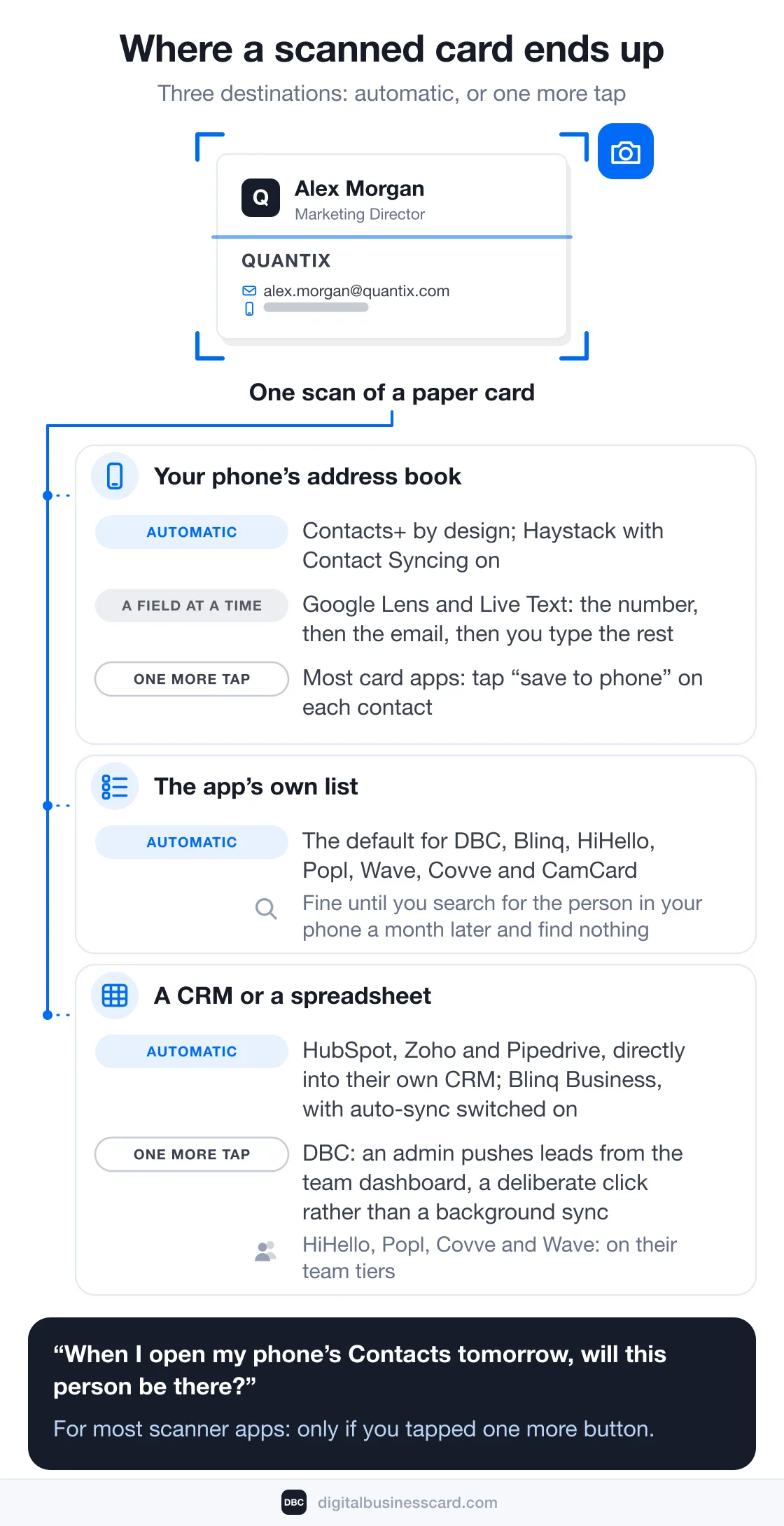
Read the ledger by its "Where the contact lands" column and the twelve apps sort into three kinds. The first puts the contact in your phone's address book: Google Lens and Live Text (a field at a time), Contacts+ (by design), Haystack with Contact Syncing on, and most card apps if you tap "save to phone" on each contact. The second keeps it in the app's own list: that is the default for DBC, Blinq, HiHello, Popl, Wave, Covve and CamCard, which is fine until you search for the person in your phone a month later and find nothing. The third writes it into a CRM or a spreadsheet: HubSpot, Zoho and Pipedrive directly; Blinq, HiHello, Popl, Covve and Wave on their team tiers; DBC from the team dashboard, where the push is a deliberate click rather than a background sync.
The one question to ask before installing anything: when I open my phone's Contacts tomorrow, will this person be there? For most scanner apps the honest answer is "only if you tapped one more button." Speed is the reason it matters. The best-known study of lead response, run on web leads at six companies by James Oldroyd with InsideSales.com, found a "21-fold decrease in the odds of qualifying a prospect if the response time stretched from 5 to 30 minutes." A card that is still a photo in an app you forgot to open is a lead you have not responded to.
Scanning Badges at a Trade Show
Every AI scanner above that advertises "badges" (DBC, Blinq, HiHello, Wave, Covve Pro, Popl's team tier) reads the printed text on the badge: name, company, title, and an email only if the organizer printed one. The barcode or QR code on that badge is different. At most shows it holds an attendee ID that only the organizer's lead-retrieval system can turn into a registration record, and that system is rented per show. What the official app costs on 2026 order forms, what a badge scan returns, and when to bring your own app instead is the subject of our guide to trade show lead capture.
A Box of 300 Cards: When Bulk Mode or Hardware Beats a Phone
The apps above are built for the cards you collect this week, one at a time. A backlog is a different job. Two phone apps have a real bulk mode: HiHello, about 100 cards in a sitting on every plan, and CamCard, several cards per scan. Past a few hundred cards, a sheet-fed desktop card scanner does the job faster, because you feed the stack and get a spreadsheet; Salesflare's guide picks the PenPower WorldCard Pro as its "business card scanner machine." That is a purchase for an office that inherits boxes of cards, not for a networker. Whichever route you take, the output you want is the same: a CSV or a vCard file you can load into your phone or CRM. If the format is new to you, what a vCard is explains what a .vcf carries and why a saved one is a snapshot.
The Scanner Apps to Skip in 2026
- Microsoft Lens (formerly Office Lens). Retired. Microsoft's retirement notice: retirement from iOS and Android "starting January 9, 2026," removal from the App Store and Google Play "on February 9, 2026," and scanning "until March 9, 2026." Lens had a Business Card mode that saved to the iPhone's Contacts app or a vCard; Microsoft's suggested replacement, the OneDrive app, has a Business Card scan that saves a PDF and creates no contact. Salesflare's guide, updated in August 2026, still lists Office Lens as its pick for Outlook.
- ABBYY Business Card Reader. The Android app reached end of life on September 18, 2023 and is gone from Google Play. The iOS app is still on the App Store, but since the same date it "no longer supports the feature of synchronization with the ABBYY Account", so your scans live on one phone.
- Evernote. Card scanning is still in the Evernote camera and turns cards into contact notes, but the only documented way to get a card into your phone's contacts is Evernote's separate, iOS-only Scannable app, and no Evernote page says which plan includes card scanning.
- Wantedly People. Salesflare's iPhone pick scans ten cards at once, but the US App Store listing returns a 404; the Japan storefront and Google Play still carry it.
Who Owns the Lead When a Whole Team Scans
Shows are back to something like full size. In 2025 the CEIR Index of US B2B exhibitions reached 93.6, 6.4% below 2019, with attendance up 4.7% on the year, and 70% of attendees rank in-person events as their top source of professional learning, in Freeman's April 2026 survey of more than 4,700 attendees. Ten reps on a booth therefore come home with a few hundred cards and badges between them, and the scanner questions change: who owns each lead, how it reaches the CRM, and what happens to the ones that were read badly.
On a DBC team account, every member's scans land in the dashboard's Leads list with the scanning member as owner, attributed to the event campaign that member is assigned to, with the campaign's tags, next to the leads captured by the cards themselves. From there an admin tags them, pushes selected leads to HubSpot or Salesforce, or exports all leads to Zoho, Pipedrive, Google Sheets, monday.com or Notion; the CSV export, by contrast, carries name, company, position and owner but not email or phone. The push is a step, not a background sync, which is also what keeps a mis-read card out of the CRM until someone has looked at it. Blinq Business does the opposite once auto-sync is switched on, pushing each captured lead on its own for a credit apiece; HubSpot and Zoho skip the question by writing straight into their own CRM. Pick by which failure you would rather have: a lead that waits for a click, or a wrong email that reached the pipeline on its own.
FAQ
What is the best business card scanner app?
Does the iPhone have a built-in business card scanner?
What is the best free business card scanner app?
What is the best way to digitize a stack of business cards?
Do business card scanner apps work offline?
Can a scanner app read conference badges?
Which scanner apps push a scanned card into HubSpot or Salesforce?
What is the most accurate business card scanner app?
Is there a scanner in the DBC app, and what does it cost?

A content writer with over 8 years of experience creating analytical content for digital products and B2B SaaS companies. His work focuses on practical guides, pricing breakdowns, and comparisons that help teams evaluate costs, features, and differences between tools.
Your first impression decides everything
- Look professional and build trust instantly
- Forget about reprints and lost contacts
- Update your details anytime
 Get Started Today