
Contents
What Is an NFC Tag?What Is an NFC Tag on My Phone?Why Is My iPhone Saying “NFC Tag Detected”?What Was It? Five Things That Set This OffIs an NFC Tag a Tracker?How Do I Turn Off the NFC Tag Notification?What People Actually Put on NFC TagsIf the Tag Was Somebody’s Business CardConclusionFAQNFC Tag Detected: What an NFC Tag Is and Why It Popped Up
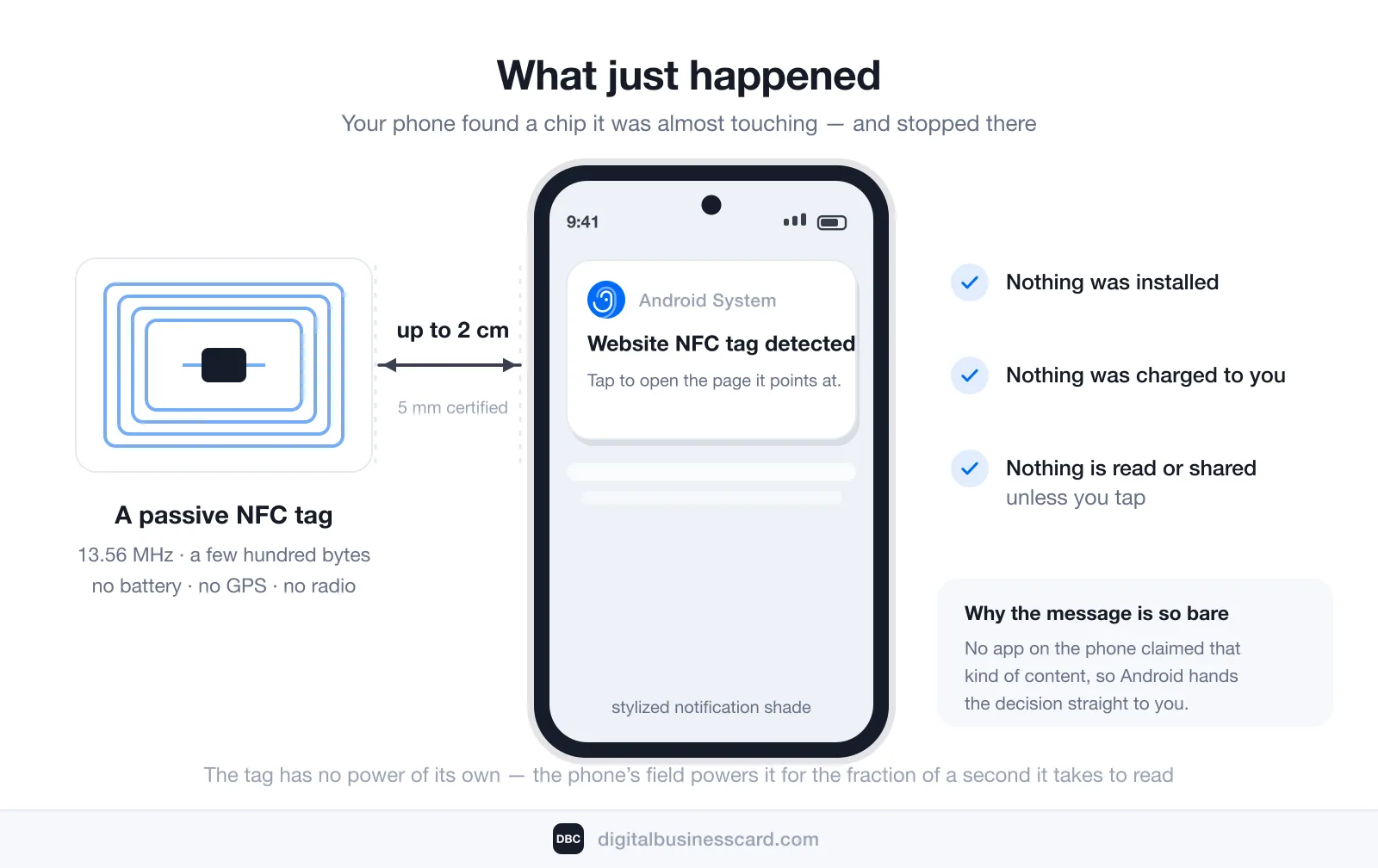
“NFC tag detected” means your phone’s NFC reader found a chip within about two centimeters of it and could not work out which app should open it — so it asked you instead. Nothing was installed, nothing was charged to you, and nothing is read or shared unless you tap the notification. The chip is passive: no battery, no GPS, no connection of its own.
If you came only for the off switch: on Android it is Settings → Connected devices → Connection preferences → NFC, toggled off. iPhone has no NFC toggle, but it does let you silence the alert — swipe left on the notification, tap Options, then Mute or Turn Off. Full steps for both, with Apple’s own wording, are further down.
You are far from the only person staring at this message. Our own Ahrefs pull in August 2026 counts 2,400 US searches a month for “nfc tag detected” and another 3,800 for “what is an nfc tag”. The alert is common; a plain-language explanation of it is not. So, in order: what the chip is, what was probably touching your phone, whether it can track you, and how to make it stop for good.
What Is an NFC Tag?
An NFC tag is a chip with a flat antenna coiled around it, thin enough to hide inside a sticker, a plastic card, a wristband, a keyring, or a label glued to a box. It has no battery and nothing running on it. When a reader comes close, the reader’s own radio field powers the chip just long enough for it to hand over the few bytes it holds — then it goes dead again.
The physical numbers explain most of the confusion around these things. The NFC Forum, the body that defines the standard, puts NFC on a base frequency of 13.56 MHz with a typical range of up to 2 cm — the certified compliant range is 5 mm — and describes the battery-less mode where one side powers the connection outright. Two centimeters is the whole story: your phone did not find a tag across the room, it found something it was practically touching.
The second useful number is memory. A common tag holds a few hundred bytes — bytes, not megabytes. That is enough for a web address, a contact record, or a Wi-Fi password, and nowhere near enough for an app, a photo, or anything that could run by itself. An NFC tag is a pointer, not a program. When people say NFC sticker they mean the same chip in adhesive form; the format changes, the technology does not.
What Is an NFC Tag on My Phone?
Nothing inside your phone is the tag. Your phone is the reader — and on both platforms it reads more or less constantly while the screen is on and the phone has been unlocked at least once since it last started up, without you opening anything. The tag was outside: something your phone brushed against, is resting on, or is carrying in its case.
That is also why the alert seems to come out of nowhere. The antenna is not where you would point it. On an iPhone it sits in the top third of the back; on most Android phones it is in the upper-middle of the back panel. You never aim it at anything, so your phone finds tags by accident all the time — on a desk, in a bag, or lying on a wallet.
This will keep happening more often, not less. ABI Research counted 1.16 billion NFC-enabled devices shipped in 2023, forecasting nearly 1.7 billion a year by 2028 at an 8% growth rate, with smartphones making up over 70% of that market and NFC reaching 65% to 75% of smartphones across the period. Those figures count readers, not tags: the number of devices walking around able to notice a chip grows by hundreds of millions a year, which is how an alert like this reaches people who were never looking for one.
Why Is My iPhone Saying “NFC Tag Detected”?
Because of a feature Apple calls background tag reading, and because your phone deliberately refuses to act on a tag without asking you first.
Apple documents the behavior itself. In Apple’s developer documentation: “the system scans for and reads NFC data without requiring users to scan tags using an app,” and “displays a pop-up notification each time it reads a new tag.” It works on iPhone XS and later, only while the phone is in use, and not at all if the device has never been unlocked since startup, the camera or Apple Pay Wallet is in use, another reader session is running, or airplane mode is on. Nothing follows until you tap the notification — and if the phone is locked, Apple’s system asks you to unlock it before handing the tag’s data to any app.
Android does the same job through what its developer documentation calls the tag dispatch system. The phone parses the tag’s message and looks for an app that has claimed that kind of content, trying ACTION_NDEF_DISCOVERED first, then ACTION_TECH_DISCOVERED, then ACTION_TAG_DISCOVERED. If no app on the phone filters for any of them, Android’s own words are that it will “do nothing.” The bare system message you are looking at is what “nothing” looks like: the phone read a chip and found nobody to hand it to.
One detail worth knowing, because it turns a mystery into an answer: the word in front of the message names the payload. “Website NFC tag detected” means the chip held a web address. Android also phrases this as “New tag scanned” on some versions and manufacturers. If you saw the word website, whatever you tapped was pointing at a page — a poster, a product, or somebody’s contact card.
What Was It? Five Things That Set This Off
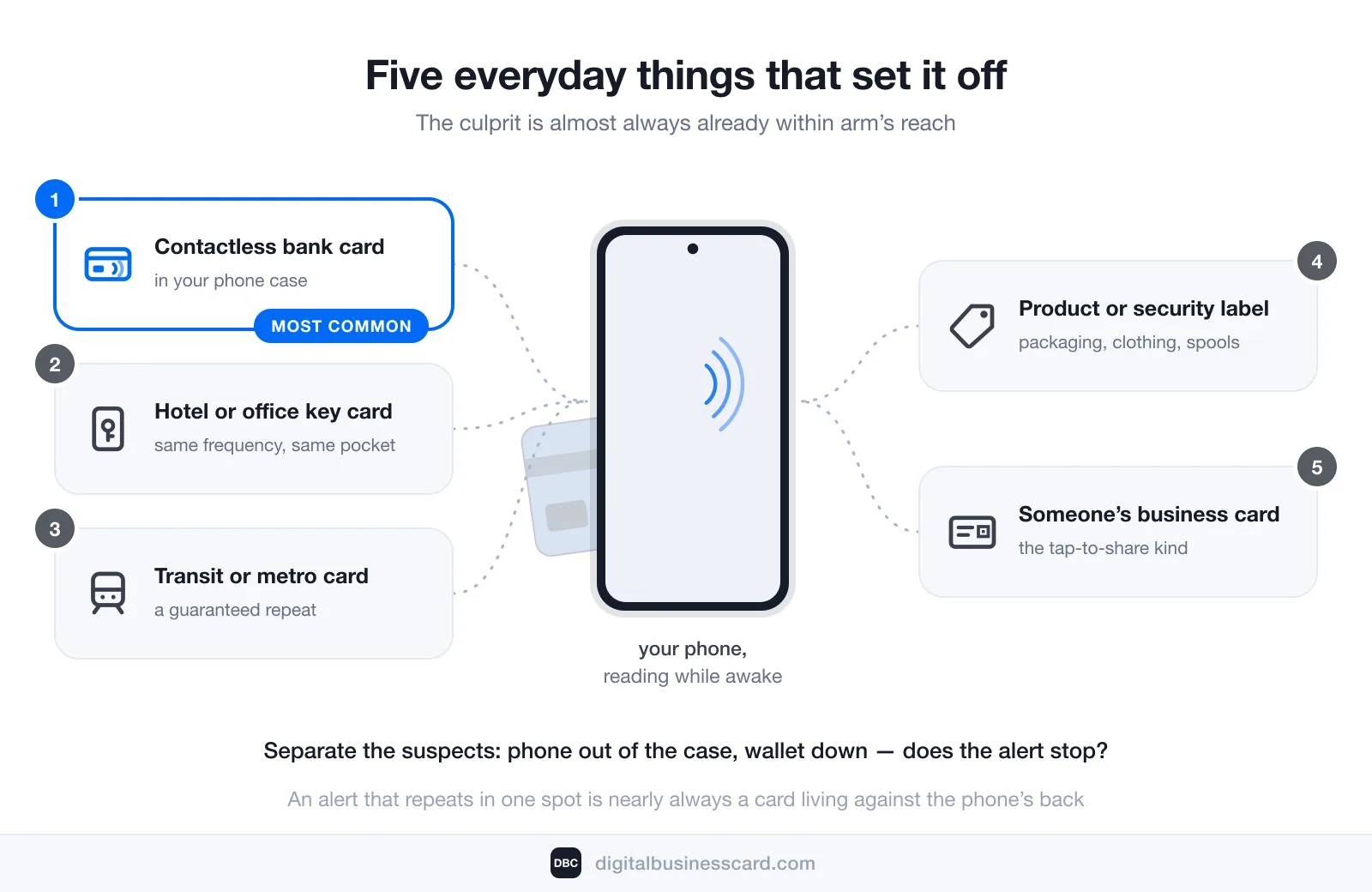
The culprit is almost always ordinary and already within arm’s reach:
- A contactless bank card in your phone case. The most common cause by a distance, and the one that fires over and over, because the card never leaves the phone.
- A hotel or office key card. Same frequency, same pocket, same result when it meets the back of your phone.
- A transit card. Metro and bus passes are contactless chips; carrying one against your phone is a guaranteed repeat performance.
- A product or anti-theft label. Packaging, clothing tags, 3D-printer filament spools, collectible figures and authenticity seals increasingly ship with a chip inside.
- Somebody’s tap-to-share business card. If the alert named a website and appeared the moment you touched a card someone handed you, that is what happened — more on it below.
To identify yours, separate the suspects: take the phone out of its case, put the wallet down, and see whether the alert stops. An alert that repeats in one specific spot is nearly always a card living against the phone’s back; a one-off in a shop or a hotel lobby is a label or a key card.
Is an NFC Tag a Tracker?
No — and the reason is physics rather than a promise from anyone. A passive tag has no battery, no clock, no location hardware and no connection to a network. It cannot record that it was read, cannot report it afterwards, and cannot do anything at all outside the couple of centimeters where a reader is powering it. A tracker needs power and a radio with range; a tag has neither.
What does deserve care is the destination, not the chip. A tag can be written with any web address, including a hostile one, and tags in public places can be swapped or covered over. The defense is the same one you already use for QR codes and links in email: read the domain shown in the notification before you tap it, and if it is not a name you recognize, dismiss it. No tag can install software on your phone by itself — the worst it can do is offer you a page.
The contactless bank card in your case deserves one accurate sentence too, because the internet is full of inaccurate ones. Its protection is not a hidden card number, and it is not a token: what stops a captured read from becoming a payment is that EMVCo, the body behind the contactless standard, requires that “a one-time use security code is generated for every transaction.” Replacing the card number outright is a phone-wallet feature — Apple describes a device-specific Device Account Number stored in the Secure Element, kept apart from the card number itself. Your phone detecting a card is not a payment either way: a purchase needs a payment terminal, not a notification.
How Do I Turn Off the NFC Tag Notification?
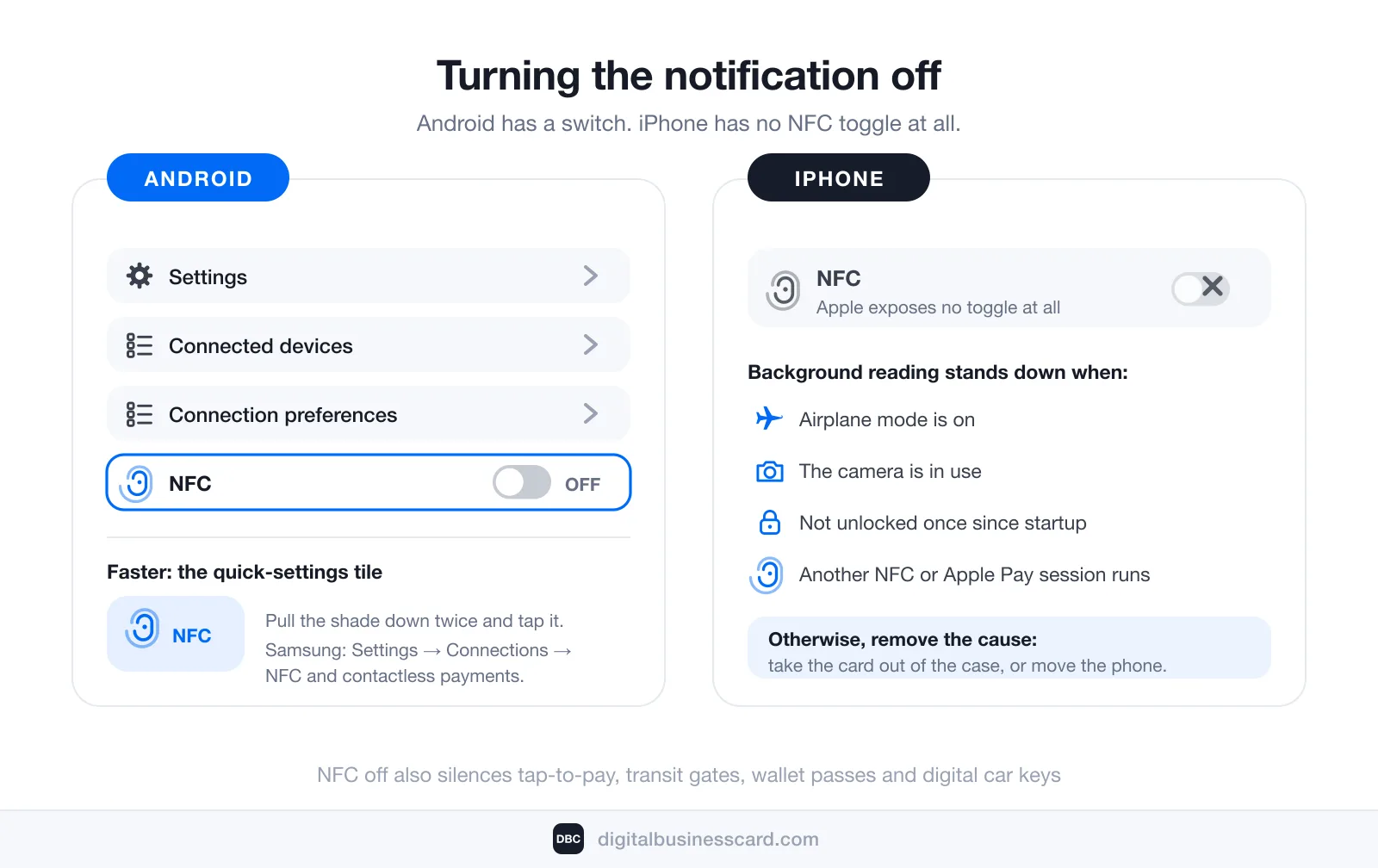
On Android, it is a setting:
- Settings → Connected devices → Connection preferences → NFC — toggle it off. On Samsung phones the path is Settings → Connections → NFC and contactless payments.
- Faster: pull down the notification shade twice and tap the NFC tile in quick settings.
On iPhone there is no NFC switch — Apple does not expose one — but the notification itself is controllable, and that is what you actually want silenced. Apple’s instructions for managing notifications: “swipe left over an alert or group of alerts,” tap Options, then choose Mute for 1 Hour, Mute for Today, View Settings or Turn Off. Turn Off stops that app’s alerts for good; View Settings opens the same panel you reach at Settings → Notifications → [app] → Allow Notifications, which Apple documents as the way to “turn off notifications for an app.”
Two iPhone notes worth having. First, the banner is raised by whichever app the tag’s link belongs to — Safari for an ordinary web address — so the control above applies to that app, not to a setting called NFC. Second, removing the cause still beats muting a symptom: take the bank card out of the case, or move the phone off whatever it is sitting on. Background reading also stands down under the Apple-documented conditions above, which is why the banner stays away in airplane mode or while the camera is open.
Before you switch it off permanently, know the cost: NFC is the same radio behind tap-to-pay, transit gates, Apple and Google Wallet passes, and digital car keys. Turning it off silences the notification and those along with it. If you use your phone to pay or to hold a wallet pass — for instance a business card pass, as described in our walkthroughs for Android and iPhone — moving the offending card out of your phone case is the better fix.
What People Actually Put on NFC Tags
Every genuine use of a tag is the same trick — a physical object standing in for a link nobody wants to type:
- Home automation. A tag by the bed that turns on Do Not Disturb and an alarm; a tag in the car that starts a driving playlist.
- Wi-Fi for guests. A tag on the fridge that joins the network without anyone reciting a password.
- Posters, museums and packaging. Tap the exhibit or the box, get the page about it.
- Product authentication. A chip that proves a spare part, a spool or a pair of sneakers is genuine.
- Contact sharing. A tap that opens someone’s details in your browser.
Notice what is missing from that list: anything heavy. The memory limit from earlier is why. Tags are addresses, and the content always lives somewhere else.
If the Tag Was Somebody’s Business Card
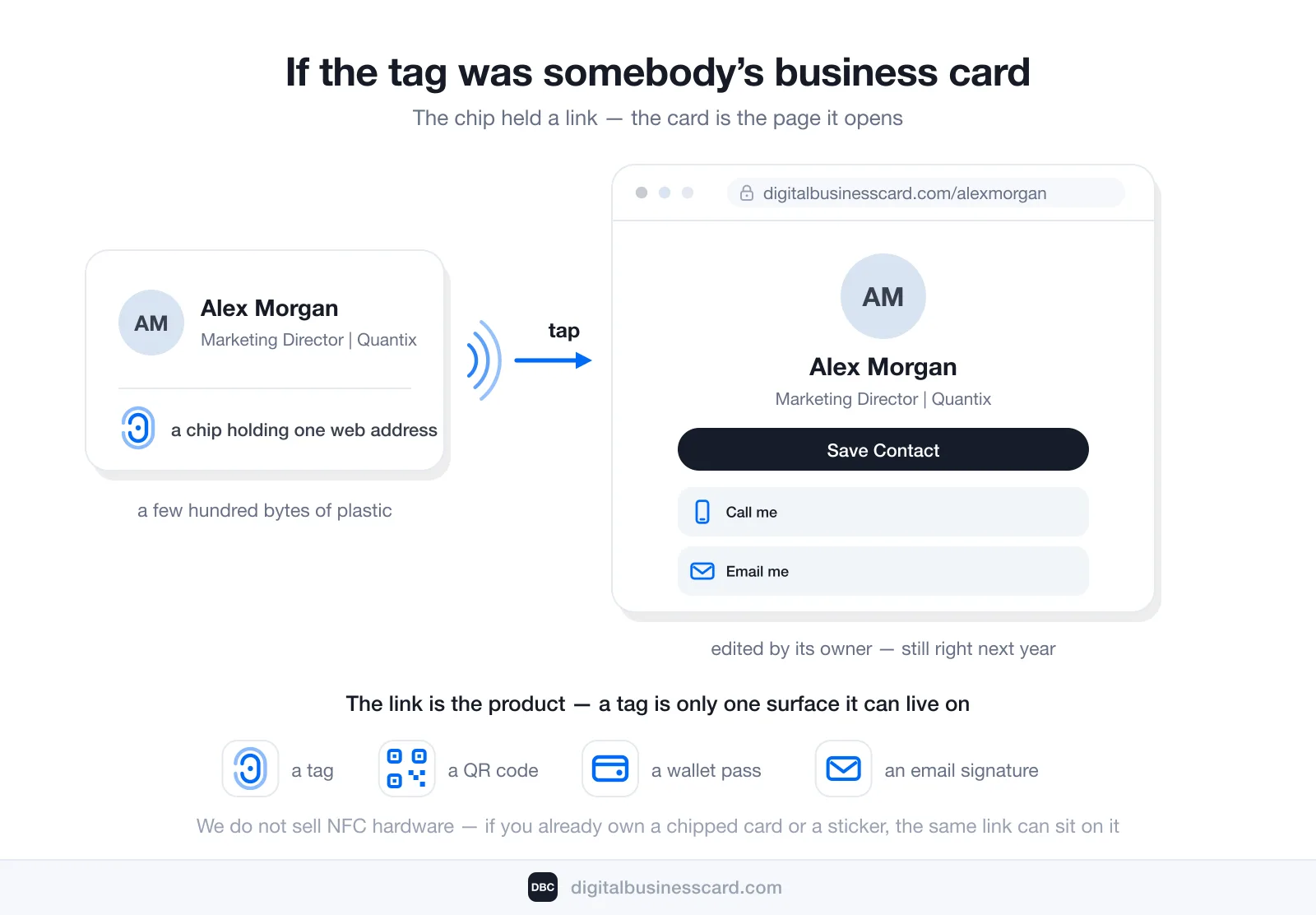
If the banner said “Website NFC tag detected” right after you touched a card, you were handed a digital business card. Here is the part that matters: the card is the page at that address, not the plastic. The chip held a link, your browser opened it, and the details you saw update whenever their owner edits them — which is why the phone number on it will still be right next year.
We build one of those platforms, so let us be exact about what is ours and what is not: we do not sell NFC hardware. A DBC card is a link with a live profile behind it, and a tag is just one of the surfaces that link can sit on — alongside a QR code, a wallet pass, and the signature at the bottom of an email. If you already own a chipped card or a pack of stickers, the link can go on it. If you own none, nothing is lost: the same profile shares by QR or link from the phone in your hand, and whoever receives it installs nothing. The full definition and the four ways of handing one over are in what is a digital business card.
The reason anyone bothers is the paper it replaces. QR Tiger’s research counts over 8 billion printed business cards thrown out every year, 88% of them within a week of being handed over, while 37% of small businesses and 23% of individuals have moved to card apps. A tap that survives the trash can is the entire pitch.
Conclusion
The notification is your phone being careful. It read a few hundred bytes off a chip it was almost touching, found no app with a claim on them, and refused to go further without your say-so. Work out what is against the back of your phone — a bank card, a key card, a label, a card someone gave you — and you have solved it; switch NFC off in settings if you would rather not be asked again, remembering that tap-to-pay goes quiet with it.
And if the tag turned out to be a business card, the useful takeaway is that the link did the work, not the object it was written to. Ours is built in a few minutes: how to make a digital business card.
FAQ
What does “Website NFC tag detected” mean?
Can an NFC tag give my phone a virus?
Can someone steal my bank card details by tapping my phone?
Do NFC tags need a battery or expire?
Why does my phone keep saying it in the same place?
How much does a digital business card cost?

A content writer with over 8 years of experience creating analytical content for digital products and B2B SaaS companies. His work focuses on practical guides, pricing breakdowns, and comparisons that help teams evaluate costs, features, and differences between tools.
Your first impression decides everything
- Look professional and build trust instantly
- Forget about reprints and lost contacts
- Update your details anytime
 Get Started Today