
Contents
What Is a Digital Business Card, Exactly?How Does a Digital Business Card Work?What Can You Put on a Digital Business Card?Digital vs. Paper Business CardsCommon Misconceptions About Digital Business CardsWho Uses Digital Business Cards?How to Create a Digital Business CardConclusionFAQWhat Is a Digital Business Card? Meaning & How It Works
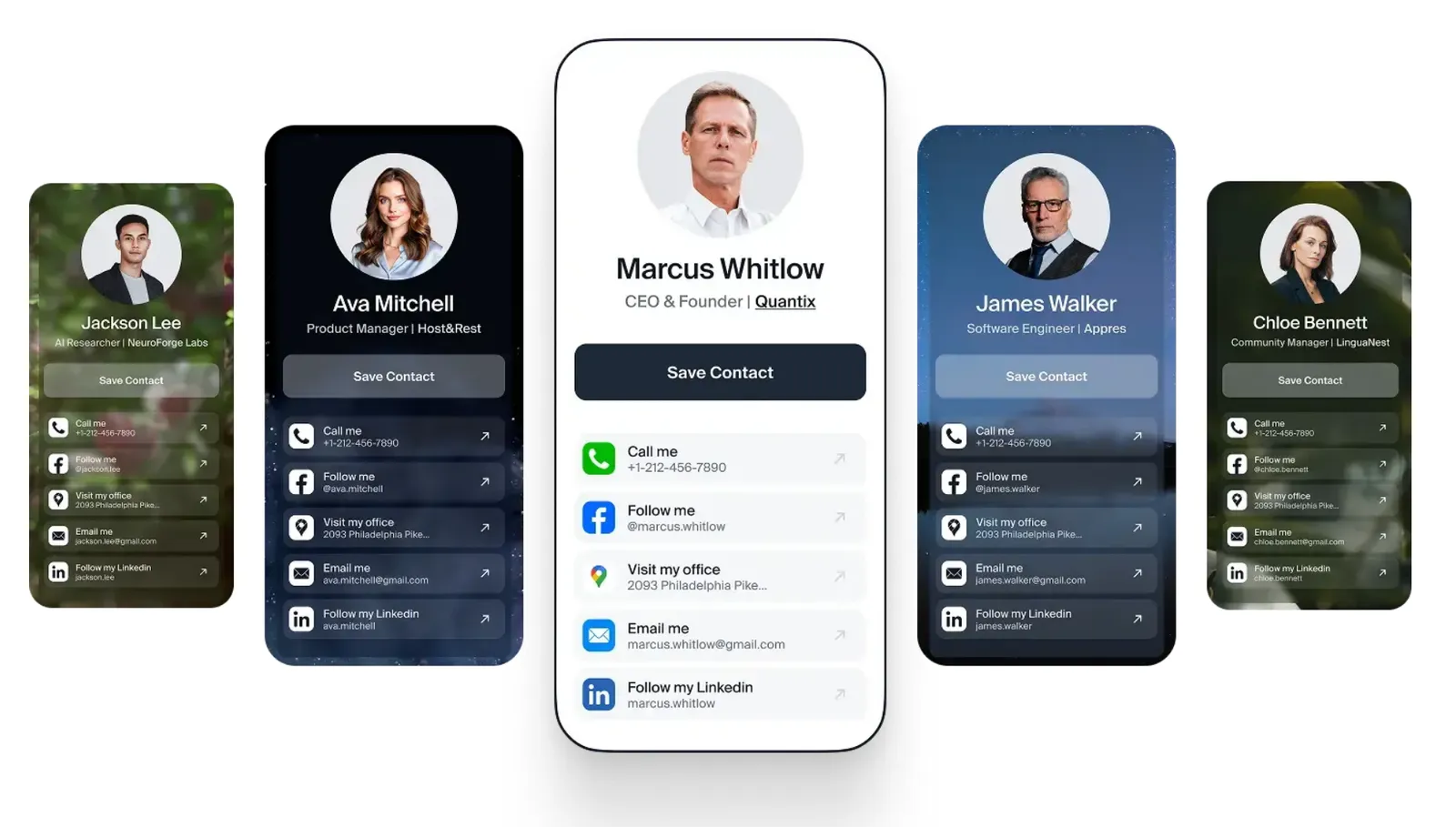
A digital business card is an online version of a traditional paper business card: a mobile-friendly profile that holds your name, job title, contact details, photo, and links in one place. Instead of handing someone a printed card, you share it through a link, QR code, NFC tap, or wallet pass — and the other person saves your details straight to their phone.
Unlike paper, a digital card never runs out, updates instantly when your details change, and can show you when someone actually opened it. The person receiving it doesn’t need any app — the card opens in their browser.
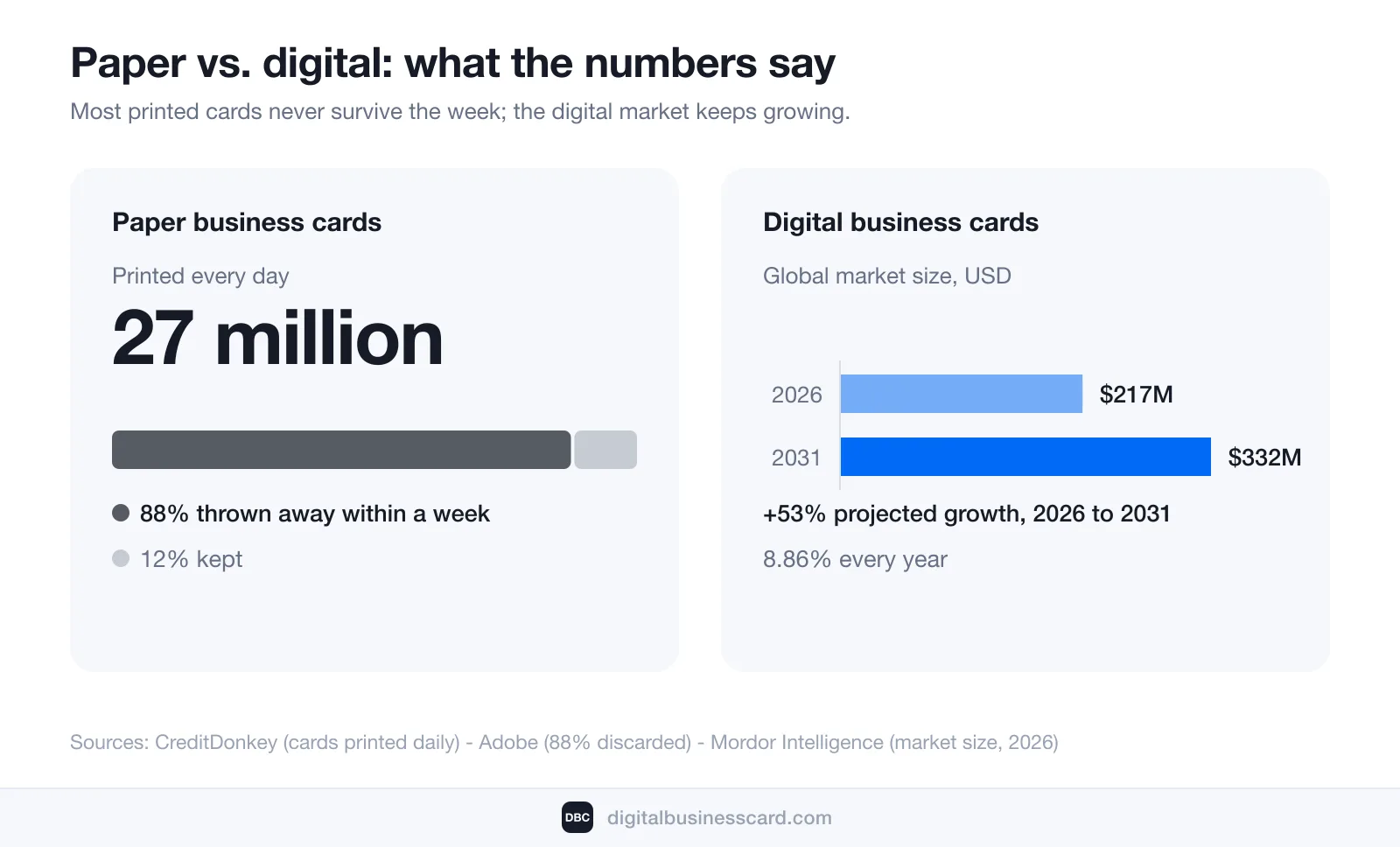
That’s the short answer. Below, I’ll unpack how these cards actually work, what belongs on one, where paper still wins (spoiler: almost nowhere), and how to create your own in a few minutes. This isn’t a niche tool anymore: Mordor Intelligence values the digital business card market at USD 217.04 million in 2026, projected to reach USD 331.78 million by 2031 — an 8.86% annual growth rate.
What Is a Digital Business Card, Exactly?
You’ll also see digital business cards called virtual business cards, electronic business cards, or smart business cards. All these names describe the same thing: a personal web page built specifically for exchanging contact details.
Here’s the distinction that most explanations miss: the card is the profile, not the delivery method. QR codes, NFC taps, wallet passes, links in your email signature — those are just different doors into the same card. You create the profile once, and every door leads to its latest version.
It also helps to be clear about what a digital business card is not:
- Not a photo of your paper card. A scanned image can’t be tapped to call you, and it doesn’t update when you change jobs.
- Not just a .vcf contact file. A contact file is one of the outputs — your card generates it so people can save you in one tap — but the card itself carries far more: links, portfolio, booking calendar.
- Not a piece of hardware. Some companies sell NFC-chipped plastic or metal cards. Those are accessories that open your digital card; they aren’t required to have one.
How Does a Digital Business Card Work?
The full lifecycle has four steps:
- You create your card on a digital business card platform — add your details, photo, links, and branding.
- The platform gives you a unique link and QR code that always point to your card.
- You share it whichever way fits the moment — the QR on your phone screen at a conference, the link in an email, an NFC tap, or a pass in your phone’s wallet.
- The other person opens it in their browser, sees your full profile, and saves your contact with one tap. No app, no account, no typing.
Because the link points to a live profile, you can change your phone number or job title tonight and everyone who ever received your card sees the updated version tomorrow.
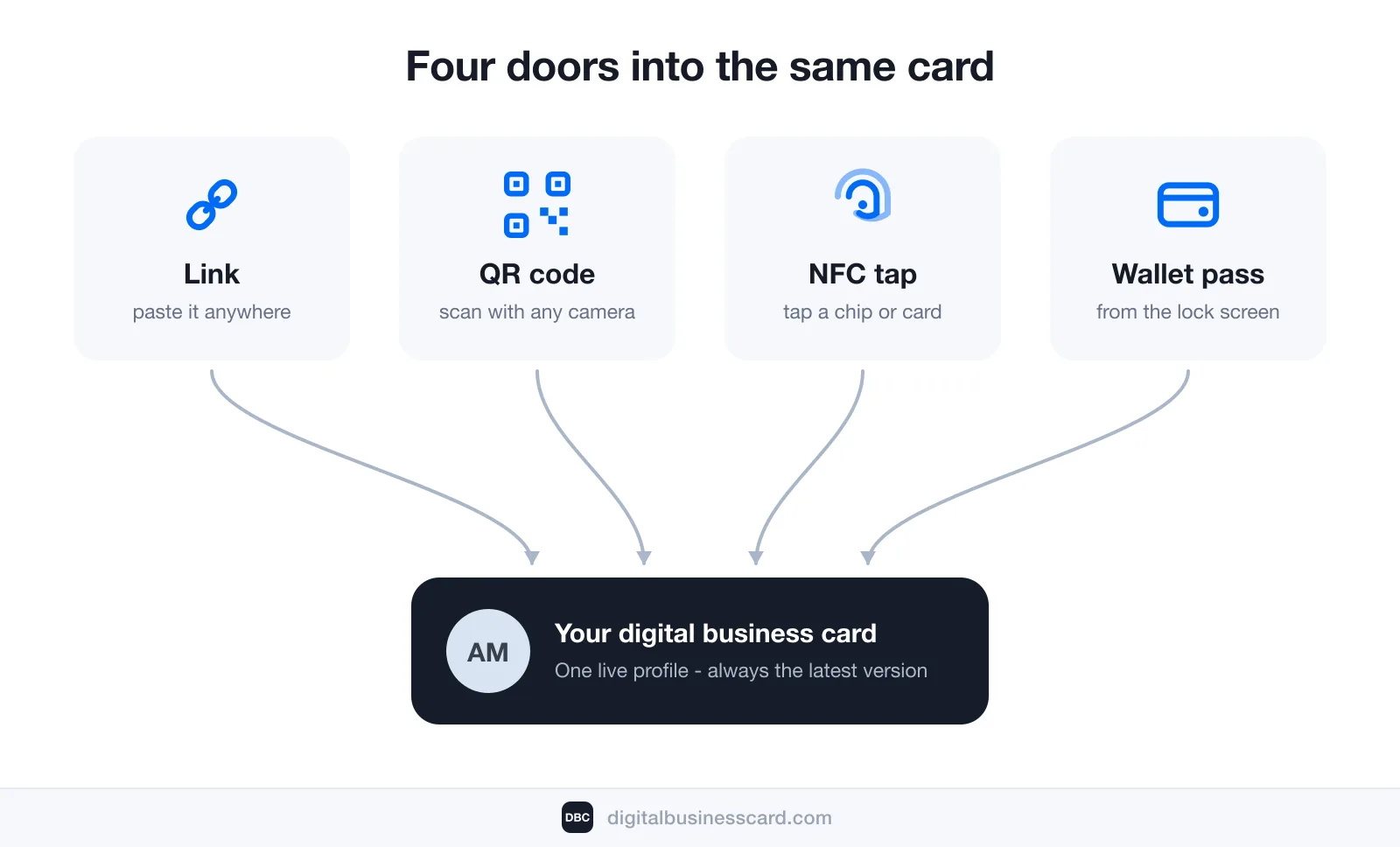
Sharing via link
The simplest method, and the most underrated. Your card’s URL works anywhere text works: email signatures, LinkedIn messages, WhatsApp, a Zoom chat, an Instagram bio. If you can paste, you can network.
Sharing via QR code
The conference workhorse. You show the QR code on your phone screen (or print it on a badge, a slide, or even a paper card), the other person points their camera at it, and your card opens instantly. Every modern phone scans QR codes natively — no scanner app needed.
Sharing via NFC tap
NFC (near-field communication) is the same technology behind contactless payments. If your card platform supports it, you can write your card’s link to an NFC tag or chipped card, and sharing becomes a physical tap. It feels great in person — just know it’s an optional extra, not the foundation.
Sharing via wallet pass
Your card can live in Apple Wallet or Google Wallet as a pass with your QR code, ready from the lock screen — faster than opening any app. I wrote a separate step-by-step guide on adding your business card to Apple Wallet.
What Can You Put on a Digital Business Card?
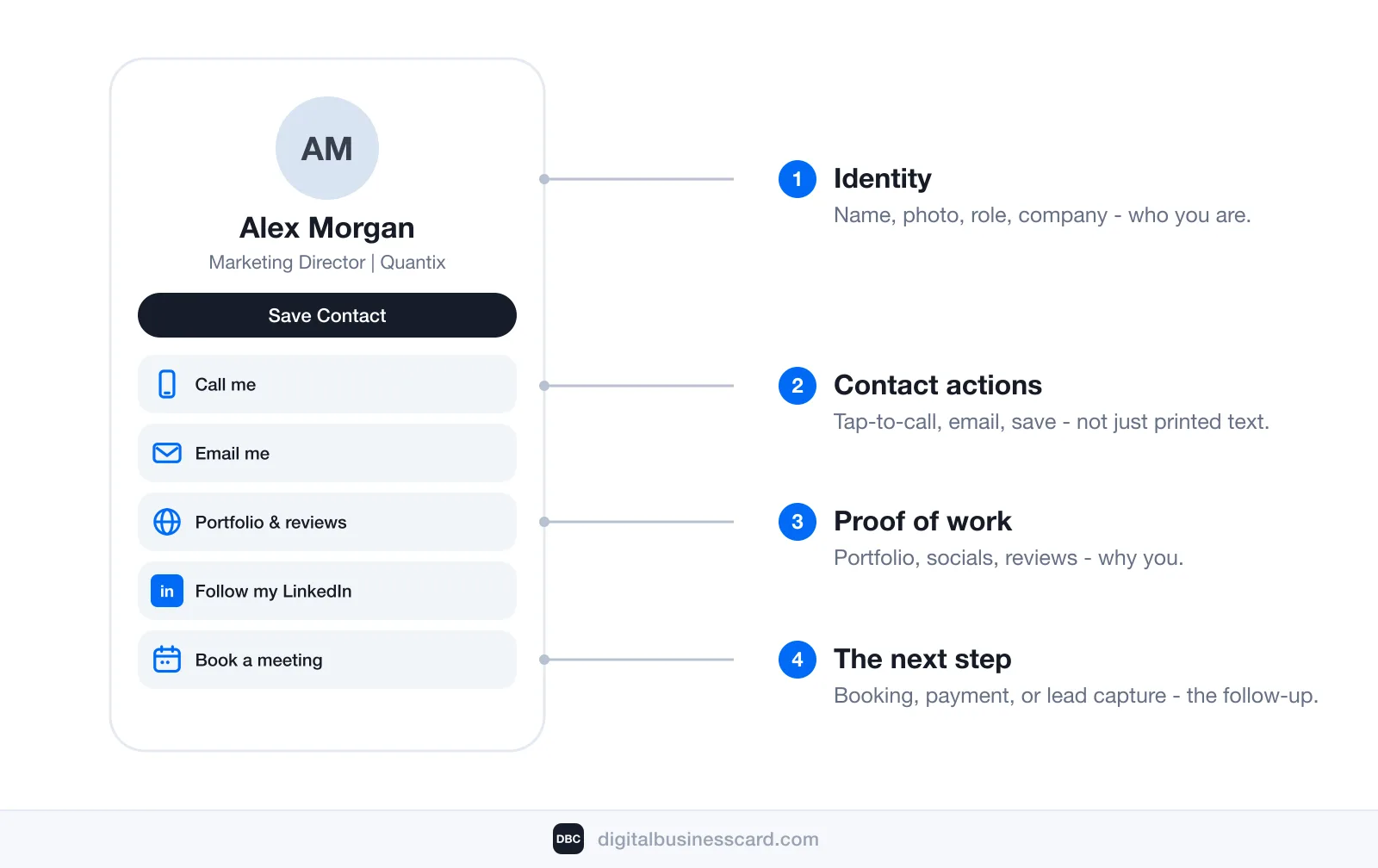
A paper card gives you roughly seven square inches. A digital card removes the ceiling entirely, so think in terms of four layers:
- Identity: name, photo or logo, job title, company, location, a one-line description of what you do.
- Contact actions: tap-to-call phone, email, website — every one of them clickable, not just printed text.
- Proof of work: your portfolio, LinkedIn and social profiles, a product demo video, customer reviews.
- The next step: a booking calendar, a payment link, or a lead capture form that asks for the other person’s details in return.
That last layer is what separates digital from paper. A paper card ends the interaction; a digital card starts the follow-up.
Don’t add all of it at once, though. The strongest cards I’ve seen pick one goal — usually “book a meeting with me” or “see my work” — and cut everything that doesn’t serve it. For inspiration, I collected real-world layouts in digital business card examples.
Digital vs. Paper Business Cards
I’ll be direct about the scale of paper’s problem. According to CreditDonkey, about 27 million business cards are printed every day — just under 10 billion a year. And Adobe reports that 88% of handed-out business cards get thrown away in less than a week. Nearly nine out of ten cards you pay for end up in the trash before Friday.
Here’s how the two formats compare side by side:
Characteristic | Paper Business Card | Digital Business Card |
|---|---|---|
Capacity | Name, title, and a few contact lines | Unlimited — links, video, portfolio, booking calendar |
Updates | Reprint the whole batch | Edit once, live everywhere instantly |
Supply | Runs out at the worst moment | Infinite — share it a thousand times a day |
Saving your contact | Manual typing (or the card gets tossed) | One tap to save to phone contacts |
Analytics | None — you never know if it worked | Views, taps, and saves are tracked |
Lead capture | One-way — you hand it and hope | Two-way — the card can collect their details too |
Cost over time | Recurring print runs, mostly wasted (88% tossed) | Free or one subscription, no reprints ever |
Paper still has one real advantage: the tactile moment of handing something over. If that ritual matters in your industry, the hybrid answer is a paper or NFC card carrying your QR code — the physical gesture, backed by a digital profile that survives the trash can.
Common Misconceptions About Digital Business Cards
Three beliefs stop people from switching, and all three are wrong.
“I need an NFC card or special hardware”
No. A digital business card is a link — you can share it today with the phone already in your pocket. NFC cards are a nice-to-have accessory for in-person events, nothing more. If a vendor tells you the hardware is the product, they’re selling you hardware.
“The other person needs the app”
No. Your card opens in any browser on any device. The recipient scans your QR code or taps your link, sees your profile, and saves your contact — without installing anything or creating an account. This matters: any friction on the receiving end kills the exchange.
“It replaces LinkedIn”
It doesn’t, and it isn’t trying to. LinkedIn is where a professional relationship continues; a digital business card is the bridge that gets you there. It delivers your details — including your LinkedIn — into the other person’s contacts in seconds, at the exact moment you meet. Profile discovery later is LinkedIn’s job; being saved now is your card’s job.
Who Uses Digital Business Cards?
Adoption has moved well past the early-adopter phase. According to QR Tiger’s research roundup, about 37% of small businesses and 23% of individuals already use digital business card apps.
In practice, I see four groups getting the most out of them:
- Sales teams and field reps — every conversation ends with a saved contact and a captured lead, not a card in someone’s pocket lint.
- Real estate agents and consultants — people who live on referrals and need their listings, reviews, and booking link one tap away.
- Founders and freelancers — your card is a pitch page: product link, demo video, calendar.
- Conference regulars — when you meet forty people in two days, “scan me” beats “let me find a pen” every single time.
I keep a full, regularly updated collection of adoption and ROI numbers in digital business card statistics if you want to go deeper into the data.
How to Create a Digital Business Card
The process is the same on every serious platform and takes about five minutes:
- Pick a platform. Look for one-tap contact saving, wallet passes, analytics, and lead capture. I compared the leading options in the best digital business cards if you want the full rundown.
- Add your details. Name, title, company, photo, phone, email — the identity layer first.
- Brand it. Colors, logo, a design that looks like you. First impressions transfer: a polished card reads as a polished professional.
- Test the save flow. Scan your own QR code with a friend’s phone and save yourself to their contacts. If any step feels clumsy, fix it before the next event.
- Put it everywhere. Email signature, LinkedIn bio, wallet pass, phone lock screen — the card only works when it’s always within reach.
That’s the condensed version — for the full walkthrough with a prep checklist, platform criteria, and the distribution setup, see our step-by-step guide on how to make a digital business card.
We built DBC: Digital Business Card around exactly this flow, because we were tired of watching conference contacts evaporate: design-first templates, Apple and Google Wallet passes, two-way contact exchange, and analytics that show which conversations turned into saved contacts. Creating a card takes a few minutes, so you can run the full flow — create, share, save — the same day you start.
Conclusion
So, what is a digital business card? It’s your professional identity as a live, shareable profile: one link that introduces you, saves your details into the other person’s phone, and keeps itself up to date. Paper answers “who are you?” — digital also answers “how do we stay in touch?”, and it does so without printing ten billion cards a year so that 88% can hit the trash by Friday.
If you exchange contacts more than a few times a month, the switch pays for itself at the first event.
FAQ
Are digital business cards free?
How does the other person save my contact?
Do digital business cards work without internet?
Are digital business cards secure?
What is the difference between a digital business card and an NFC card?

A content writer with over 8 years of experience creating analytical content for digital products and B2B SaaS companies. His work focuses on practical guides, pricing breakdowns, and comparisons that help teams evaluate costs, features, and differences between tools.
Your first impression decides everything
- Look professional and build trust instantly
- Forget about reprints and lost contacts
- Update your details anytime
 Get Started Today