
Contents
How Do I Find My LinkedIn QR Code?How to Share Your LinkedIn QR CodeHow to Scan Someone Else’s LinkedIn QR CodeWhat LinkedIn’s QR Code Can’t DoA Profile Code and a Contact Code Are Different ToolsUse Both: A Two-Code Routine for an EventConclusionFAQHow to Find and Share Your LinkedIn QR Code (2026)
To find your LinkedIn QR code, open the LinkedIn mobile app, tap the QR code icon in the search bar at the top of your home screen, and open the “My code” tab. From there iOS can “Share my code” or “Save to photos”, and Android can “SAVE TO GALLERY” — LinkedIn lists sharing itself as coming soon on Android. The code points at your LinkedIn profile and nothing else: it carries no phone number, no email and no booking link, it brings nothing back from the person who scans it, and LinkedIn may ask a signed-out visitor to log in before showing your full profile.
That code is a shortcut into the largest professional network on earth — LinkedIn puts its community at 1.3 billion members, over 290 million of them in North America, per LinkedIn’s own about page. LinkedIn’s mobile interface changes, though, and guides to it go stale quietly. Every label below was checked against LinkedIn’s own help documentation on August 14, 2026.
Two things this guide is not. It is not a LinkedIn QR code generator — LinkedIn issues your code itself, and nothing you install can change that. And it is not about designing a code for a printed card; that job belongs to our guide on the QR code for a business card.
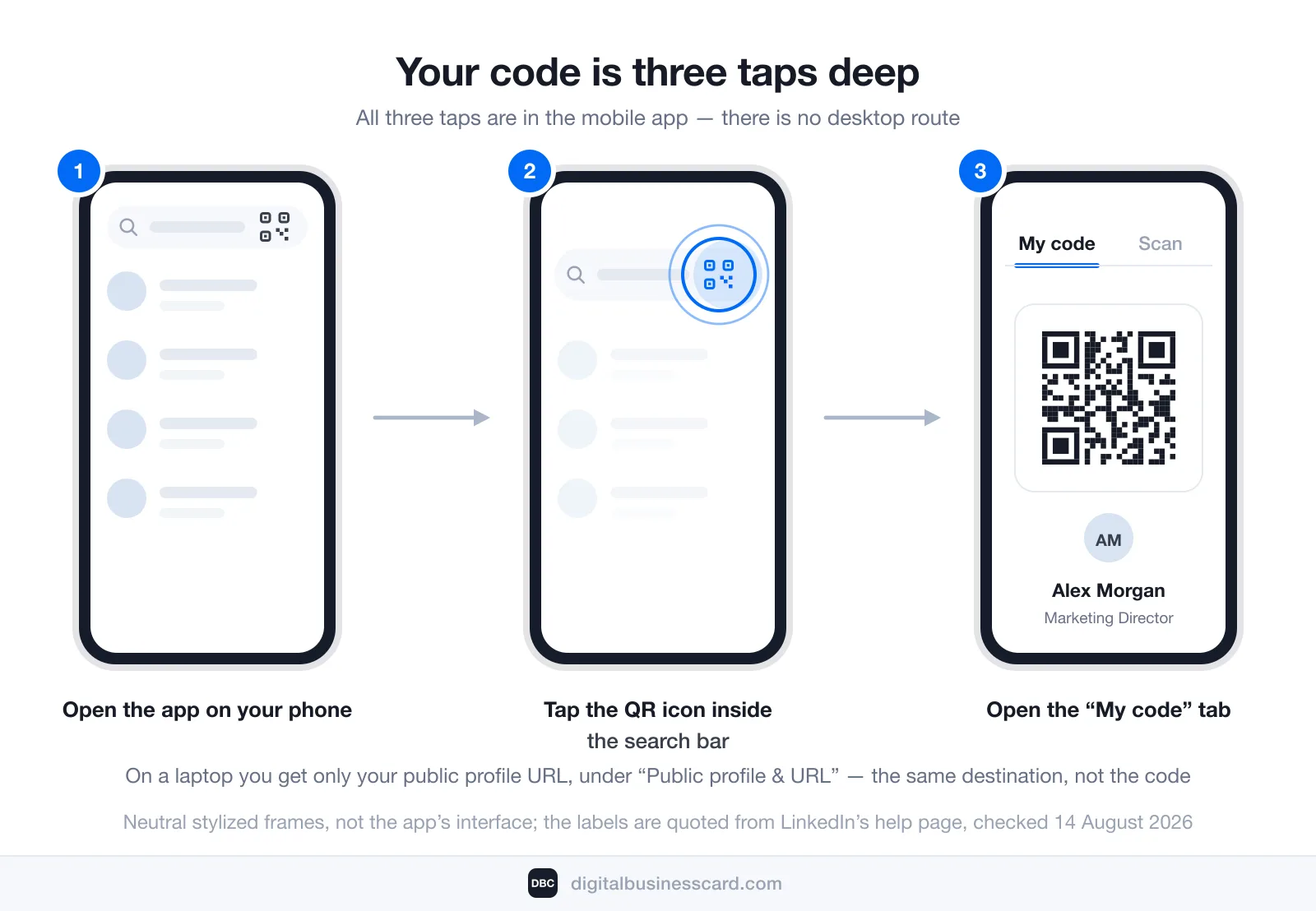
How Do I Find My LinkedIn QR Code?
Three taps, and all three are in the mobile app:
- Open the LinkedIn app on your phone or tablet. The code is a mobile feature; LinkedIn documents no desktop route to it.
- Tap the QR code icon in the search bar at the top of your home screen. It sits inside the search field itself, on the right, which is why people hunt for it in the profile menu and never find it.
- Open the “My code” tab. LinkedIn writes it as My code on iOS and MY CODE on Android. The neighbouring tab is the scanner.
Those labels come straight from LinkedIn’s help article Using a LinkedIn QR Code to Connect with Members, checked on August 14, 2026. If what you see in the app differs, that help page is the authority, not this article.
If you are on a laptop and the code is what you came for, there is no equivalent. What desktop gives you is your public profile URL — LinkedIn shows it under Public profile & URL on the right of your own profile page. That URL points at the same profile your QR code opens, so a third-party generator can turn it into an image. That image is no longer LinkedIn’s code, though, and LinkedIn will not maintain it for you.
How to Share Your LinkedIn QR Code
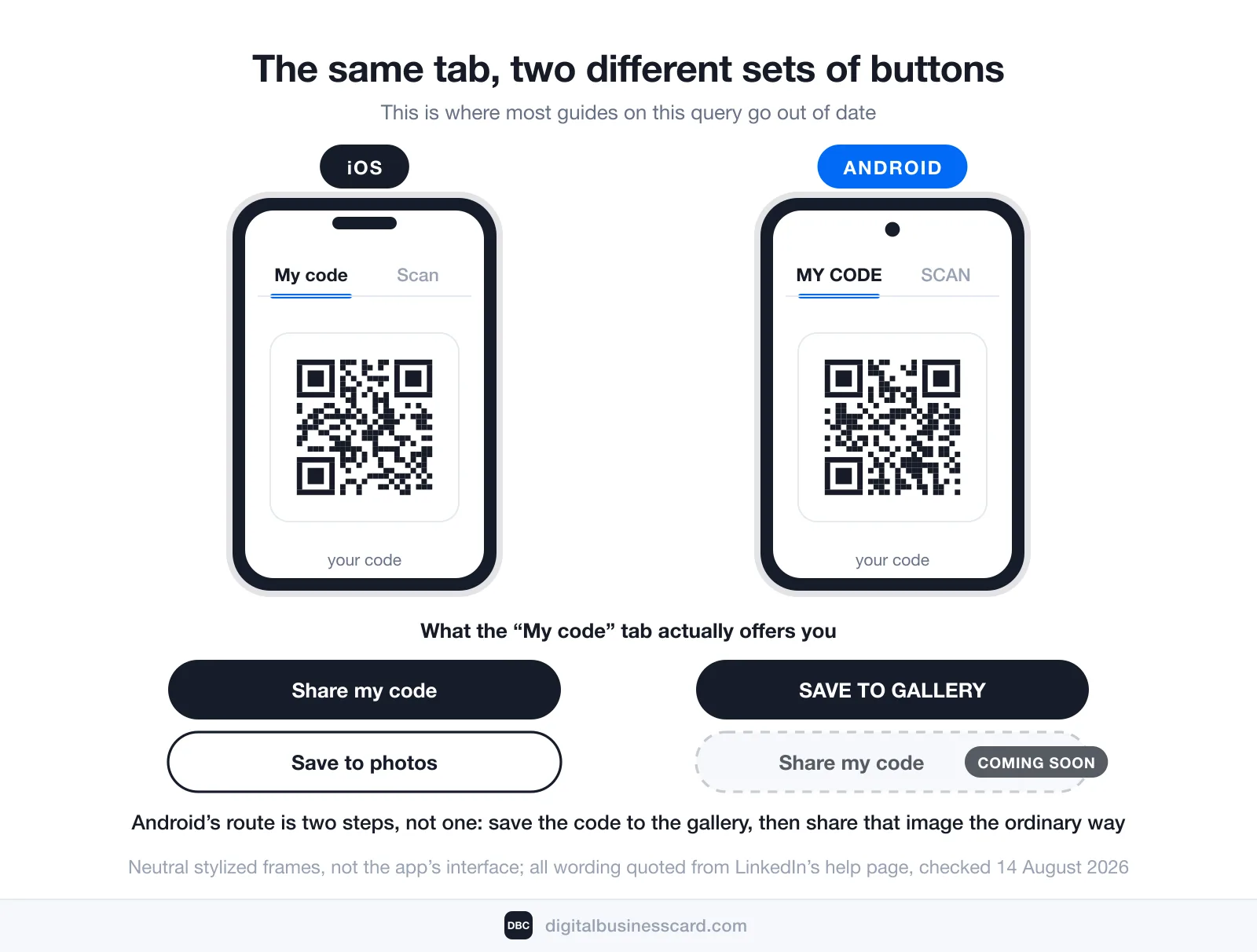
Here is where the two platforms part ways, and where most guides on this query are simply out of date.
On iOS, the My code tab gives you two actions:
- Share my code — hands the code to a message, an email, or any third-party app in the share sheet.
- Save to photos — drops a copy into your photo library.
On Android, you get one:
- SAVE TO GALLERY — stores the code in your device’s photo gallery.
LinkedIn’s help page lists the sharing action itself as “coming soon on Android”. So the Android route is two steps rather than one: save the code to the gallery, then share that image the ordinary way from your gallery app. The result is identical; the path is just longer. Any guide telling Android users to tap “Share my code” is describing a button LinkedIn has not shipped to them.
Where the Saved Image Is Actually Worth Using
A code sitting in your camera roll does nothing. Four places where it earns its keep, one rule each:
- A video-call background. Put it in a corner of your Zoom or Teams background and it is scannable for the whole meeting. Keep it away from the edges — most virtual-background crops eat them.
- An event badge or lanyard insert. The one context where everyone around you already has LinkedIn open. Print it big enough to scan from arm’s length rather than nose-length.
- The last slide of a deck. Presenters who leave a code up during questions collect connections; presenters who read a URL aloud do not.
- A printed card. Works, with caveats about permanence covered further down. Get the physical dimensions right first — our guide to QR code size covers the minimum that still scans in the real world.
How to Scan Someone Else’s LinkedIn QR Code
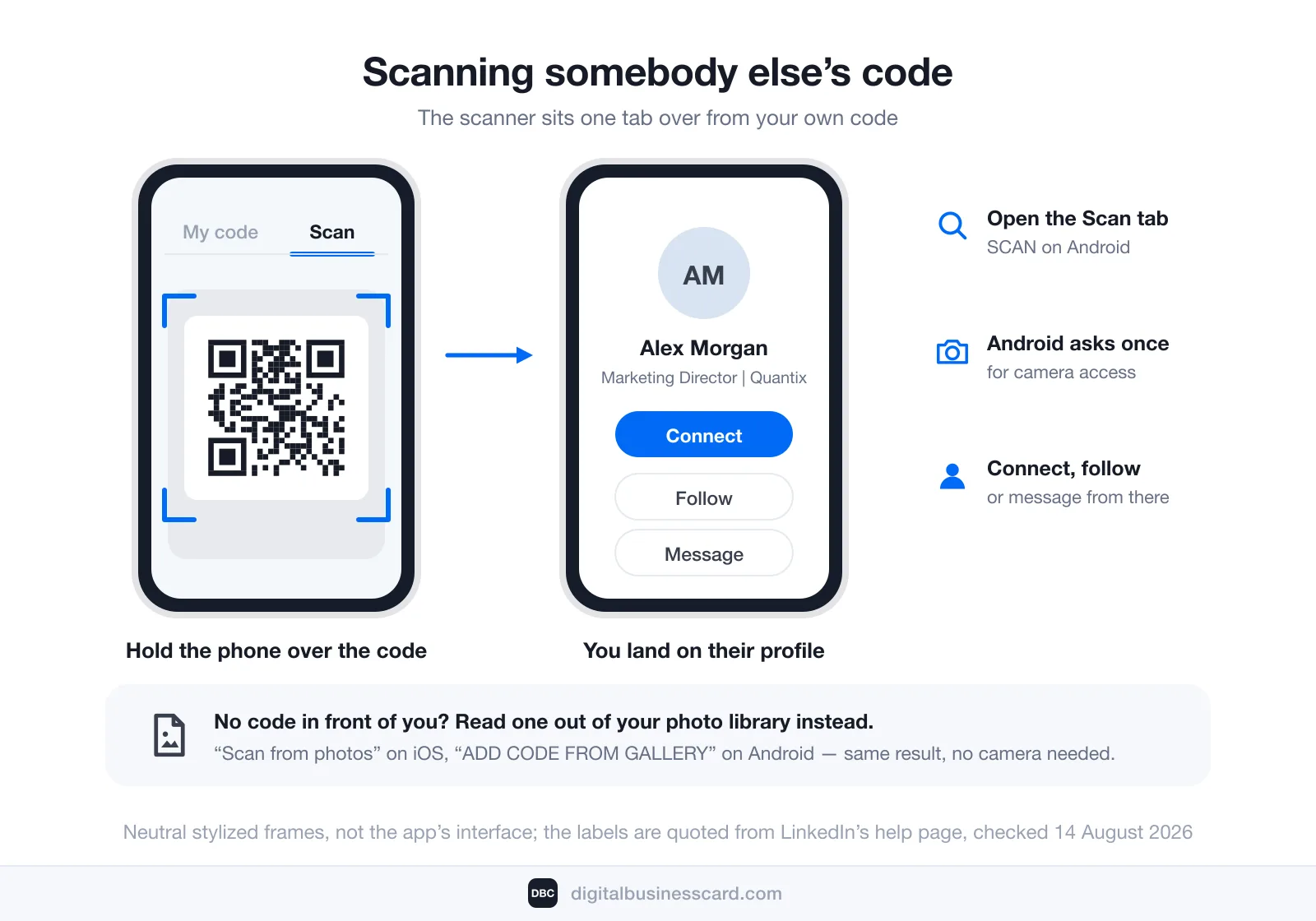
The scanner lives one tab over from your own code. Open the app, tap the QR code icon in the search bar, then:
- Open the Scan tab (SCAN on Android). Android asks once for ENABLE CAMERA ACCESS.
- Hold the phone over the code. LinkedIn takes you straight to that member’s profile, where you can connect, follow or message.
- Got the code as a picture rather than in person? Use Scan from photos on iOS or ADD CODE FROM GALLERY on Android to read it out of your library.
An ordinary phone camera will usually resolve the pattern too and open the profile in a browser, though LinkedIn documents only its own in-app scanner. Either way, what happens next depends less on the camera than on the other person — which is the subject of the next section.
What LinkedIn’s QR Code Can’t Do
None of what follows is a flaw. LinkedIn built this code to do one job — get two LinkedIn members connected fast — and it does that job well. The gaps only show up when you ask it to be your business card.
It Points at a Profile, Not at Your Contact Details
A scan opens a page. It does not put you in anyone’s address book. LinkedIn’s help documentation describes exactly one outcome: the person who scans is taken to your profile to connect. Your phone number, your work email, your calendar link, the portfolio you actually want them to look at — none of that rides along, because none of it is what the code carries.
That distinction is the whole difference between a profile link and a contact record, and it is why digital business cards exist as a separate category of thing.
The Person Scanning May Hit a Login Prompt
Your code’s usefulness partly depends on the other person’s relationship with LinkedIn rather than with you. LinkedIn states it plainly on its public profile visibility page:
In order to see your full profile, visitors may need to log in to their LinkedIn accounts.
The same page notes that your public profile settings control which sections are even eligible to appear to someone who is not signed in.
For a recruiter with the app already open, that is nothing. For a client who left LinkedIn in 2019, it is a sign-in wall between them and your name.
It Captures Nothing Back
A QR exchange on LinkedIn runs one way. Somebody scans your code, lands on your profile, and then either sends a request or does not. The code itself reports nothing: no scan count, no export, no record of who you handed it to. A signed-in scanner may surface later in “Who’s viewed your profile”, but that is a profile-view list — it cannot tell a scan from a search, and it does not hand you an email address. If you showed your code to nine people at an event and two connected, the other seven never happened as far as your records are concerned.
You Can’t Change What It Looks Like — and Design Moves Scans
LinkedIn draws the pattern; you get the pattern LinkedIn draws. No logo, no colour, no frame, no call to action inside the code.
That matters more than it sounds. QR Code Generator by Bitly published an original-data report built on roughly 2 billion scans between January and December 2025: codes carrying a logo averaged 232 scans each against 152 for codes without one — 53% more — and customized designs pulled two to three times the scans of plain ones. A code nobody can brand is a code performing at the bottom of that range by design.
Change Your Custom URL and Old Printed Links Can Die
This is the warning every article on this topic asserts and almost none of them sources. LinkedIn’s own documentation on managing your public profile URL is precise about it:
- You can change your custom public profile URL up to five times within six months.
- After a change, the previous URL stays linked to you for six months — unless you unlink it.
- An unlinked URL goes invisible to other members for seven days, after which they can claim it.
- Navigate to a custom URL that somebody else has since claimed and you may land on a page reading “Profile Not Found”.
LinkedIn does not document which form of your address its QR code encodes, so take these as rules about your LinkedIn address rather than about the pattern itself: they govern every card, badge and slide already carrying your custom URL, and the code too if it resolves through that URL. The moral is the same either way. A batch printed against a LinkedIn address is not instantly dead the day you rebrand it — there is a six-month grace period — but it is not permanent either, and anything printed for the long term should point at an address you control outright.
There’s No QR Code for a LinkedIn Page
The feature is a member feature. LinkedIn’s QR documentation covers member profiles; there is no equivalent in-app code documented for a company Page. Businesses that want one end up taking the Page URL to a third-party generator — at which point it is an ordinary URL code with none of LinkedIn’s scanning niceties, and all of the permanence questions above.
A Profile Code and a Contact Code Are Different Tools
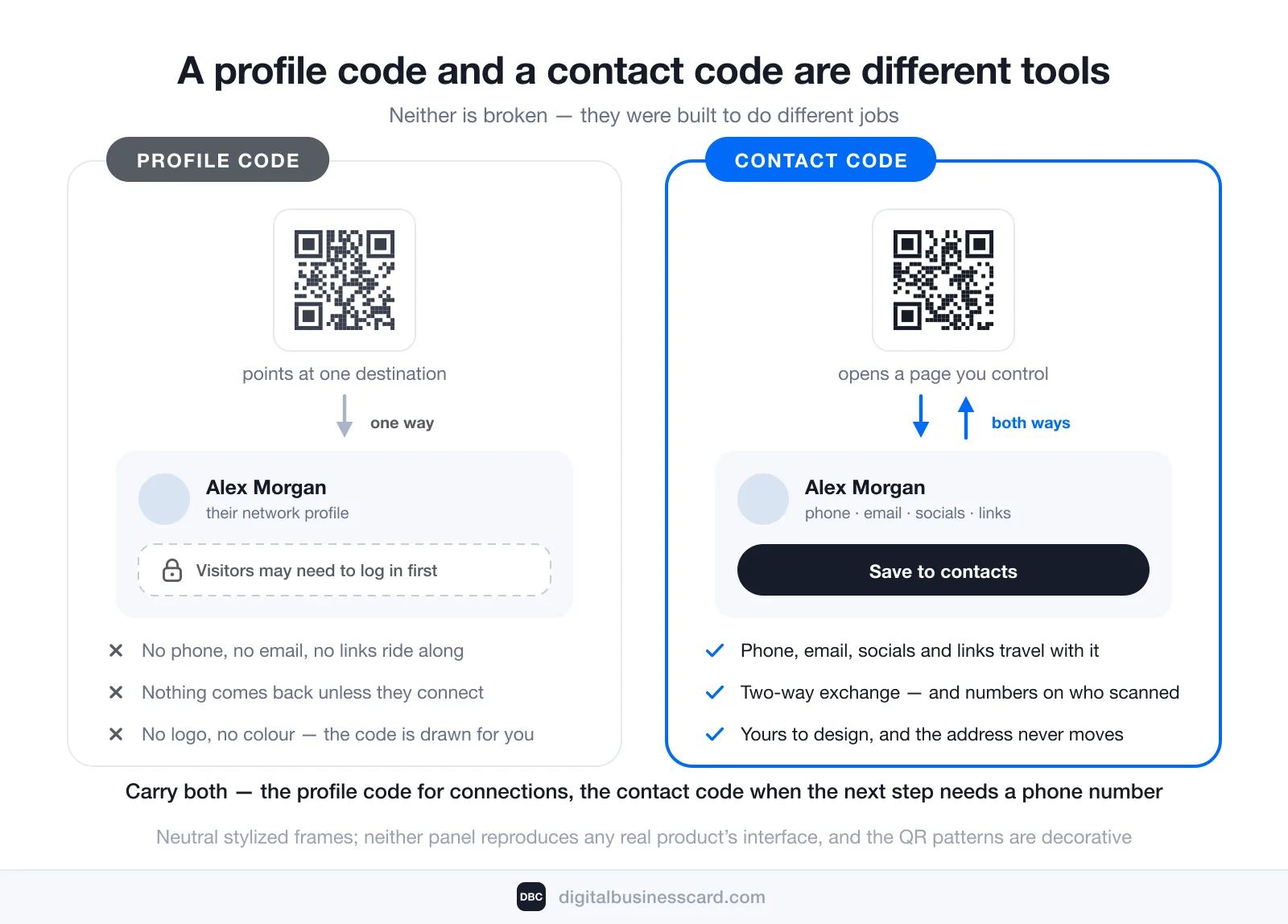
The fix is not to abandon LinkedIn’s code. It is to stop asking it to be the other kind of code.
Where they differ | LinkedIn QR code | A digital business card’s QR code |
|---|---|---|
What a scan opens | Your LinkedIn profile | Your card page — a web page you control |
What the other person needs | A LinkedIn account; they may be asked to log in for the full profile | A browser. No app, no account, no sign-up |
What it carries | Whatever LinkedIn renders on a profile | Phone, email, socials, links, plus a save-to-contacts action |
What comes back to you | Nothing, unless they send a connection request | Two-way contact exchange and analytics on shares and saves |
Design control | None — LinkedIn draws it | Yours, including the card behind the code |
When your details change | Custom-URL changes have a six-month grace period, then old links can break | Edit the card; the code and its address stay the same |
Since we build one of these, here is where we stand plainly: DBC is our digital business card platform. A card is created in minutes from a template, it publishes to a permanent address with its own QR code, and whoever scans it needs no app on their side. Two-way contact exchange means you leave the conversation with their details, not only they with yours. On digitalbusinesscard.com the Individual plan is $6.99 per user per month, billed annually. If you want the build itself rather than the comparison, the walkthrough is how to make a digital business card.
Use Both: A Two-Code Routine for an Event
Nobody has to pick. Carry both and lead with whichever the moment calls for.
- Lead with the LinkedIn code when the relationship is the point and the other person already lives in the app — a recruiter, a peer in your field, anyone who will look you up later anyway. One scan, connection sent, done.
- Lead with the card code when the next step needs a phone number, a calendar link or a portfolio — a prospect, a supplier, a client who will call you on Tuesday. It also works on the person who deleted LinkedIn, which at any real conference is more people than you expect.
- Afterwards, the LinkedIn side gives you connection requests to accept, and the card side gives you the contacts and the scan numbers. Only one of the two tells you how the day actually went.
You will not have to talk anyone into scanning. Bitly’s State of QR Code Scans in 2026 puts scan-rate growth at 8% year over year in North America and 42% in Europe, and sums the wider pattern up like this: “In most markets, QR Code creation grew as little as 0.5–7%, while scans jumped 20–50% or more.” People are scanning the codes that already exist far more often, rather than merely meeting more of them. The constraint is no longer whether anyone will scan yours. It is what yours has to hand them when they do.
Conclusion
Your LinkedIn QR code is three taps deep in the mobile app: the QR icon in the search bar, then the My code tab, then share it on iOS or save it to the gallery on Android. For connecting two LinkedIn members standing in the same room, nothing is faster. It stops at the edges of LinkedIn, though — one destination, no contact details, nothing captured back, and a login prompt waiting for anyone who is signed out. Keep it for what it is good at, and carry a contact code for everything else.
FAQ
How do I find my LinkedIn QR code?
Can I get my LinkedIn QR code on a desktop computer?
Does LinkedIn have a QR code generator?
Can someone scan my LinkedIn QR code without the LinkedIn app?
Does my LinkedIn QR code stop working if I change my custom URL?
Is there a LinkedIn QR code for a company page?

A content writer with over 8 years of experience creating analytical content for digital products and B2B SaaS companies. His work focuses on practical guides, pricing breakdowns, and comparisons that help teams evaluate costs, features, and differences between tools.
Your first impression decides everything
- Look professional and build trust instantly
- Forget about reprints and lost contacts
- Update your details anytime
 Get Started Today