
Contents
What an Apple Wallet Business Card Actually IsWallet Pass vs vCard: What Each One Does After the HandshakeHow to Add Your Business Card to Apple WalletHow Sharing an Apple Wallet Business Card Works in PracticeGoogle Wallet Does the Same Job on AndroidWhat to Look For in a Platform That Generates Wallet PassesThe Honest Limitations of a Wallet Business CardConclusionFAQApple Wallet Business Card: What It Is and How to Add Yours
An Apple Wallet business card is a pass — the same kind of object as a boarding pass or a concert ticket — that carries your digital business card’s QR code and lives in the Wallet app on your iPhone. It is not a contact file, it never sits in anyone’s address book, and the person you share it with installs nothing. You raise the pass, they point their camera, your card opens in their browser.
That one distinction — a pass, not a contact — answers most of the questions people bring to this topic, and it is the part almost every explanation skips. So this guide takes it in order: what the pass actually is, how it differs from the vCard your new contact ends up saving, how to add one to your iPhone, what the handshake looks like in practice, what the Google Wallet half of the story is, what to demand from a platform that generates these passes, and where the honest limits are.
The short version of adding one: Wallet cannot make a business card itself, so the pass comes from your card platform. In the DBC app you open your card, tap Share, then Add card to Apple Wallet, and confirm. If that is all you came for, skip to how to add your business card to Apple Wallet.
What an Apple Wallet Business Card Actually Is
Start with Apple’s own definition. In the Wallet Passes developer documentation, “passes are digital representations of information that previously might have been distributed on paper, plastic, or some other physical item.” Wallet knows five kinds of them — boarding passes, event tickets, store cards, coupons, and generic passes — and a business card is built as the last kind: a generic pass with your name, title, and company on the front and, doing all the real work, a QR code.
Technically the pass is a .pkpass file: a small signed bundle of JSON and images that the Wallet app knows how to render and keep. Signed matters — Wallet only accepts passes produced with an Apple-issued certificate, which is why passes come from platforms and businesses rather than from a menu inside Wallet itself. There is no “new pass” button in Wallet, and that fact will come back in the limitations section.
The conceptual point to hold onto: the pass in your Wallet is yours, not theirs. It is a sharing surface you carry — a business card in the literal sense — not a record of you in somebody else’s phone. Nothing about you reaches the other person until they scan the code, and what the scan opens is your live card page, at an address shaped like digitalbusinesscard.com/alexmorgan. The saving of an actual contact happens there, on the page, not in Wallet.
It is also not NameDrop, Apple’s iPhone-to-iPhone contact exchange: that trades personal contact cards between two iPhones held together, while a Wallet business card is branded, works on any receiving phone with a camera, and shares what you choose to publish.
Wallet Pass vs vCard: What Each One Does After the Handshake
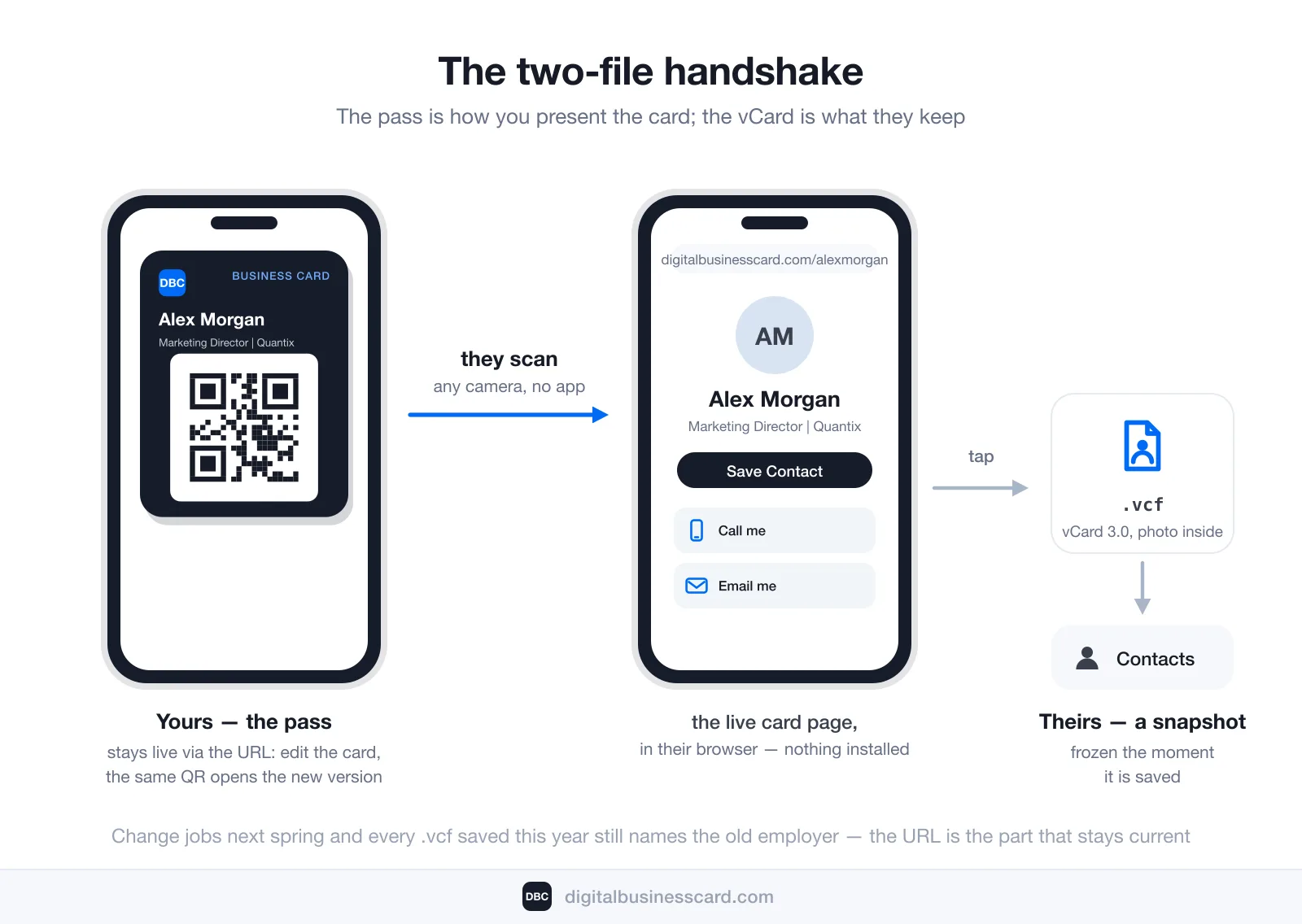
These are the two files people conflate, and they could hardly be more different. A vCard is a .vcf contact file — the thing that actually lands in someone’s Contacts app when they tap Save Contact. A Wallet pass is not a contact at all; it is the carrier for the link that leads to one. They are not competitors. They are two stages of the same handshake, and each does a job the other cannot.
Aspect | Wallet pass | vCard (.vcf) |
|---|---|---|
What it is | A signed | A plain-text contact file read by Contacts, Outlook, Google Contacts |
Whose phone it lives on | Yours — the sharer’s | Theirs — the receiver’s |
What it holds | Your name, title and a few contact rows, plus a QR code pointing at your live card URL | The contact data itself: numbers, emails, company, photo |
Stays current? | The QR points at a live page, so edits to the card appear at the same address. The text printed on the pass changes only when a new pass is issued | No — a .vcf is a snapshot, frozen at the moment it was saved |
Job in the handshake | How you present the card | What they keep afterwards |
The snapshot row deserves one precise paragraph, because it is where stale-contact pain comes from. On a DBC card, tapping Save Contact generates a vCard 3.0 file on the spot — photo traveling inside the file — and hands it to the phone. That file is correct at the moment it is written and never changes again: change jobs next spring and every .vcf saved this year still names the old employer. The card URL is the part that stays live — the next person to scan the same pass gets the current details, and anyone who kept the link can always pull up the fresh version. The full anatomy of the format is in what is a vCard.
So when a platform says its Wallet card “always stays up to date,” read it precisely: the pass keeps pointing at a page you keep current. The words on the pass itself are another matter. Apple’s pass documentation says a pass is updated by “distributing a new version of the pass”, or through an update web service that the issuer can optionally run. Ask which one your platform does. The contact files people saved along the way behave like every contact file ever saved — they age.
How to Add Your Business Card to Apple Wallet
Apple’s distribution documentation lists four ways a pass can reach Wallet: added automatically during an in-app action, an Add to Apple Wallet button in an app or App Clip, a download on a web page, or an email attachment. A card platform like ours uses the button in the app. With DBC it is a few taps:
- Have a card. Build it on the web or in the DBC app; it goes live at your own address (digitalbusinesscard.com/yourname). If the card does not exist yet, start from how to create a digital business card on iPhone.
- Open the DBC app on your iPhone. If you made the card on the website, install DBC: Digital Business Card from the App Store and sign in with the same account. Your card is already there.
- Open your card and tap Share.
- Tap Add card to Apple Wallet. Right after you create a card, the app also shows this as its own screen, with an Add to Apple Wallet button, so you may have done it already.
- Tap Add on the pass preview. iOS shows the pass before it saves it. Once you confirm, the pass sits in Wallet next to your boarding passes.
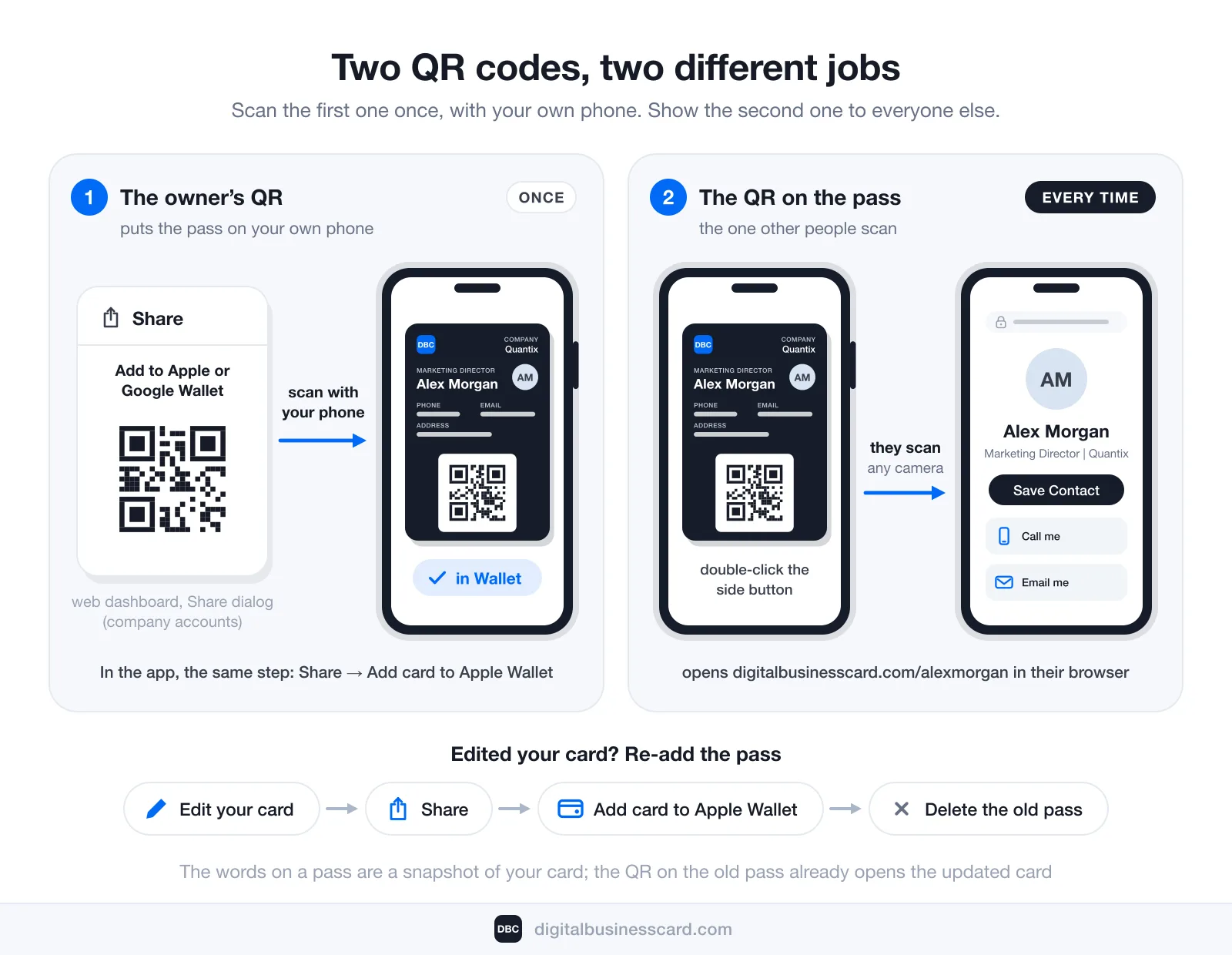
From then on you share from Wallet, not from the app: double-click the side button (it works from the lock screen), pick the card, and turn the screen toward the other person. If the pass is not on the phone yet, the app’s Share screen shows the same QR and can send your card link by text or email.
Team cards work the same way in the app. On a company account, the Share dialog in the web dashboard also has an “Add to Apple or Google Wallet” QR code. That code is for the card’s owner: scan it with your own phone and the pass installs in your own Wallet. It is not the code you show to new contacts. An admin who creates a card for someone else can send them the wallet link from the same dialog instead.
When someone scans the pass, the other side of the handshake takes over. The scan opens your card in a browser with no app and no account. Save Contact writes a proper vCard 3.0, with your photo included in the file, into their contacts. If lead capture is on, the card asks for their details at the same tap, so the exchange runs both ways. And the card reports back: views and saves show up in your analytics, which is more than any object in a pocket has ever done.
On price, the same honesty as everywhere else: the Individual plan is $6.99 per user/month, billed annually, with the card, the Apple and Google Wallet passes, analytics and the permanent URL included from day one. There is no unpaid tier. The pass is not an upsell on top of the card; it is one of the ways the card is shared, next to the QR code and the link.
What Ends Up on the Pass
Apple controls the layout, fonts and field positions of every pass, so the platform only decides what goes in each slot. On a DBC pass that is your company at the top, your name with your job title above it, up to three contact rows (usually phone, email and address, or other links when those are empty), your photo, a logo, and the QR code, which opens digitalbusinesscard.com/yourname. The logo starts as ours; upload your own in the app (Edit, then the small circle next to your photo) and it replaces ours on the pass and appears on your card page too. That works on every plan.
If Something Goes Wrong
“I scanned the code and it just added the card to my own phone.” You scanned the owner’s QR from the dashboard’s Share dialog. Nothing is broken: that step is done. From now on, open Wallet and show the QR on the pass; that is the one other people scan.
“The pass still shows my old title, phone number or logo.” A DBC pass is a snapshot of your card at the moment you added it, and it does not refresh itself after you edit the card. Open the card in the app, tap Share, then Add card to Apple Wallet again to get a fresh pass, and delete the old one, or both stay in Wallet. The QR on the old pass already opens your corrected card, so nothing you have printed or shared needs redoing.
“I can’t find Add to Apple Wallet in Contacts or in Wallet.” Neither Contacts nor Wallet has that button; it lives in your card app, under Share.
How Sharing an Apple Wallet Business Card Works in Practice
The reason to put a business card in Wallet is speed under real conditions: a hallway conversation ending, an elevator arriving, a queue forming behind the person you are talking to. The sequence fits mid-sentence — open Wallet (the side-button double-click that brings up your cards gets you there without hunting for an icon), tap the pass, turn the screen toward the other person.
Their half is even shorter. They point the iPhone or Android camera at the QR code, tap the notification, and your card opens in their browser — photo, numbers, links, and the Save Contact button. Nothing to install on either side, no account for them, no “do you have the app?” conversation. An Android receiver changes nothing — which is what a paper card offers and most app-to-app sharing does not.
Two practical properties are worth knowing. Displaying the pass needs no signal — it is stored on your phone, so a dead-zone conference basement cannot stop you from raising the code. Opening the page does need a connection on the receiver’s side, since the card lives at a URL; in practice the scanning phone is online, and the offline case that matters — yours — is the one the pass covers.
Google Wallet Does the Same Job on Android
The Android half of this story is shorter, because it is genuinely the same idea. Google Wallet has its own equivalent of Apple’s generic pass — in Google’s developer documentation, the Generic pass is “intended to be flexible enough to support a variety of purposes by providing fields where you can define custom labels and values” — and a business card pass on Android is built from it: name and title on the face, QR code doing the work.
One distribution detail actually favors Google’s side: passes can be issued “across multiple platforms, including Android apps, and anywhere hyperlinks are supported, such as websites, email, and SMS messages” — an Add to Google Wallet action is ultimately a link, so a pass can reach a phone through channels as plain as a text message. The sharing moment is identical to the iPhone version: open Google Wallet, show the pass, they scan, your page opens. In the DBC app on Android the button reads Add card to Google Wallet, in the same Share menu. And because both passes point at the same card URL, they are two doors to one card, not two cards to maintain.
If you are on Android and starting from zero, the build is covered in how to create a digital business card on Android.
What to Look For in a Platform That Generates Wallet Passes
Hand-building a signed .pkpass with a developer certificate is nobody’s idea of networking, so the practical question is what to demand from the platform that does it for you. Five things separate a useful wallet card from a decorative one:
- A live URL behind the QR code. This is the load-bearing choice. Some tools bake a static vCard straight into the code, which means every scan hands out a snapshot that will quietly go stale. A QR that points at a page you can edit is the difference between a card and a leaflet.
- Both wallets from one card. Apple and Google passes should be generated from the same card, at the same address, so one edit to the page reaches everyone who scans either pass. Ask, too, whether the text on the pass refreshes by itself or whether you re-add the pass after an edit; both are legitimate, but you should know which one you are buying.
- No friction on the receiving side. The scan must end in a browser page, never in an app-store detour or a sign-up wall for the other person.
- Analytics on the page behind the pass. A paper card tells you nothing after it leaves your hand. The page a pass points to can report views and saves — which is how you find out whether Tuesday’s event produced contacts or just conversations.
- Lead capture at the moment of scan. The scan is the one moment you have the other person’s attention; a platform that can ask for their details right there turns a one-way handout into a two-way exchange.
Notice what is missing: pass design tools, custom artwork, NFC hardware (DBC has no NFC at all; a card is shared by QR code, link and Wallet pass). Pleasant, but none of them changes what happens after the scan — and after the scan is where business cards succeed or fail.
The Honest Limitations of a Wallet Business Card
We build these for a living, so let us be the ones to say plainly what a Wallet business card does not do.
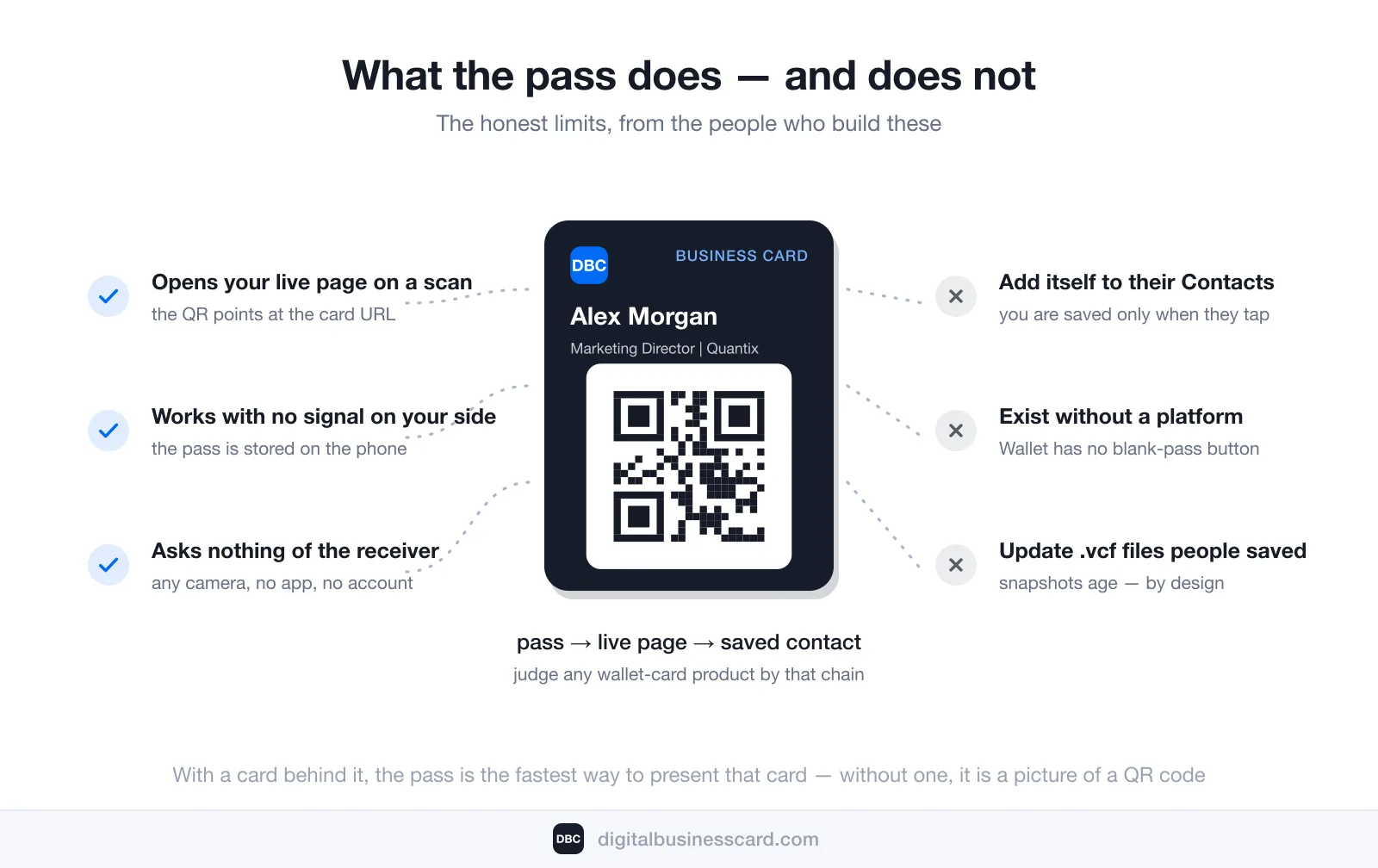
Wallet cannot create one. There is no blank-pass button in either wallet app; passes come only from signed sources. A wallet business card therefore always implies a platform (or your own developer tooling) behind it — the pass is an output of a card, not a standalone thing you make once and own free of any service.
The pass does not put you in anyone’s contacts. A scan opens your page; you become a contact only when the other person taps Save Contact and accepts the vCard. No honest QR-based tool can skip that step — phones do not let a stranger’s pass write to the address book, and you would not want yours to. If a vendor implies their pass “adds you automatically,” they are describing the same two-tap flow everyone has.
Some things stay snapshots. The live URL keeps the page current, but whatever people saved as a .vcf before your last edit stays as it was — a property of contact files, not of any platform. Our own passes are snapshots too: the name, title and contact rows on a DBC pass are fixed when you add it, so after an edit you add a fresh pass and delete the old one. The QR keeps opening the current card either way.
The receiver needs a connection at scan time. Rarely a problem in practice, but a real difference from handing over paper.
A pass is a shortcut, not the product. With a card behind it, the pass is the fastest way an iPhone offers to present that card. Without one, it is a picture of a QR code. And it remains one item among your boarding passes and loyalty cards — worth an occasional tidy-up: how to remove cards from Apple Wallet.
Conclusion
An Apple Wallet business card is a pass that carries your card’s QR code — a sharing surface in the literal, hold-it-up sense, not a contact file and not a record in anyone’s phone. The pass gets your card on screen in two gestures; the live URL behind it keeps what people see current; the vCard is what they keep, and it freezes the moment they save it. Judge any wallet-card product by that chain — pass → live page → saved contact. If the middle link is missing, the wallet part is cosmetic.
FAQ
Is an Apple Wallet business card the same as a contact card?
Does the other person need an iPhone or a special app?
Does a Wallet business card work offline?
How do I add my business card to Apple Wallet?
Can I update my card after adding the pass to Wallet?
Is there a Google Wallet version of a business card?
How much does a digital business card with a Wallet pass cost?

A content writer with over 8 years of experience creating analytical content for digital products and B2B SaaS companies. His work focuses on practical guides, pricing breakdowns, and comparisons that help teams evaluate costs, features, and differences between tools.
Your first impression decides everything
- Look professional and build trust instantly
- Forget about reprints and lost contacts
- Update your details anytime
 Get Started Today