
Contents
What Is a vCard?What’s Inside a .vcf FilevCard Versions: 2.1, 3.0, and 4.0Why a Saved Contact Loses the Photo or the Job TitleHow a QR Code Carries a vCardDo People Still Use vCards?How Do You Create a vCard?A Static .vcf vs a Live Card LinkThe Short VersionFAQWhat Is a vCard? The Contact File Behind QR Cards
A vCard is the standard file format for an electronic contact card. It is saved with a .vcf extension, travels as plain text under the MIME type text/vcard, and holds one person’s name, phone numbers, email addresses, employer, job title, postal address, website, and optionally a photo — every line wrapped between BEGIN:VCARD and END:VCARD. Because every phone, mail client, and CRM on the market can read one, a .vcf is what almost every “save to contacts” button actually hands over, including the one behind a QR-code business card.
This guide is about that file — not the trading card game that shares the name. What is inside a .vcf, how the three living versions of the format differ, why a contact sometimes arrives without the photo or the job title, and what a QR code can and cannot carry.
Two things this guide deliberately does not cover, because they have their own homes: generating a QR code for a printed card is a step-by-step job we wrote up separately in how to create a QR code for a business card, and how large that code must be printed lives in the QR code size guide. Here the file is the subject and the QR square is only the envelope.
What Is a vCard?
A vCard is a text file with a strict grammar. Open one in any editor and you can read every character of it — there is no proprietary blob, no binary header, no vendor lock. That is precisely why it travels: a format that is just labeled lines of text can be parsed by a 2009 feature phone, a modern CRM, and everything in between.
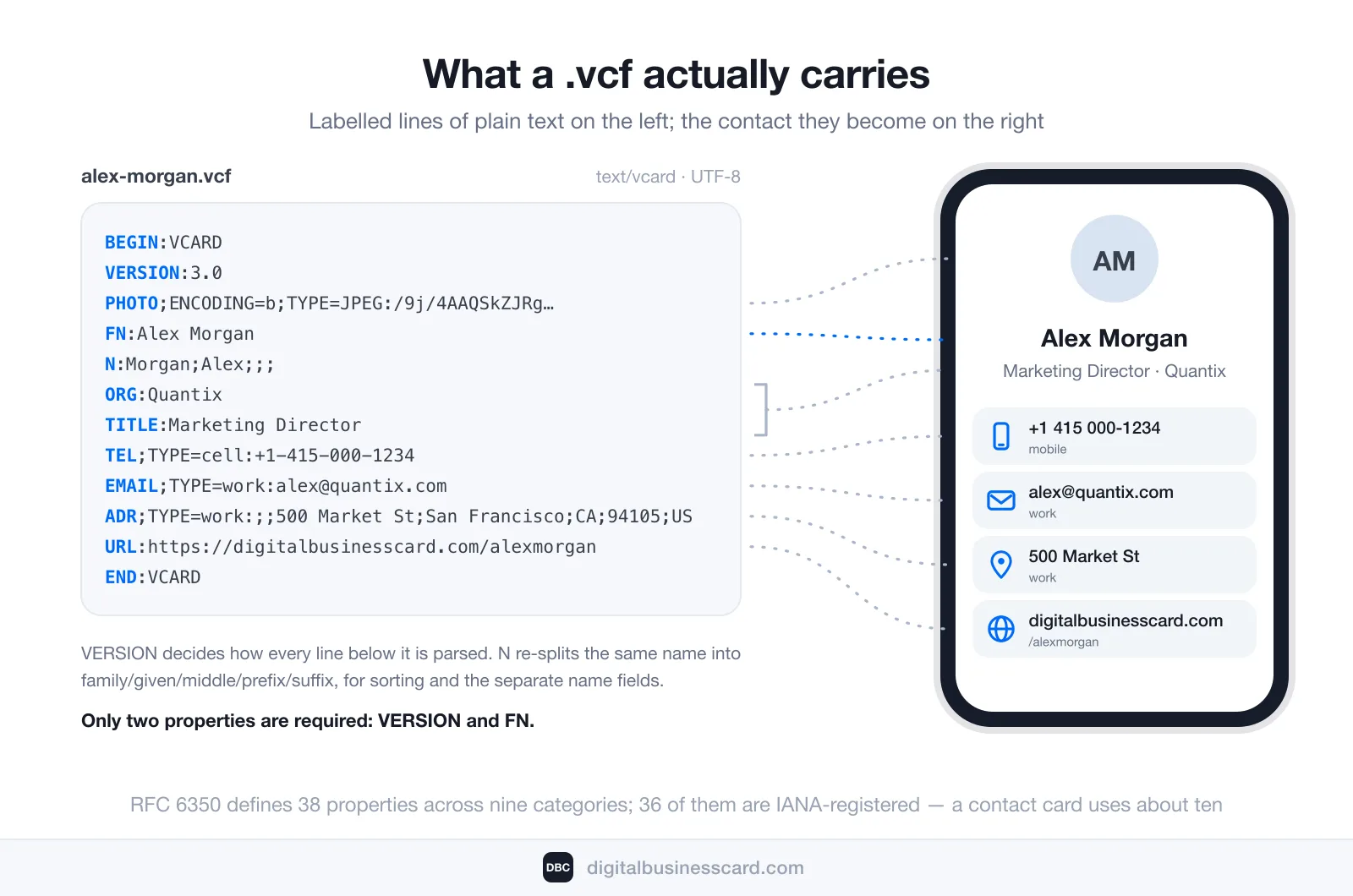
The grammar is simple. The file opens with BEGIN:VCARD, closes with END:VCARD, and between them each line is a property name, an optional set of parameters, a colon, and a value. Only two properties are actually required by the current specification, published as RFC 6350: VERSION, which must come immediately after BEGIN:VCARD, and FN, the formatted name — the one line the phone shows you before anything else. Everything else in a contact card is optional, which is why a nine-line vCard and a sixty-line vCard are both perfectly valid.
The same specification settles a question that used to cause real damage: “The charset […] for vCard is UTF-8 as defined in [RFC3629]. There is no way to override this.” One encoding, no negotiation. Files written under the older versions did negotiate it, and that is where a lot of mangled names come from — more on that below.
What’s Inside a .vcf File
RFC 6350 defines 38 properties across nine categories — general, identification, delivery addressing, communications, geographical, organizational, explanatory, security, and calendar. Thirty-six of those go into the IANA registry the same document creates; the two left out are BEGIN and END, which wrap the file rather than describe the person. In practice, a contact card handed to another human uses about ten of them. Here is the working set, and what each one becomes on the receiving phone.
Property | What it holds | Where it shows up |
|---|---|---|
VERSION | 2.1, 3.0, or 4.0 | Nowhere visible — but it decides how everything below is parsed |
FN | The full name as one string | The contact’s display name. The only mandatory content property |
N | The name split into five parts: family, given, middle, prefix, suffix | Sorting and the separate first/last name fields |
ORG | Employer, optionally with department | The company line |
TITLE | Job title | The role under the name — and the first thing to vanish in a sloppy export |
TEL | A phone number, tagged by type (cell, work, home, fax) | Each number as its own labeled row |
An address, also type-tagged | The email rows | |
ADR | A structured postal address in seven components | The address block, and the map pin behind it |
URL | A web address — site, portfolio, or card link | The tappable link row |
PHOTO | An image, either embedded as data or referenced by URL | The contact’s picture — the field least likely to survive the trip |
NOTE | Free text | The notes field. Useful for “met at the Berlin conference” |
Repeated properties are normal and expected: three TEL lines and two EMAIL lines in one file is ordinary, and each one carries its own TYPE parameter so the phone knows which is the mobile and which is the desk number.
vCard Versions: 2.1, 3.0, and 4.0
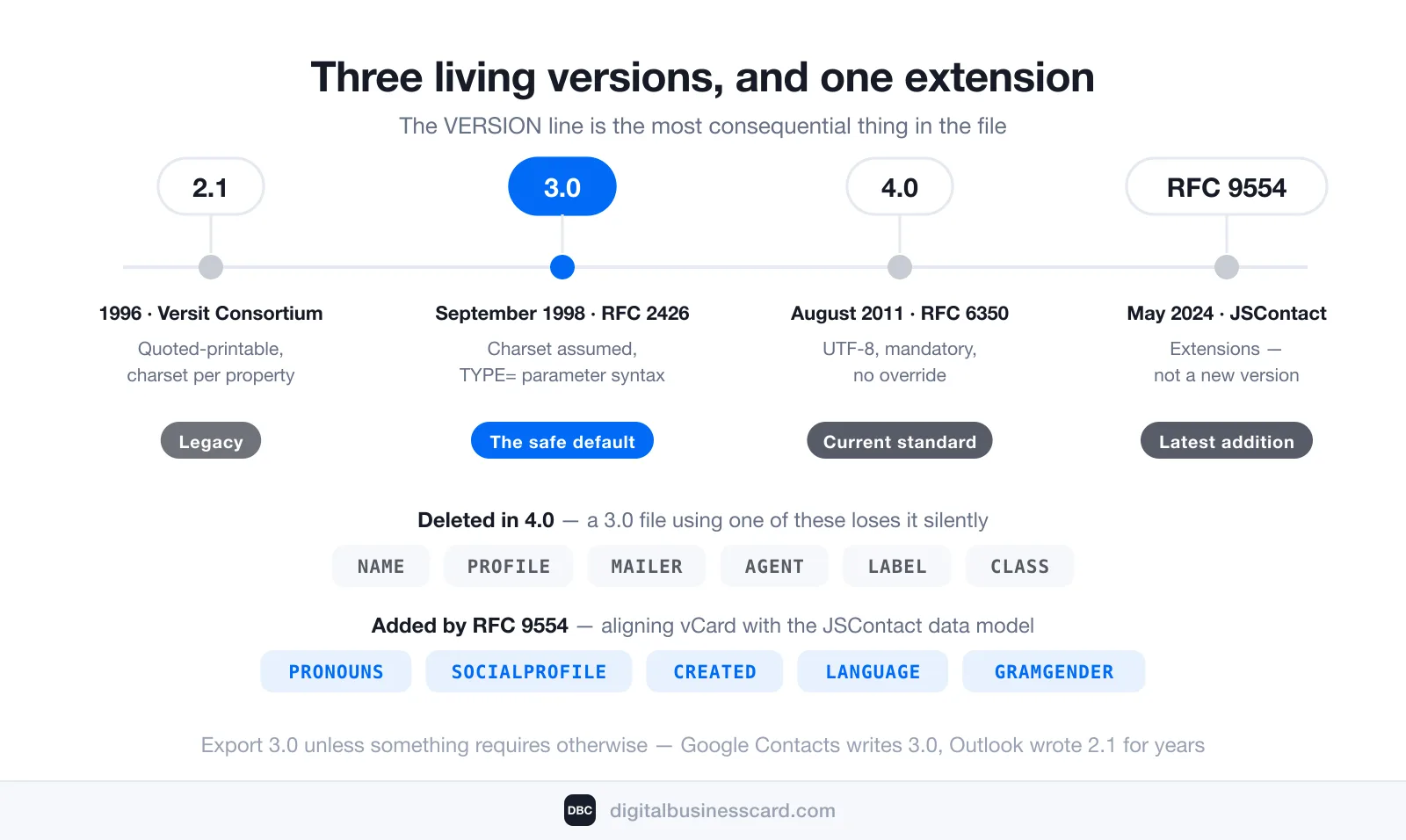
There is no single vCard format. There are three, all still in circulation, and the VERSION line is the most consequential thing in the file.
Version | Published | Encoding | Practical status |
|---|---|---|---|
2.1 | 1996, by the Versit Consortium | Quoted-printable with a declared charset per property | Legacy. Still emitted by old export tools; the usual source of garbled accented names |
3.0 | September 1998, RFC 2426 | Charset assumed, TYPE= parameter syntax | The safe default. Read and written everywhere — iOS, Android, Google Contacts, Outlook, iCloud |
4.0 | August 2011, RFC 6350 | UTF-8, mandatory, no override | The current standard. Cleanest spec, still unevenly supported by consumer address books |
The format is not frozen, either. RFC 9554, published in May 2024 as “vCard Format Extensions for JSContact”, added five properties the last decade made necessary — PRONOUNS, SOCIALPROFILE, CREATED, LANGUAGE, and GRAMGENDER — aligning it with the JSContact data model.
Practical verdict: if you get to choose, export 3.0. It is the version with the widest guaranteed support, and nothing in a normal business contact needs a 4.0-only property. Export menus rarely tell you which version they write — Google Contacts produces 3.0, and Outlook wrote 2.1 for years before moving to 3.0 in its current builds.
Why a Saved Contact Loses the Photo or the Job Title
Everyone has done this: scanned a code, tapped save, and ended up with a name and a phone number where a full card was promised. Nothing is broken. There are four mechanical reasons, and each one is worth knowing before you blame the app.
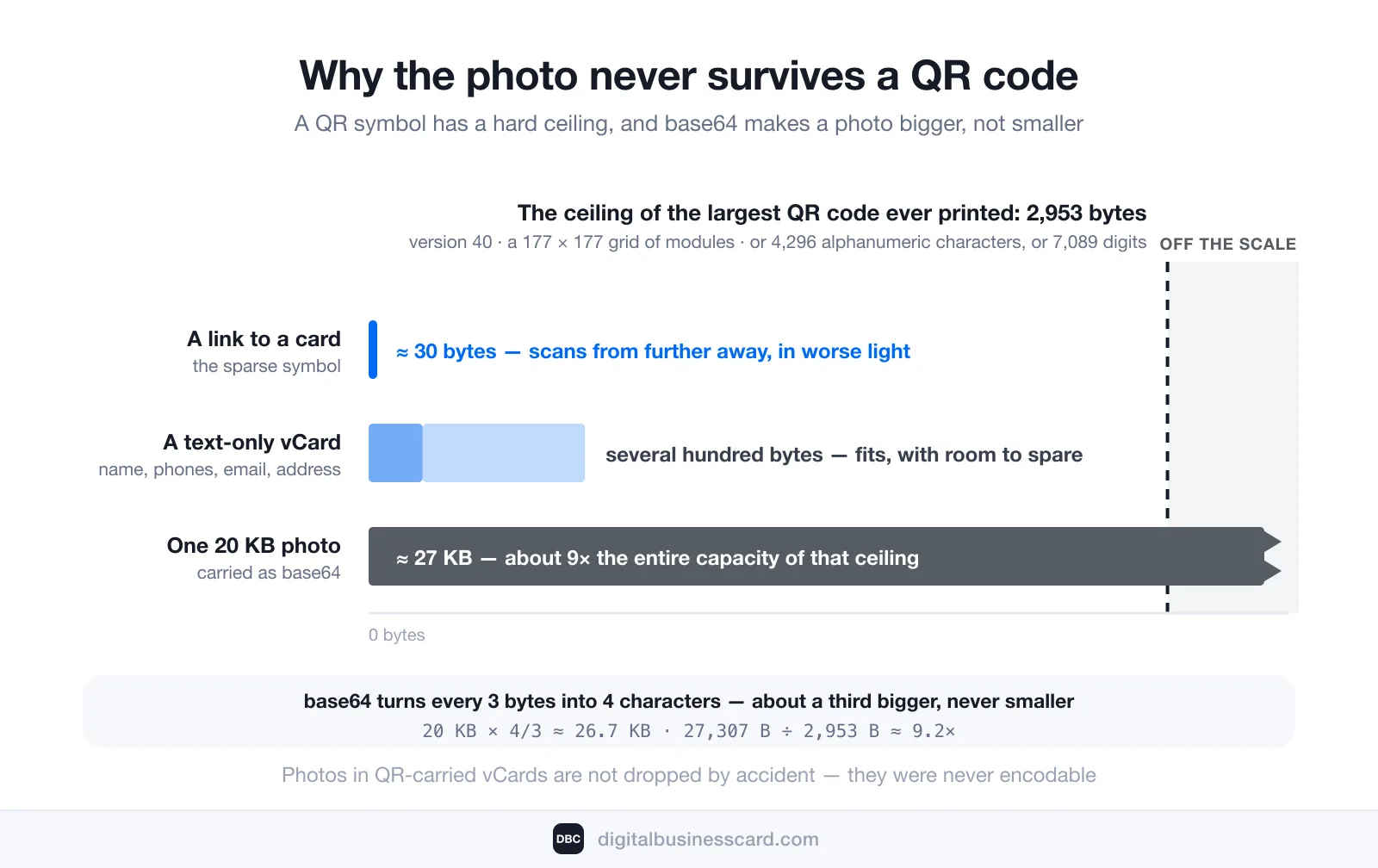
1. The QR code ran out of room. A QR symbol has a hard ceiling. At its largest — version 40, a 177×177 grid of modules under ISO/IEC 18004 — it holds 2,953 bytes of binary data, 4,296 alphanumeric characters, or 7,089 digits, and only at error-correction level L, the lowest of the four. A vCard of text fields fits comfortably inside that. An embedded photo does not: images are carried as base64, which turns every 3 bytes into 4 characters and inflates the file by roughly a third, so even a modest 20 KB portrait needs about nine times the entire capacity of the largest QR code ever printed. Photos in QR-carried vCards are not dropped by accident — they were never encodable.
2. The property no longer exists. Set RFC 2426’s property list against RFC 6350’s and seven names are simply gone from 4.0: NAME, PROFILE, LABEL, MAILER, AGENT, SORT-STRING, and CLASS. Version 4.0 also retired the old base64 mechanism in favor of data URIs. A 3.0 file whose formatted mailing address lives in a LABEL block has nowhere to put it in a 4.0 world, so a strict parser discards it silently.
3. The character encoding disagreed. A 2.1 file declares its charset per property and encodes with quoted-printable; 4.0 mandates UTF-8 and forbids anything else. When a 2.1 export meets a UTF-8-only importer, “Zoë” arrives as “Zoë” — the name survived, its bytes did not.
4. It was never standard to begin with. Anything a vendor invents rides in an X- property (X-SOCIALPROFILE, X-ABLabel, and so on). Apps that recognize the prefix keep it; every other app drops it without a warning. Custom fields are the least portable thing in a contact card.
How a QR Code Carries a vCard
A QR code is a container, not a format. It stores a string of characters, and what those characters mean is entirely up to whatever wrote them. For contact sharing there are exactly two things worth putting inside, and they behave in opposite ways.
The whole vCard, encoded directly. The scanner reads BEGIN:VCARD, recognizes the payload as a contact, and offers to save it — with no internet connection involved, because the data is physically in the pattern. The costs: several hundred bytes force the symbol up to a high version number, which crowds far more — and therefore far smaller — modules into the same square, and small modules are the first thing a mediocre camera or a scuffed print run fails on. No photo can come along either, and the file is frozen the instant it goes to press.
A link to a live card, encoded instead. Around thirty bytes, so the symbol stays on a low version number with large, forgiving modules. The scan opens a hosted card, and the save button there writes the .vcf on the spot — photo included, because a download has no 2,953-byte ceiling. Be precise about what that buys you: the file landing in the address book is still a snapshot. What stays live is the link, so the next person to scan gets a file built from whatever is true that day. The cost is a dependency — the receiver’s phone needs a connection at the moment of the scan.
Both routes end at the same place — a .vcf landing in someone’s address book. They differ only in when the file is written: at the print shop, or at the moment of the handshake. NFC tags and wallet passes carry the same payload under the same choice; a pass in Apple Wallet simply keeps the code on your lock screen instead of on cardstock.
Do People Still Use vCards?
Constantly, and almost never knowingly. The format has not needed a rewrite since 2011, so it stopped being news; meanwhile the number of places it gets used quietly multiplied. Every contact attached to an email, every “share contact” in a phone’s address book, every conference badge scan, every save from a digital card ends in a .vcf.
The carriers are the part that is growing. Bitly’s scan data, published in March 2026, reports a metric worth naming precisely — scan rate, meaning how many scans each existing code collects — and it rose in every region between 2024 and 2025: Europe +42%, Latin America +40%, Asia-Pacific +21%, MENA +18%, Sub-Saharan Africa +10%, North America +8%. Where the same report puts creation and total scans side by side, the gap is the real story: in Europe the number of codes created grew 7% while total scans grew 53%. People are not printing more codes; they are scanning the ones already out there far more often. The regional split is in Bitly’s State of QR Code Scans. Every one of those contact scans terminates in the same text format a phone from 1996 could have read.
How Do You Create a vCard?
Three honest routes, in ascending order of effort and descending order of how long the result stays accurate.
Export one from an address book. In iPhone or Mac Contacts, select the contact and share or export as vCard. In Google Contacts, use Export and choose vCard. In Outlook, save the contact as a .vcf. This is the fastest route and the one most people need; check which version your tool writes if the file is going somewhere fussy.
Write one by hand. A valid vCard is genuinely nine lines of text: BEGIN:VCARD, VERSION:3.0, then FN, N, ORG, TITLE, TEL, EMAIL, and END:VCARD. Save it with a .vcf extension and any phone will open it. This is worth doing once — nothing demystifies the format faster than watching a file you typed in a text editor turn into a contact.
Let a digital card issue one. A hosted card holds your details in one place and builds the .vcf on demand, at the moment someone saves you. The advantage is not convenience; it is that the file is written from your details as they stand that day rather than from whatever was true on export day. Ours works this way — tapping Save Contact on a DBC card assembles a vCard 3.0 file in the browser, with the photo embedded as base64, and hands it to the phone. The receiver needs no app for any of it: the card is a web page and the save button is a download. The concept in full sits in what a digital business card is.
A Static .vcf vs a Live Card Link
The vCard format has one real weakness, and it is not technical: a .vcf is a snapshot. It records what was true when it was written, and no copy of it has ever updated itself. The question is how fast that matters, and there are numbers for that. ZoomInfo’s decay research puts B2B contact data at 22.5% to 70% loss of accuracy per year, with HubSpot’s 22.5% as the commonly used benchmark and job titles going stale at roughly 2–3% per month. Handing out a static contact file is handing out something with a measurable half-life.
Aspect | Static .vcf | Link to a live card |
|---|---|---|
When it is written | Once, at export or print | Fresh on every save |
New job or number | Every copy already sent is wrong, permanently | Edit once; the next save carries the change |
Photo | Only if delivered as a file, never through a QR code | Yes — the download has no size ceiling |
Works offline | Yes, completely | The receiver needs a connection at scan time |
Tells you anything | No. A sent file reports nothing back | Views, shares, and saves |
Cost | Free | A card plan — our Individual plan is $6.99 per user/month, billed annually |
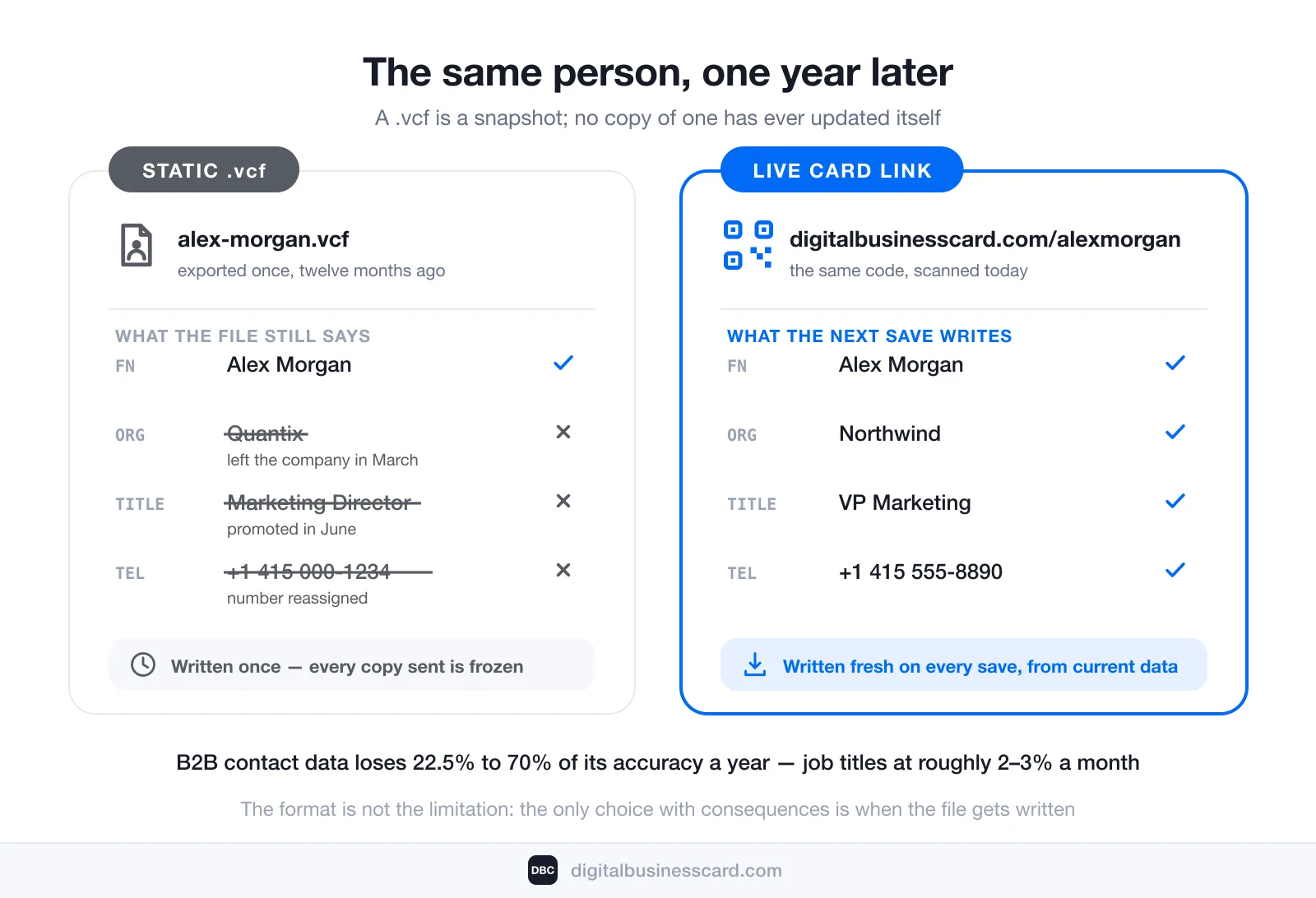
This is not an argument against the format — we ship .vcf files ourselves, on every single save. It is an argument about who writes the file and when. We built DBC so the writing happens at the last possible moment: your details live on a card you can edit, the card publishes to a permanent link with its own QR code, and each tap of Save Contact assembles a vCard 3.0 file right then, photo included. They install nothing, sign up for nothing, and end up with a normal contact in a normal address book. Be clear about what that does and does not fix: their copy is a snapshot from the day they saved you, exactly like any other .vcf. What changed is that the link on their card, in their inbox, and in your QR code keeps resolving to the current version — so the correction is always one scan away instead of impossible.
The Short Version
A vCard is a plain-text contact file with a .vcf extension and a fixed vocabulary of properties, first published in 1996 and last rewritten as RFC 6350 in 2011. Version 3.0 is the safest thing to export; 4.0 is the cleanest specification. Fields disappear for four knowable reasons — a QR code that ran out of bytes, a property that 4.0 deleted, an encoding mismatch, or a non-standard X- field. The format is not the limitation. Deciding whether the file gets written once, in advance, or freshly at the moment someone saves you is the only choice that has consequences a year from now.
FAQ
What is a .vcf file?
How do I open a vCard file?
Which vCard version should I export?
Can a QR code contain a vCard with a photo?
Do vCard files expire?

A content writer with over 8 years of experience creating analytical content for digital products and B2B SaaS companies. His work focuses on practical guides, pricing breakdowns, and comparisons that help teams evaluate costs, features, and differences between tools.
Your first impression decides everything
- Look professional and build trust instantly
- Forget about reprints and lost contacts
- Update your details anytime
 Get Started Today