
Contents
CamCard Business Pricing Overview (Plans, Limits, and Costs)CamCard Pricing Breakdown for a 50-User Team (Annual Cost)What Users Say About CamCardIs CamCard Pricing Worth It for Companies and Teams?How DBC: Digital Business Card Addresses CamCard’s LimitationsDBC vs CamCard: Pricing Comparison for a 50-User TeamCamCard vs DBC: Cost Comparison TableFeature Comparison Table: CamCard vs DBCConclusionFAQCamCard Pricing for Teams (2026): Plans and 50-User Cost Breakdown
CamCard is a Chinese digital business card platform that has helped sales, event, and business development teams digitize business cards, manage leads, and sync contacts with CRMs since 2009.
As the oldest player in the market, it made a meaningful contribution to the industry and set early standards for card scanning and contact synchronization.
But does it still remain the most affordable and practical choice for companies in 2026?
That’s exactly what I’m going to uncover in this article.
Together with my team, we analyzed CamCard pricing for companies, calculated the annual cost for a 50-member team, and compared it with DBC: Digital Business Card to understand which option delivers higher ROI for growing teams.
Read on to see where companies often overpay for CamCard and how your team can save money without sacrificing functionality.
CamCard Business Pricing Overview (Plans, Limits, and Costs)
CamCard offers two main pricing tiers for companies: Premium and Professional. Both plans are designed for at least 10 users and are billed monthly per user. Here's a breakdown of what each includes and how they compare.
CamCard Business Plan Feature Comparison: Premium vs Professional
Feature | Premium ($21/user/month) | Professional ($25/user/month) |
|---|---|---|
Read unlimited cards | ✅ | ✅ |
Proofreading volume | 20 IDs/month | 50 IDs/month |
Card management | ✅ | ✅ |
Communication history | ✅ | ✅ |
Tag management | ✅ | ✅ |
Admin & permissions | ✅ | ✅ |
Task management & reminders | ✅ | ✅ |
Security features | ✅ | ✅ |
Group email | 5,000/month | 10,000/month |
Import/export (Excel) | ✅ | ✅ |
Export to Outlook, Google, Salesforce, SugarCRM | ✅ | ✅ |
Web service API | ✅ | ✅ |
Main Differences Between CamCard Plans
- The Professional plan includes a larger proofreading allowance — 50 IDs/month vs. 20 IDs/month in the Premium plan.
- Doubles the group email limit to 10,000 emails/month.
- Other features are identical across both tiers.
Key Limitations in CamCard Business Plans
- There is no transparency around overage pricing when teams exceed monthly limits for card scanning or group emails.
- The listed $21–$25 per-user/month rates don’t clarify whether they apply to all team sizes. To get this information, you must contact sales.
- There is no visible option for annual pricing, which could offer savings for growing teams.
CamCard’s plans offer core features but leave teams guessing about overages, scalability, and modern functionality, while charging premium rates.
CamCard Pricing Breakdown for a 50-User Team (Annual Cost)
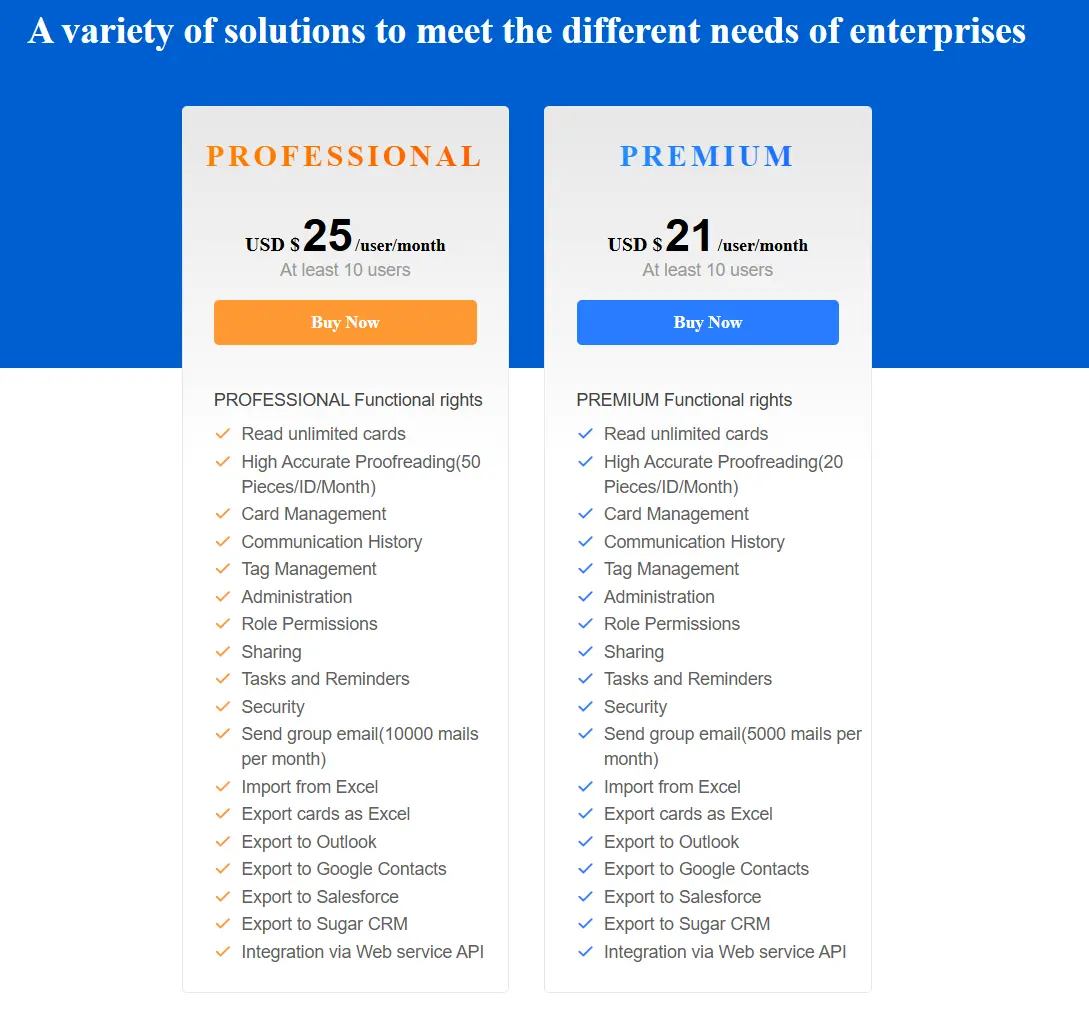
CamCard charges business teams on a per-user, monthly basis. Each user pays a fixed monthly rate based on the selected plan. To calculate team costs, we multiplied the per-user monthly price by the number of users and then by 12 months.
CamCard does not offer any annual discounts. Any reduced pricing requires a direct sales conversation and is not transparent by default.
CamCard Premium Plan Cost for a 50-User Team
The Premium plan is priced at $21 per user per month.
For a team of 50 users:
- Monthly cost: 50 × $21 = $1,050
- Annual cost: $1,050 × 12 = $12,600
At this price point, the Premium plan provides access to CamCard’s standard business functionality with usage limits across the team.
CamCard Professional Plan Cost for a 50-User Team
The Professional plan costs $25 per user per month.
For a team of 50 users:
- Monthly cost: 50 × $25 = $1,250
- Annual cost: $1,250 × 12 = $15,000
The Professional plan is only relevant for teams that regularly scan a high volume of physical business cards or rely on large-scale group email communication. Outside of higher scanning and email limits, the plan does not add functional differences compared to the Premium tier. For a 50-user team, upgrading to Professional means paying an additional $2,400 per year for features your team may not actually need.
To make the pricing difference more transparent, here is a side-by-side cost overview for a 50-user team.
Monthly vs Annual Cost Overview for a 50-User Team
Plan | Price per User (Monthly) | Monthly Cost | Annual Cost |
|---|---|---|---|
Premium | $21 | $1,050 | $12,600 |
Professional | $25 | $1,250 | $15,000 |
What Users Say About CamCard
To form an objective view of whether CamCard is worth its price, we reviewed user feedback across multiple trusted platforms, including G2, Capterra, TrustRadius, and app reviews from the Apple App Store and Google Play.
We focused on reviews from users who choose CamCard for everyday work tasks such as event networking, lead capture, and contact management. The goal was to understand not just what CamCard does well, but where it starts to fall short for teams.
Here is an example from a verified business user.
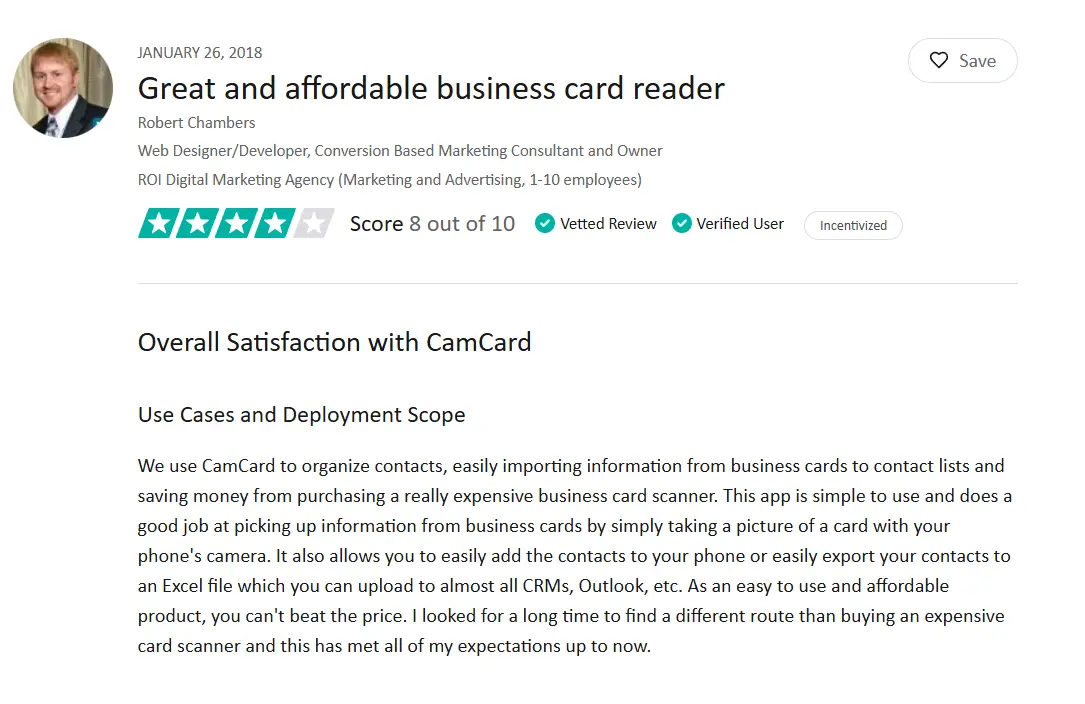
Marketing Consultant Rober Chambers explains that CamCard works well as a mobile business card scanner. It helps quickly digitize contacts after meetings or events, saves time compared to manual entry, and is more affordable than dedicated hardware scanners. He also highlights how easy it is to export scanned contacts into Excel and then upload them into CRM systems.
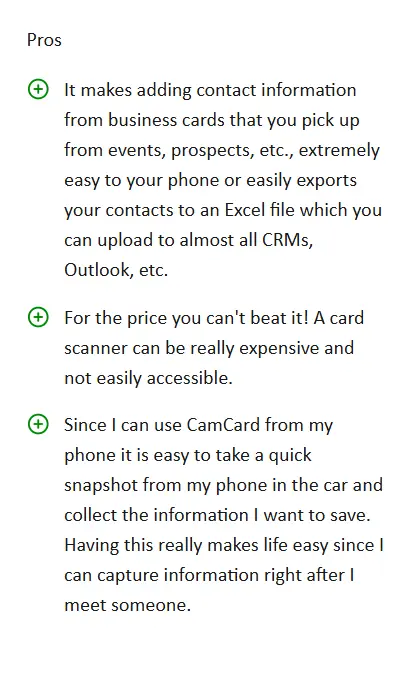
At the same time, the reviewer points out several drawbacks that become noticeable in daily use. He mentions that OCR accuracy is inconsistent and that corrections are often required. He also notes limited direct CRM integrations and a lack of streamlined workflows. According to the reviewer, CamCard is not a good fit for capturing large volumes of business cards and does not scale well for heavier team usage.
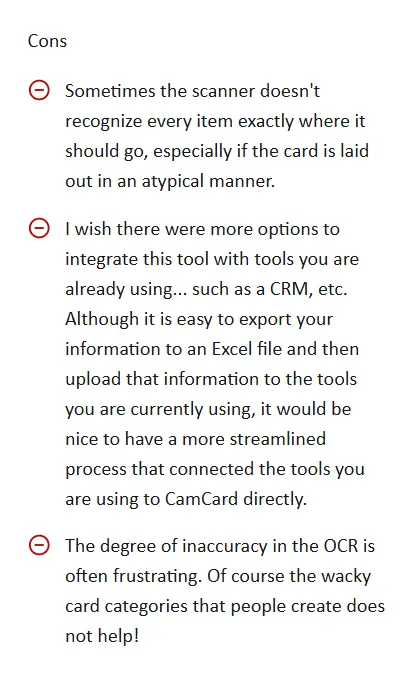
What this review shows: CamCard works well for basic card scanning, but it becomes less reliable and harder to scale when teams rely on it daily.
Here is one more review from an individual user.
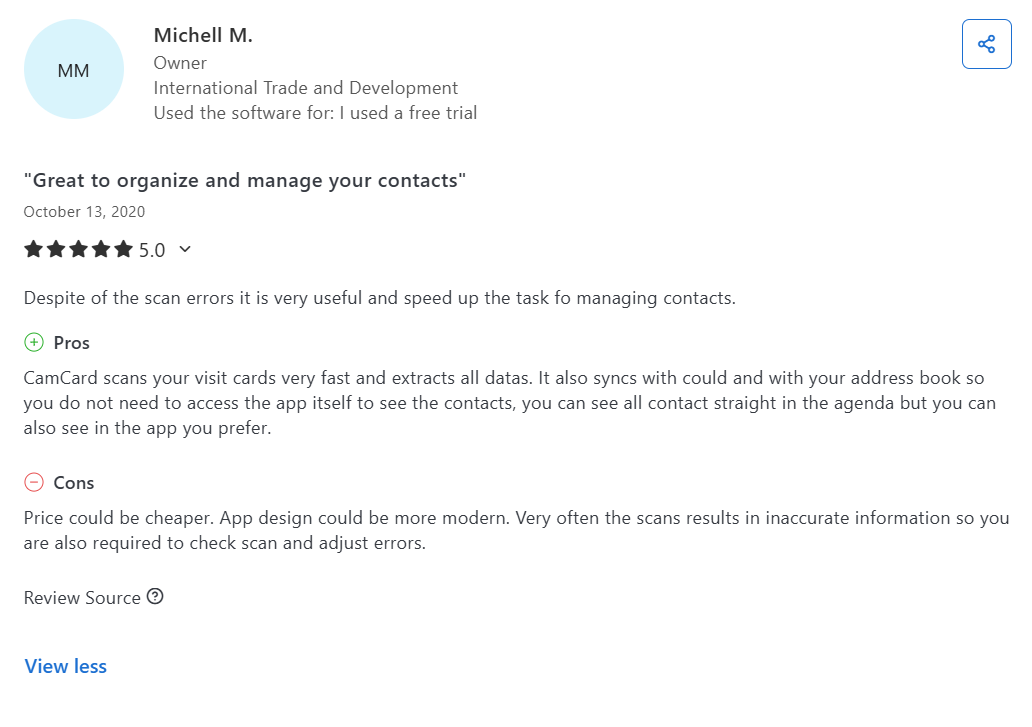
Business owner Michell M. describes CamCard as a practical tool for digitizing and organizing business contacts. Based on his experience, he highlights several benefits that make the app useful for everyday contact management.
What the reviewer finds useful:- Fast business card scanning that reduces manual data entry.
- Automatic extraction of contact details.
- Cloud and address book synchronization, allowing access to contacts outside the app.
- Improved speed when managing and organizing contacts after meetings or events.
At the same time, the reviewer points out several issues that affect CamCard’s pricing value and long-term efficiency:
What the reviewer finds limiting:- Inconsistent OCR accuracy, leading to frequent scanning errors.
- Regular need to manually review and correct extracted data.
- An outdated app interface compared to modern alternatives.
- Pricing that feels high relative to scan accuracy and overall user experience.
What this review shows: While CamCard improves speed compared to manual entry, OCR accuracy and an outdated interface reduce its long-term value at the given price.
Lastly, we want to share one more review from Daniel Städeli:
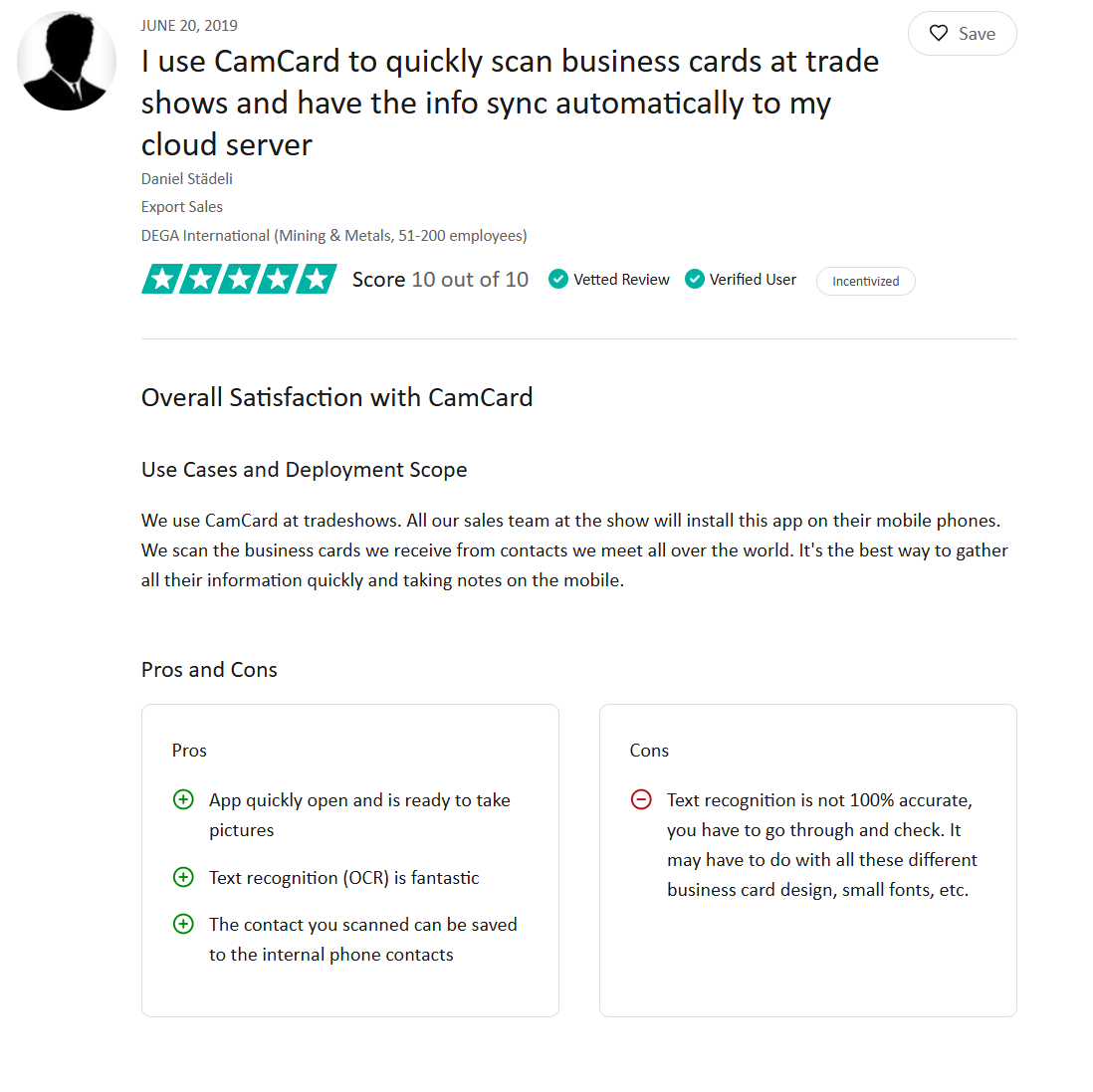
The Export Sales manager explains that CamCard is an effective tool for scanning business cards at trade shows and international events. He describes how sales teams use the app on their mobile devices to quickly capture business card data, add notes, and automatically sync contact information to the cloud. According to the reviewer, this approach helps teams collect large numbers of contacts efficiently during in-person meetings.
Based on his experience, the reviewer highlights several strengths that make CamCard suitable for event-based contact capture:
What the reviewer values:- Fast app launch and readiness to scan business cards on the spot.
- OCR technology that performs well with standard card layouts.
- Ability to save scanned contacts directly to the phone’s address book.
- Cloud synchronization that keeps contact data accessible across devices.
At the same time, he also points out an important limitation that affects reliability at scale:
What the reviewer finds limiting:- OCR accuracy is not consistent across all business card designs.
- Cards with small fonts or complex layouts require manual review and correction.
What this review shows: CamCard performs best in controlled scenarios, but inconsistent OCR accuracy limits its reliability when you scale.
Common Patterns in CamCard User Reviews
After reviewing verified user feedback from business professionals, I identified several recurring patterns in how CamCard is perceived in day-to-day use. These patterns help explain not only what users value in the product, but also where frustration appears over time and how this directly affects the perceived fairness of CamCard’s pricing for companies.
What users consistently appreciate about CamCard:- CamCard reliably speeds up the process of digitizing business cards after meetings, events, and trade shows.
- The app reduces manual data entry and helps teams capture contact information on the go.
- Cloud synchronization and address book integration make contacts accessible across devices without additional setup.
- For individual users or light, short-term use, CamCard delivers clear productivity gains.
- OCR accuracy is not consistent, especially with non-standard card layouts, small fonts, or complex designs.
- Manual review and correction of scanned data is frequently required.
- As the number of scanned cards grows, these corrections reduce overall efficiency.
- Limited native CRM integrations and team workflows create additional manual steps for companies.
- CamCard’s pricing feels reasonable for individual professionals or occasional event use.
- For teams handling large volumes of contacts, the time spent fixing OCR errors increases operational cost.
- As usage scales, the value of CamCard’s pricing becomes harder to justify due to limited automation and team features.
Is CamCard Pricing Worth It for Companies and Teams?
CamCard has strengths, and many users highlight them positively in reviews. However, pricing decisions should be based on facts. At a team scale, companies pay up to $15,000 per year for 50 users, and expect a product that delivers maximum value without ongoing manual work.
We already mentioned CamCard’s limitations that affect daily operations, so the decision ultimately depends on whether those trade-offs are acceptable for your team.
Before making that choice, it is worth looking at a more modern and cost-effective alternative.
DBC: Digital Business Card offers much lower total cost for a 50-user team and is designed to avoid the operational issues that repeatedly appear in CamCard user feedback.
Below, we explain how DBC addresses these limitations in practice.
How DBC: Digital Business Card Addresses CamCard’s Limitations
In this section, we focus on the key limitations users commonly associate with CamCard and explain how DBC: Digital Business Card addresses each of them in practice.
Limitation #1: Reliance on OCR scanning
CamCard relies on OCR (Optical Character Recognition) to capture data by scanning photos of physical business cards. In real use, the accuracy of this approach depends too much on how a card looks rather than on the information it actually contains. Unusual layouts, small text, or cards with unique designs often lead to errors that teams have to fix manually.
How DBC: Digital Business Card solves thisAt DBC, we invested months of development in building an AI-powered business card scanner that handles all possible card variations. Instead of basic OCR, our scanner is trained to accurately read complex layouts, small fonts, and unique designs.
As a result, our users eliminate the highest operational costs and do not need to manual clean up anything.
Limitation #2: Users need extra steps to move contacts into CRM systems
CamCard does not offer a direct way to move scanned contacts into CRM systems. Teams often need to export data, review it, and then manually upload it. In my opinion, this disrupts the workflow and slows lead capture.
How DBC: Digital Business Card solves thisDBC connects directly with HubSpot and Salesforce. Once a contact is scanned, the data syncs automatically to the CRM without any additional steps.
Limitation #3: Lack of centralized team contact management
CamCard works not bad for capturing individual contacts, but user reviews show that managing contacts across teams often requires additional manual effort. When multiple team members scan and export contacts separately, companies rely on external tools and processes to keep data aligned.
Over time, this creates problems for teams that need shared access, consistent data formats, and predictable workflows across sales and marketing.
How DBC: Digital Business Card solves thisDBC centralizes contact management at the company level. Teams work with shared contact structures, consistent data fields, and unified workflows instead of individual exports and manual alignment.
Limitation #4: Outdated interface and low design flexibility
Several CamCard users note that the product feels outdated compared to modern business tools. The interface and card designs do not align with the prices companies are required to pay.
How DBC: Digital Business Card solves thisDBC offers a modern, industry-leading design at a much lower cost. Teams get access to customizable card designs and an intuitive interface that reflects how modern companies present themselves in 2026.
The impact of these differences is most visible when we look at the pricing of DBC and CamCard. Below is a cost comparison for a 50-user team.
DBC vs CamCard: Pricing Comparison for a 50-User Team
For a team of 50 users, DBC: Digital Business Card uses the Business plan, priced at $4.99 per card per month, billed annually.
Calculation:- $4.99 × 50 users = $249.50 per month
- $249.50 × 12 months = $2,994 per year
This price includes team usage, CRM integrations, centralized contact management, analytics, and modern card design, with no add-ons or hidden costs.
CamCard vs DBC: Cost Comparison Table
Platform | Users | Annual cost | Notes |
|---|---|---|---|
CamCard | 50 | ~$15,000/year | OCR-based scanning, manual cleanup, limited team workflows |
DBC: Digital Business Card | 50 | $2,994/year | Digital cards, CRM sync, team-first design |
For a 50-user team, DBC costs $2994 per year compared to up to $15000 per year for CamCard. So DBC achieves nearly 500% cost savings compared to CamCard.
For companies evaluating long-term cost and operational efficiency, this gap becomes difficult to ignore.
Feature Comparison Table: CamCard vs DBC
InterfaceInterfaceCategory | CamCard | DBC: Digital Business Card |
|---|---|---|
Contact capture | OCR scanning | Digital sharing |
Manual data cleanup | Required | Not required |
CRM sync | Limited workflows | Direct HubSpot Salesforce |
Team contact management | Individual based | Centralized |
Card design | Limited | Fully customizable |
Interface | Outdated | Modern |
Add-ons required | Yes | No |
Hidden limits | Yes | No |
Final Recommendation
CamCard can be a reasonable choice for teams that mainly scan physical business cards at events and are comfortable with manual data cleanup and higher per-user costs.
For companies that care about predictable pricing, clean contact data, CRM automation, and beautiful presentation, DBC: Digital Business Card offers a better proposition.
At a 50-user scale, the pricing gap alone makes the decision practical rather than subjective. Paying $15,000 per year for scanning workflows versus $2,994 for a fully digital business card platform forces companies to ask a simple question:
Does it make sense to pay $15,000 per year for scanning at our team size?
Conclusion
CamCard charges companies a high price for a product that still has undeniable limitations. Yes, it helps digitize contacts after events, and has been on the market for a long time, but it is still not worth the price of up to $15,000 per year for a 50-user team.
If you are looking for a more affordable and modern alternative, DBC: Digital Business Card offers a platform built for companies that need customizable design, usability, and predictable pricing. We offer a 5x lower price for teams and deliver a level of design flexibility not available in other tools on the market.
To get started, visit our Digital Business Card for Companies page and enjoy our platform with a pleasant pricing that actually makes sense for growing companies.
FAQ
What is CamCard pricing for business users?
How much does the CamCard app pricing cost in 2026?
Does CamCard offer a free trial or a free tier?
Is there a discount for annual billing on CamCard plans?
What real ROI can teams expect from using CamCard?
How does CamCard pricing compare to DBC for business teams?

A content writer with over 8 years of experience creating analytical content for digital products and B2B SaaS companies. His work focuses on practical guides, pricing breakdowns, and comparisons that help teams evaluate costs, features, and differences between tools.
Your first impression decides everything
- Look professional and build trust instantly
- Forget about reprints and lost contacts
- Update your details anytime
 Get Started Today